
Ask an AI about this page
 ChatGPT
 Claude
 Perplexity
 Google AI Mode
 Microsoft Copilot
 Grok
Grok Mistral Le Chat
MCP tools reference
Updated

The BCL MCP server at https://bcl.my/mcp gives AI agents 62 tools: 30 that read and 32 that write. Each tool does the same job as one BCL API endpoint, with the same checks. This page lists them all, with the permission each one needs and its rate limit.
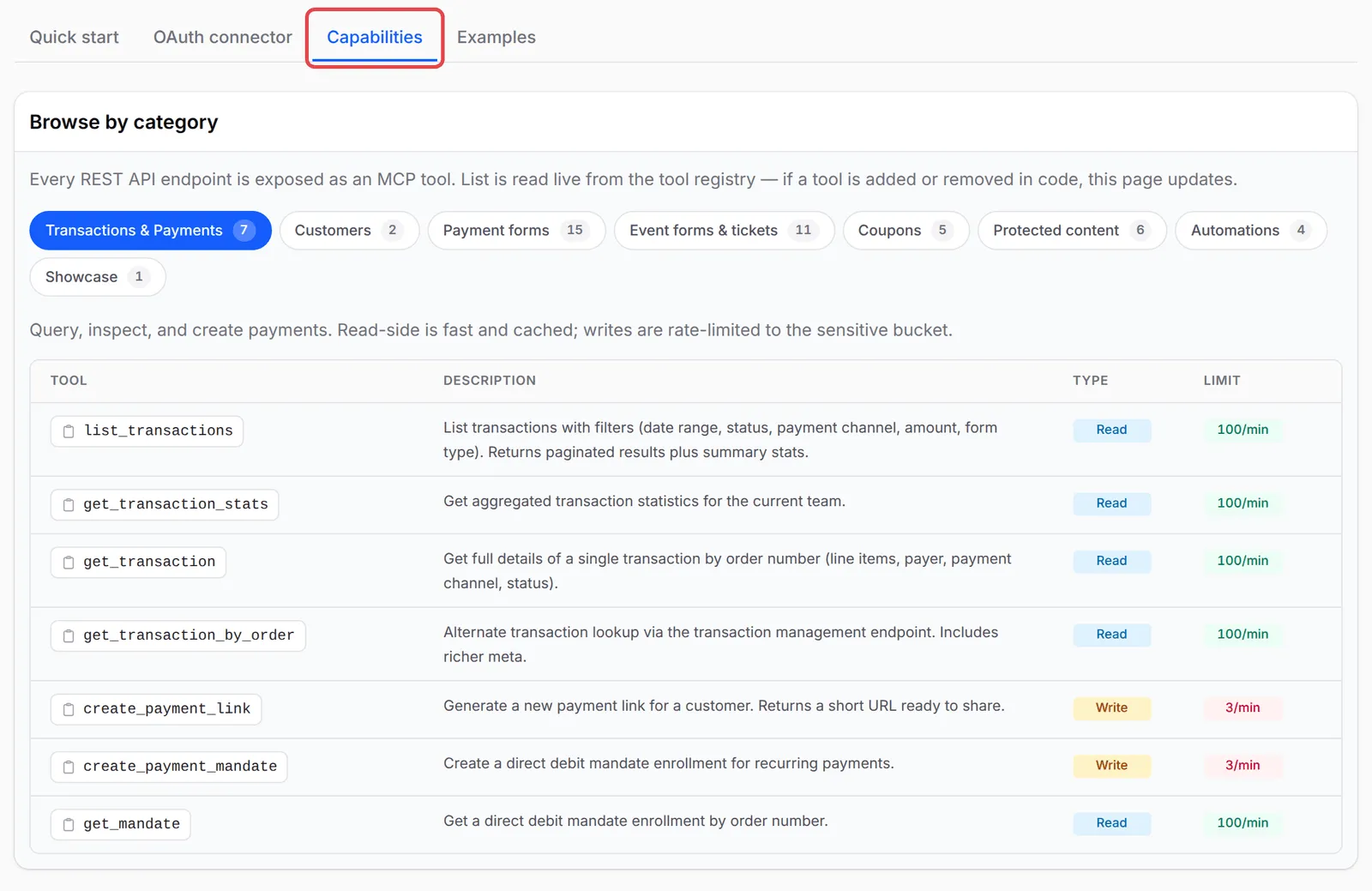
To connect an agent, see Connect Claude or ChatGPT to BCL or Set up other AI apps. BCL shows the same list under Platform Setup → Connect AI Agent, on the Capabilities tab.
Permissions
Section titled “Permissions”A token or OAuth connection needs at least one MCP permission. The agent only sees the tools its permissions allow:
| Permission | Token checkbox | Gives access to |
|---|---|---|
mcp:read |
MCP Read | Every read tool below |
mcp:write |
MCP Write | Every write tool below. It does not include the read tools. |
Full access (*) |
(older tokens only) | All tools |
A token with only API Read or API Write is refused with “Token needs at least one of: mcp:read, mcp:write”. A write tool called without mcp:write returns “Tool ‘…’ requires the ‘mcp:write’ ability”.
The agent sees the same data as the BCL user who created the token or approved the connection. An Admin sees the whole team’s data. A Team member sees only their own, unless Show data for all team members is on. See Team roles and permissions.
Transactions and payments
Section titled “Transactions and payments”These tools cover payments and Direct Debit. list_transactions, get_transaction_stats and the customer tools count live payments only; Test Mode payments are left out.
| Tool | What it does | Type | Limit |
|---|---|---|---|
list_transactions |
List transactions. Filters: dates, status, payment channel, amount, form type, search by order number, name, email or phone | Read | read |
get_transaction_stats |
For a date range (default last 30 days): paid revenue and count, all transactions by status, paid ones by payment channel and form type | Read | read |
get_transaction |
One transaction by order number, such as LINK-00123: items, payer, channel, status |
Read | read |
get_transaction_by_order |
The same lookup with more detail | Read | read |
get_mandate |
One Direct Debit mandate by order number | Read | read |
create_payment_link |
Create a payment link. Needs amount, payer name, email, phone and portal key | Write | sensitive |
create_payment_mandate |
Create a Direct Debit mandate enrolment | Write | sensitive |
Customers
Section titled “Customers”Customer tools look up the people who paid you:
| Tool | What it does | Type | Limit |
|---|---|---|---|
list_customers |
List customers, search by email or phone, sort by amount paid or number of transactions | Read | read |
get_customer |
One customer with their recent transactions | Read | read |
Payment forms
Section titled “Payment forms”Most form tools change one setting at a time, so the agent can make one careful change:
| Tool | What it does | Type | Limit |
|---|---|---|---|
list_forms |
List payment forms | Read | read |
get_form |
One form in full: products, variations, coupon, webhook and affiliate settings | Read | read |
list_showcase_forms |
Forms shown on your homepage | Read | read |
duplicate_form |
Copy a form under a new title and slug. The copy is live straight away | Write | write |
update_form_status |
Turn a form on or off | Write | write |
update_form_title |
Rename a form | Write | write |
update_form_slug |
Change the form’s web address | Write | write |
update_form_content |
Change the form’s description | Write | write |
update_form_prices |
Change product or variation prices, including quantity discount tiers | Write | write |
update_form_stock |
Change product stock | Write | write |
update_form_coupon |
Attach or detach a coupon | Write | write |
update_form_affiliate |
Turn affiliates on or off for the form, show affiliate info, override the commission | Write | write |
update_form_redirect_urls |
Set the pages to open after a successful or failed payment | Write | write |
update_form_webhook |
Set the form’s webhook URL | Write | write |
update_form_facebook_pixel |
Set the Facebook Pixel ID | Write | write |
update_form_tiktok_pixel |
Set the TikTok Pixel ID | Write | write |
update_form_homepage |
Show or hide the form on your homepage | Write | write |
Event forms and tickets
Section titled “Event forms and tickets”Event tools work on your event and ticketing forms:
| Tool | What it does | Type | Limit |
|---|---|---|---|
list_event_forms |
List event forms | Read | read |
get_event_form |
One event with its ticket tiers and settings | Read | read |
update_event_form_status |
Publish an event or set it to draft | Write | write |
update_event_form_slug |
Change the event’s web address | Write | write |
update_event_form_venue_name |
Change the venue name | Write | write |
update_event_form_content |
Change the event description | Write | write |
update_event_form_tickets |
Change ticket tiers and stock | Write | write |
update_event_form_ticket_prices |
Change ticket prices | Write | write |
update_event_form_affiliate |
Affiliate settings for the event | Write | write |
update_event_form_facebook_pixel |
Set the Facebook Pixel ID | Write | write |
update_event_form_tiktok_pixel |
Set the TikTok Pixel ID | Write | write |
update_event_form_homepage |
Show or hide the event on your homepage | Write | write |
Coupons
Section titled “Coupons”Coupon tools read and manage your discount codes:
| Tool | What it does | Type | Limit |
|---|---|---|---|
list_coupons |
List coupons | Read | read |
get_coupon |
One coupon with its settings and usage | Read | read |
create_coupon |
Create a percentage or fixed coupon, with optional limits and dates | Write | sensitive |
update_coupon |
Change a coupon’s settings | Write | write |
update_coupon_status |
Turn a coupon on or off | Write | write |
Protected content
Section titled “Protected content”Protected content tools cover your gated videos, files, text and links:
| Tool | What it does | Type | Limit |
|---|---|---|---|
list_protected_contents |
List protected content with customer counts | Read | read |
get_protected_content |
One item with its access settings and view and download counts | Read | read |
get_protected_content_customers |
Who has access, with their usage | Read | read |
update_protected_content_status |
Turn content on or off | Write | write |
update_protected_content_title |
Change the page title and access email subject | Write | write |
update_protected_content_access |
Change access type, dates, duration, device and download limits | Write | write |
More detail: Manage protected content by API and AI tools.
Automations
Section titled “Automations”Automations are read only:
| Tool | What it does | Type | Limit |
|---|---|---|---|
list_automations |
List automations with their triggers and run counts | Read | read |
get_automation |
One automation with its conditions and steps | Read | read |
get_automation_executions |
Run history: which runs succeeded or failed | Read | read |
get_automation_stats |
Success and failure counts | Read | read |
Platform tools (BCL staff only)
Section titled “Platform tools (BCL staff only)”Nine read tools start with platform_: platform_revenue_overview, platform_revenue_concentration, platform_merchant_performance, platform_growth_and_churn, platform_form_performance, platform_conversion_funnel, platform_traffic_overview, platform_affiliate_overview and platform_monthly_trend. They report on the whole BCL platform. Your agent sees them in its tool list, but for a merchant account they only return “Platform analytics are available to super admins only.”
What the tools cannot do
Section titled “What the tools cannot do”Some jobs are only done in the BCL dashboard. The tools cannot:
- Delete anything.
- Create a payment, event, booking or lead form from scratch, or upload files.
- Read booking forms, lead forms, participants or affiliates.
- Change payment settings, Bayarcash keys, gateway fees, company or team settings, or API tokens.
- Send email, SMS or WhatsApp messages.
Rate limits
Section titled “Rate limits”Every token or OAuth connection has its own limits, counted per minute:
| Bucket | Limit | Used by |
|---|---|---|
| read | 100 a minute | Every read tool |
| write | 10 a minute | Every write tool except the three below |
| sensitive | 3 a minute | create_payment_link, create_payment_mandate, create_coupon |
| meta | 60 a minute | Connecting, listing tools and ping (initialize, tools/list, ping) |
Over the limit, the call fails with “Rate limit exceeded for bucket ‘sensitive’. Retry in 42s.” (with the bucket and seconds that apply) and error code -32003. The response data gives bucket, limit_per_minute and retry_after_seconds, so a well-behaved agent waits and tries again.
Errors
Section titled “Errors”The server speaks JSON-RPC 2.0 over HTTP POST. These are the errors an agent can get:
| Code | Meaning |
|---|---|
-32001 |
No token, or the token is invalid or expired (HTTP 401) |
-32002 |
The token lacks the permission for this tool (HTTP 403 when it has no MCP permission at all) |
-32003 |
Rate limit reached |
-32601 |
The method or tool name does not exist |
-32602 |
tools/call without a tool name |
-32700 |
The request body is not JSON |
When a tool’s input is wrong, for example a missing order number, the tool itself answers with isError: true and a “Validation failed” message listing each field. For every argument of every tool, ask your agent “Show me the inputs for <tool name>”, or see the BCL API reference.
Every request made with a valid token, including refused and failed calls, is recorded in Tools → MCP Audit Log. Requests without a valid token are not. See Check what your AI agent did.
Common issues
My token has MCP Write, but the agent cannot read anything. Why?
MCP Write covers only the write tools. Tick MCP Read as well so the agent can look things up before it changes them.
The agent says "Rate limit exceeded". What now?
Each token or connection has a per-minute limit for each kind of tool. Wait for the seconds given in the message, or ask the agent to do fewer changes at once.
Why does the agent list platform_ tools I cannot use?
The nine platform_ tools report on the whole BCL platform and only work for BCL staff. For merchants they return "Platform analytics are available to super admins only." Ignore them.
Was this article helpful?
Thanks for your feedback.
Sorry this didn't help. WhatsApp us and we'll sort it out with you.