
Ask an AI about this page
 ChatGPT
 Claude
 Perplexity
 Google AI Mode
 Microsoft Copilot
 Grok
Grok Mistral Le Chat
Automation variables
Updated

Variables are placeholders in curly brackets, such as {name}, that BCL swaps for real values when the automation runs. They work in every text field of a step: recipients, subjects, message bodies, spreadsheet columns, and the URL, headers and body of an HTTP request.
Find and insert a variable
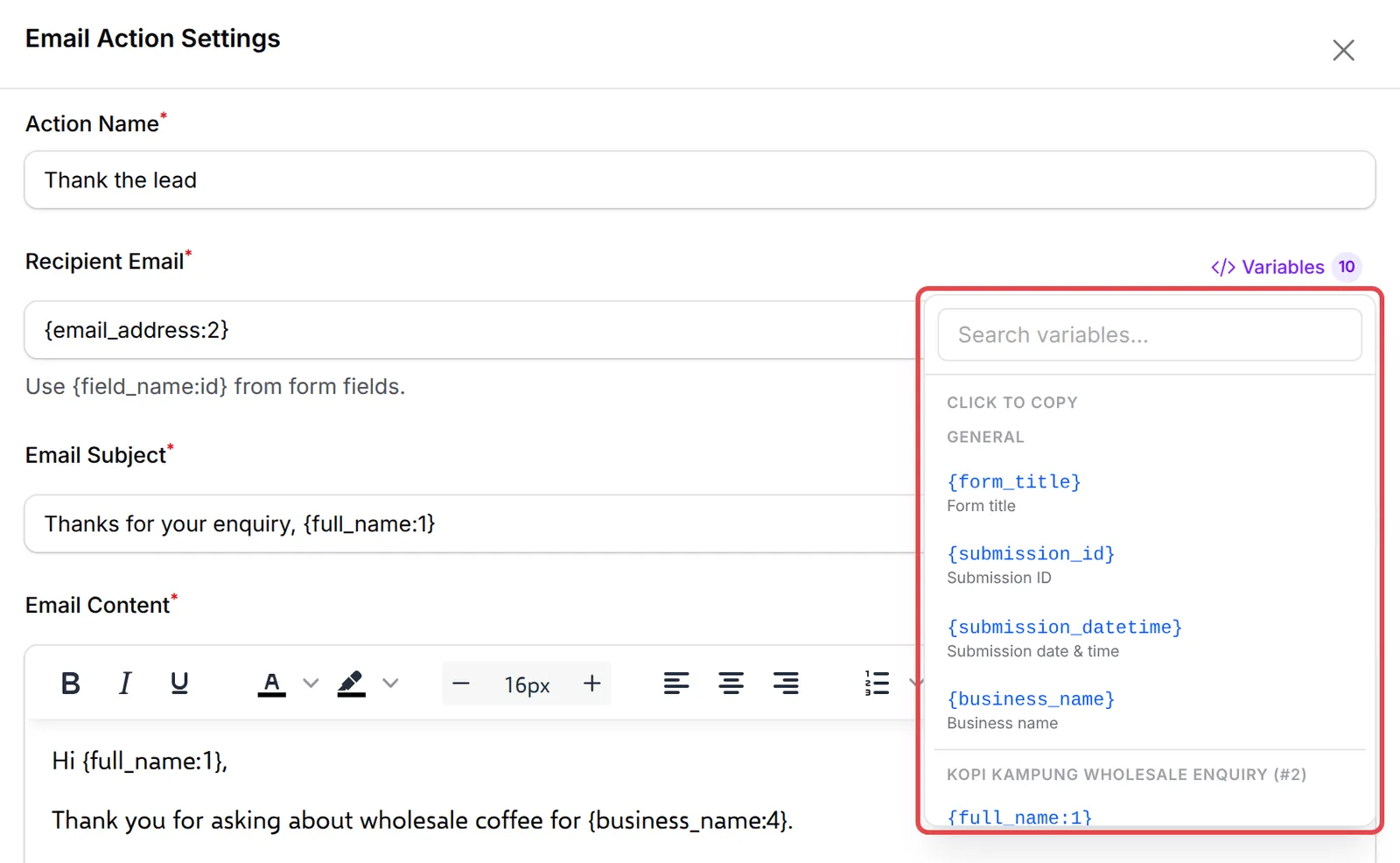
Section titled “Find and insert a variable”Next to each field that accepts variables, click Variables. The list shows only the variables of your automation’s trigger, grouped and searchable. Click one to copy it, then paste it where you want it.
A few rules apply everywhere:
- Type variables exactly, with both brackets and no spaces:
{order_number}, not{ order_number }or{Order Number}. - A variable that does not exist for the trigger, or has no value, becomes empty. BCL does not show an error, except when a recipient ends up empty: the step then fails with a message in the history.
- Test messages use sample data, such as “Ahmad Ali” and “RM 150.00”. Real runs use the real values below.
Payment variables
Section titled “Payment variables”These work with Payment Initiated, Payment Successful, Payment Failed, Payment Cancelled, Payment Completed and Status Changed. The examples come from a test purchase on the demo account.
| Variable | What it holds | Example |
|---|---|---|
{name} |
Customer name | Farah Idris |
{email} |
Customer email | farah.idris@example.com |
{phone} |
Customer phone, with country code | +60133456784 |
{form_title} |
Form title | Kopi Kampung Home Brewing E-Guide |
{form_type} |
Form type | Payment Form |
{form_url} |
Link to the form | https://<your-subdomain>.bcl.my/form/kopi-kampung-home-brewing-e-guide |
{form_featured_image} |
Link to the form’s featured image | https://…/featured.jpg |
{order_number} |
Order number | LINK-05851 |
{reference_id} |
Order number (same as above) | LINK-05851 |
{created_at} |
When the transaction was created | 2026-09-27 22:15:55 |
{payment_date} |
When it was paid | 2026-09-27 22:15:56 |
{payment_method} |
Payment method | FPX |
{payment_status} |
Status in words | Successful |
{status_description} |
The bank’s status text | Approved |
{receipt_url} |
Link to the receipt page | https://<your-subdomain>.bcl.my/receipts/LINK-05851 |
{amount} |
Amount paid, formatted | RM 15.00 |
{subtotal} |
Subtotal, formatted | RM 15.00 |
{discount} |
Discount, formatted | RM 5.00 |
{shipping_cost} |
Shipping cost, formatted | RM 10.00 |
{amount_value} |
Amount paid, number only | 15.00 |
{subtotal_amount} |
Subtotal, number only | 15.00 |
{discount_amount} |
Discount, number only | 0.00 |
{fee_amount} |
Gateway fee, number only | 0.00 |
{shipping_name} |
Shipping method | Standard Delivery |
{address} |
Full shipping address on one line | 123, Jalan Ampang, 50450, Kuala Lumpur, Malaysia |
{address_line1}, {address_line2} |
Address lines | 123, Jalan Ampang |
{city}, {state}, {postal_code}, {country} |
Parts of the address | Kuala Lumpur |
{items_list} |
One line per item with quantity and price | 1x Home Brewing Guide - RM 15.00 |
{items_summary} |
Items on one line, for SMS | 1x Home Brewing Guide |
{items_json} |
Items as JSON, for HTTP requests | [{"sku":"Home Brewing Guide","name":"Home Brewing Guide","quantity":1,"price":15}] |
{total_items} |
Number of item lines | 1 |
{product_table} |
A formatted table of items with an Access button for digital items, for email | (table) |
{business_name} |
Your business name | KOPI KAMPUNG SDN. BHD. |
{receipt_url} is useful after a failed or cancelled payment: the receipt page then offers the customer a button to try the payment again.
Form fields
Section titled “Form fields”Each custom field on a payment, event or booking form becomes a variable named after the field’s name, for example {company_name} for a field named company_name. Uploaded files show as a link. These do not appear in the Variables list, so check the field name in the form builder.
Item variables
Section titled “Item variables”For each item in the order, replace N with its position (1 for the first item, 2 for the second). For protected content, M is the content number within that item.
| Variable | What it holds | Example |
|---|---|---|
{product_name_N} |
Item name | {product_name_1} = Home Brewing Guide |
{product_image_N} |
Link to the item image | https://…/beans.jpg |
{download_link_N} |
The item’s Download Link | https://drive.google.com/… |
{protected_content_url_N_M} |
The buyer’s private link to protected content | {protected_content_url_1_1} = https://<your-subdomain>.bcl.my/content/KLxu9odA... |
{protected_content_title_N_M} |
Title of that content | Kopi Kampung Home Brewing Guide |
{access_finder_url_N_M} |
Page where the buyer can get their link again by email | https://<your-subdomain>.bcl.my/content/O6FYW1GU/access |
An item without a download link or protected content leaves those variables empty.
Shipping variables
Section titled “Shipping variables”Order Shipped has all payment variables above plus these two:
| Variable | What it holds | Example |
|---|---|---|
{tracking_number} |
Tracking number | TRK123456789MY |
{courier} |
Courier name | Poslaju |
Lead form variables
Section titled “Lead form variables”New Lead Received has four general variables plus one variable per field of your lead forms.
| Variable | What it holds | Example |
|---|---|---|
{form_title} |
Lead form title | Kopi Kampung Wholesale Enquiry |
{submission_id} |
Submission code | SUB-12345 |
{submission_datetime} |
When it was submitted | 27/09/2026 21:32 |
{business_name} |
Your business name | KOPI KAMPUNG SDN. BHD. |
{field_name:id} |
The answer to one field | {email_address:2} = aisyah@example.com |
Field variables use the field’s name and its id, joined by a colon, such as {full_name:1} or {monthly_volume:5}. The Variables list shows them grouped by form, with fields that every selected form shares under On every form. Checkbox answers are joined with commas. File and signature fields are not available.
Event variables
Section titled “Event variables”Participant Created, Participant Checked In and Certificate Generated share these variables. {certificate_url} is filled for Certificate Generated.
| Variable | What it holds | Example |
|---|---|---|
{attendee_name} |
Participant name | Zainab Harun |
{attendee_email} |
Participant email | zainab.harun@example.com |
{attendee_phone} |
Participant phone | +60133456786 |
{ticket_number} |
Ticket number | DDGO36C1 |
{ticket_name} |
Ticket type | Normal |
{ticket_url} |
Link to the ticket | https://<your-subdomain>.bcl.my/ticket/DDGO36C1/view |
{seat_number} |
Seat, for seated events | B1-006 |
{event_name} |
Event name | Kopi Kampung Coffee Festival 2026 |
{event_type} |
Event type | seating |
{event_date}, {event_start_date} |
Start date | 17/10/2026 |
{event_end_date} |
End date | 17/10/2026 |
{event_time} |
Start time | 09:00 |
{event_location}, {event_address} |
Venue location | Dewan Kopi Kampung, Jalan Kopi 1, 50450 Kuala Lumpur |
{price_paid} |
Price paid, formatted | RM 35.00 |
{original_price} |
Ticket price before discount | RM 35.00 |
{order_number} |
Order number | LINK-05856 |
{created_at} |
When the participant was created | 27/09/2026 22:20 |
{certificate_url} |
Link to the certificate | https://… |
{business_name} |
Your business name | KOPI KAMPUNG SDN. BHD. |
Attendee fields you add to the event form are available as {attendance_<field name>}, for example {attendance_favourite_coffee}. The buyer’s custom fields work as on payment forms.
Affiliate variables
Section titled “Affiliate variables”| Variable | Triggers | What it holds | Example |
|---|---|---|---|
{affiliate_id} |
All affiliate triggers | Affiliate ID | 12 |
{affiliate_name} |
All affiliate triggers | Affiliate name | Amir Rashid |
{affiliate_email} |
All affiliate triggers | Affiliate email | amir@example.com |
{affiliate_phone} |
All affiliate triggers | Affiliate phone | 60123456789 |
{business_name} |
All affiliate triggers | Your business name | KOPI KAMPUNG SDN. BHD. |
{referral_id} |
Referral Approved, Referral Rejected | Referral ID | 34 |
{order_number} |
Referral Approved, Referral Rejected | Order that earned the referral | LINK-12345 |
{amount} |
Referral Approved, Referral Rejected | Order amount | RM 150.00 |
{commission_formatted} |
Referral Approved, Referral Rejected | Commission | RM 15.00 |
{status} |
Referral Approved, Referral Rejected | Referral status | approved |
{referral_source} |
Referral Approved, Referral Rejected | Where the referral came from | Website |
{payout_id} |
Payout Requested | Payout request ID | 7 |
{payout_formatted} |
Payout Requested | Payout amount | RM 500.00 |
{payout_status} |
Payout Requested | Payout status | pending |
{requested_at} |
Payout Requested | When it was requested | 27/09/2026 10:15 |
{referral_count} |
Payout Requested | The affiliate’s total referrals | 18 |
A few habits save time with variables:
- Use number-only amounts in HTTP requests. Use
{amount_value}there, and the formatted{amount}in messages. - Check a real run’s data. In the automation’s history, open an execution and look at Execution Data: it lists every variable with the value it had, which is the quickest way to spot an empty one.
- Keep SMS short with
{items_summary}. Use{product_table}only in emails.
Common issues
Why does my HTTP request send an empty name and email for lead form fields?
Lead form fields need their name and id, such as {email_address:2}. {email} or {email_address} alone do not exist for leads, and a variable that does not exist becomes empty without an error. Copy the exact key from the Variables list.
How do I put the download link of each product in the email?
Use {product_table} for a table with an Access button per item, or the item variables such as {download_link_1} and {protected_content_url_1_1} to place each link yourself.
Can I show the customer's answer to a custom field on my payment form?
Yes. Each custom field on a payment, event or booking form becomes a variable named after the field, for example {company_name}. Test it with a real purchase and check the execution data in the history.
Was this article helpful?
Thanks for your feedback.
Sorry this didn't help. WhatsApp us and we'll sort it out with you.