
Ask an AI about this page
 ChatGPT
 Claude
 Perplexity
 Google AI Mode
 Microsoft Copilot
 Grok
Grok Mistral Le Chat
Fix a failed or duplicate e-invoice
When LHDN rejects an e-invoice, BCL keeps it under Payments → MyInvois with the reason. Pressing Submit E-Invoice again without fixing that reason fails again, and sending the same e-invoice twice within 10 minutes is refused as a duplicate.
Why you see a duplicate error
Section titled “Why you see a duplicate error”LHDN blocks an e-invoice that is identical to one sent in the last 10 minutes. BCL checks this before sending: if nothing has changed since the last attempt, it shows Nothing has changed since the last attempt and tells you how many minutes to wait, instead of sending a submission that would fail.
So a duplicate message usually means the first attempt already failed for another reason, and the later presses were the same e-invoice again. Pressing more often does not help: find and fix the first reason.
Find why an e-invoice failed
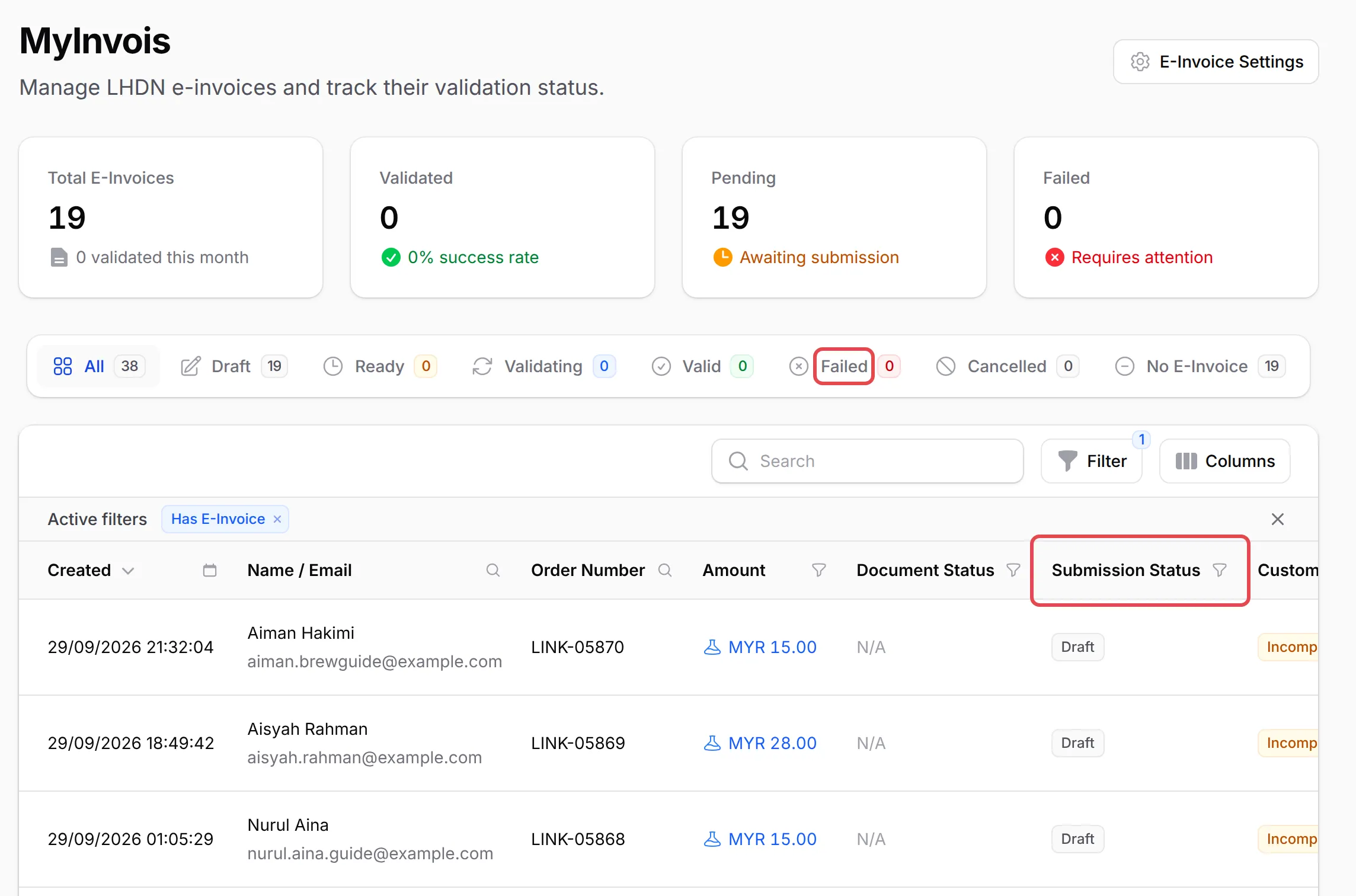
Section titled “Find why an e-invoice failed”Failed e-invoices are on the MyInvois page:
-
Go to Payments → MyInvois and open the Failed tab.
-
Point at the status in the Submission Status column to see the reason, or open the row’s menu and choose View E-Invoice for the full failure details.
-
Fix the cause. Common ones:
Reason Fix Bayarcash is not set as intermediary for your TIN Add Bayarcash in the MyInvois Portal: see Add Bayarcash as your MyInvois intermediary Your TIN or company details are wrong or missing Correct them in Team → Company Profile (the E-Invoice Settings button on the MyInvois page opens it) Your customer’s details are incomplete or wrong Use Update Customer Data in the row’s menu, or Request Customer Data to ask the customer -
Click Submit E-Invoice once and check the status again after a few minutes.
If you corrected the details, you can submit straight away. The 10-minute wait only applies to an e-invoice that has not changed.
A few habits avoid duplicate errors:
- Press Submit E-Invoice once. Submission and LHDN validation take a moment; watch the status change from Validating instead of pressing again.
- Check Company Profile before your first e-invoice. The E-Invoice Compliance box lists anything missing, and Check Connection confirms Bayarcash is your intermediary.
Common issues
I pressed Submit E-Invoice many times and now it says duplicate. Is something broken?
No. LHDN refuses the same e-invoice sent again within 10 minutes, so the duplicate message is a result, not the cause. Wait 10 minutes, open the e-invoice under Payments → MyInvois, read why the first attempt failed, fix that, then submit once.
BCL says Nothing has changed since the last attempt. What do I do?
You tried to send the same e-invoice again within 10 minutes. Either wait for the time shown, or correct the details that made it fail and submit straight away.
My customer says the e-invoice request page asks them to wait some minutes.
They sent the same request a moment ago. The page says how many minutes to wait before trying again.
Was this article helpful?
Thanks for your feedback.
Sorry this didn't help. WhatsApp us and we'll sort it out with you.