
Ask an AI about this page
 ChatGPT
 Claude
 Perplexity
 Google AI Mode
 Microsoft Copilot
 Grok
Grok Mistral Le Chat
Set guest limits for table reservations
For restaurant bookings, each table (or table type) is a booking service with the type Reservation (Table Booking). Its Min Guests and Max Guests decide which party sizes can book it. When no table fits the number of guests the customer picked, or a time is full, the booking page shows it as not available.
Set the guests for a table
Section titled “Set the guests for a table”Set the range once for each table’s service:
-
Go to Bookings → Services and click Edit on the table’s service, or click New booking service and choose Reservation (Table Booking) as the Service Type.
-
Open the Capacity tab and fill in:
Field What it does Min Guests The smallest party that can book this table. 1 means no minimum. Max Guests The largest party for this table. It is also the total number of guests all bookings can share in one time slot. Buffer Time Free minutes after each booking, for clearing the table. 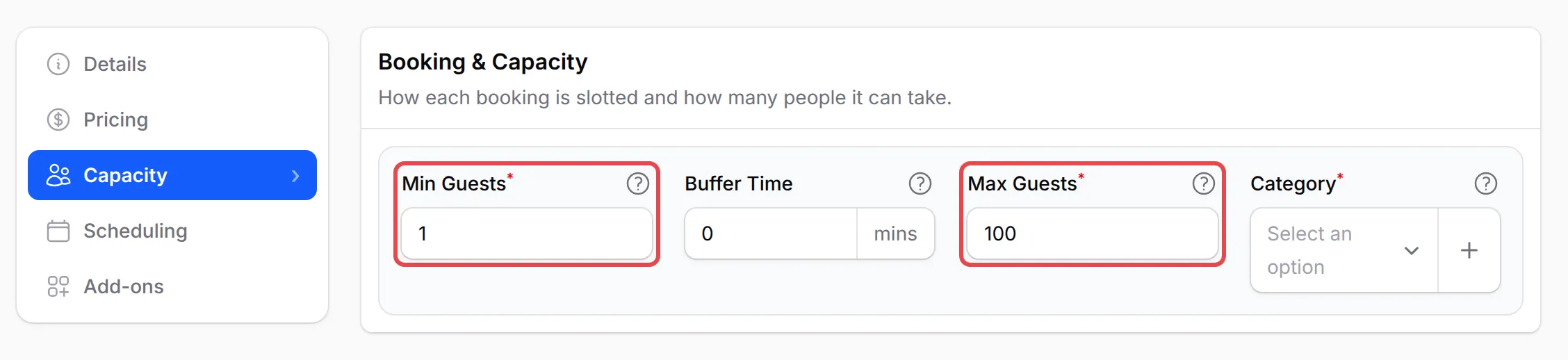
-
Click Update Service (or Create Service for a new one).
Min Guests cannot be more than Max Guests. On the booking page, the table shows its range, such as 6-12 guests.
Parties of more than 10
Section titled “Parties of more than 10”The guest picker on the booking page shows quick buttons for 1 to 10 guests. For a bigger party, the customer uses the + button, which goes up to the highest Max Guests among the active services on the form. After they pick a table, the limit follows that table.
If customers cannot go above 10, raise Max Guests on the service for your large tables, and check that the service is still active.
Why a table or time shows Not available
Section titled “Why a table or time shows Not available”When the form offers two or more tables, the customer picks one after the number of guests. A table is greyed out with Not available for the number of guests when the party is smaller than its Min Guests or bigger than its Max Guests:
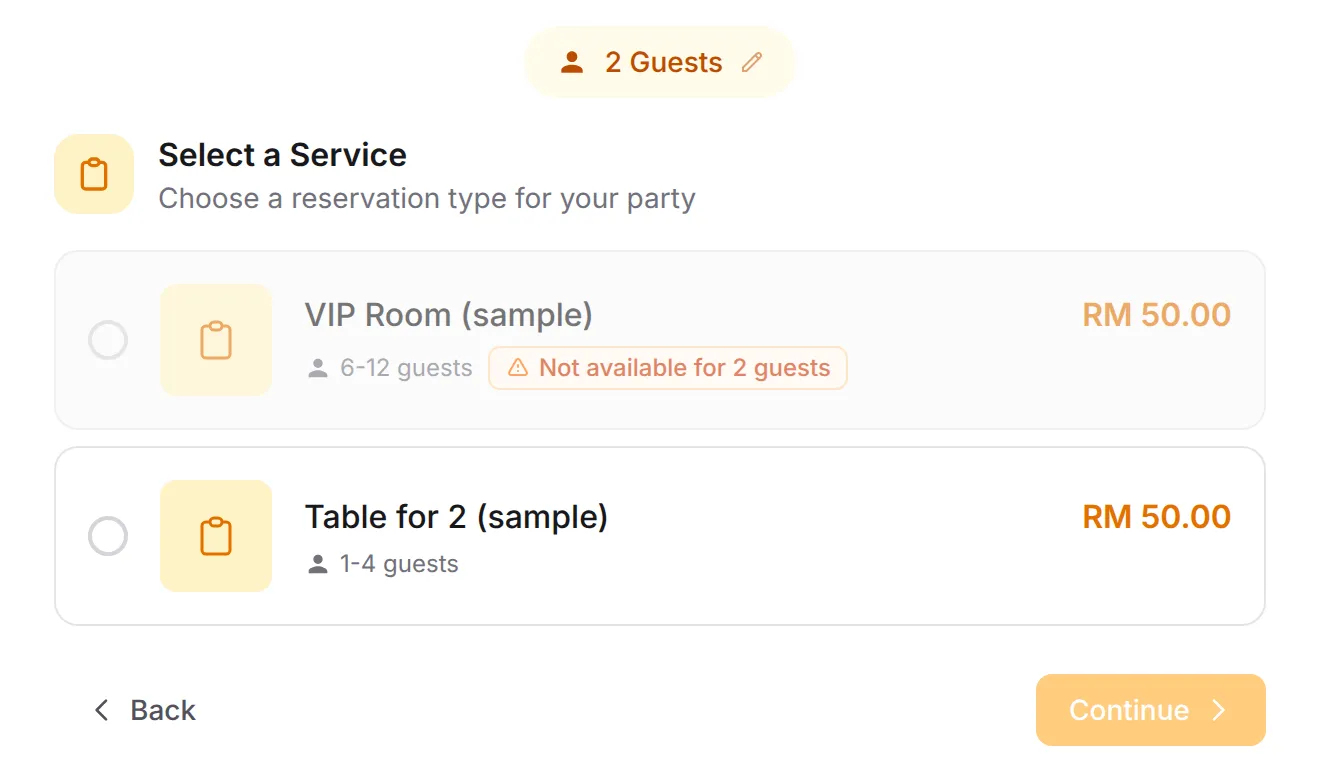
If every table shows this, no table covers that party size. Either widen a range (for example, raise a 2-4 table to 5) or add a service for the missing size. Customers can change the number of guests with the guests button at the top of the page.
A form with only one table skips this list: the guest picker goes up to that table’s Max Guests, and a party smaller than its Min Guests is refused when the customer books.
A time slot can also be unavailable. Point at it to see why:
| Message | Why | What to change |
|---|---|---|
| Already booked or Fully booked | The guests already booked at that time plus this party would go over Max Guests | Raise Max Guests, or add another table service |
| Only N spots left | Some seats are left, but fewer than the party | The customer picks another time or fewer guests |
| Too soon to book | The slot starts within the Booking Cutoff hours, or has passed | Lower Booking Cutoff on the Scheduling tab |
| Same day booking not allowed | The date is today and Allow Same Day Booking is off | Turn on Allow Same Day Booking |
| Not available | Another reason, such as the slot not fitting before closing time | Check the form’s opening hours |
No slots at all on a date usually means the form is closed that day in its Operating Hours, the date is a day off, or it is further ahead than Advance Booking Days. See Create a booking form for opening hours and days off, and Create booking services for the booking rules.
A few checks before you open reservations:
- Cover every party size. List your tables’ ranges side by side (for example 1-2, 2-4, 5-8, 6-12) and make sure each number up to your largest table fits at least one.
- Remember Max Guests is shared per slot. A table service with Max Guests 4 takes one party of 4, or two parties of 2, at the same time. Create one service per table, or raise Max Guests, if you have several tables of that size.
Common issues
How do I set a minimum number of guests for a restaurant table?
Go to Bookings → Services, edit the table's service, open the Capacity tab and set Min Guests. A VIP room with Min Guests 6 and Max Guests 12 shows as 6-12 guests, and a party of 2 sees it as not available.
Why can't my customer choose more than 10 guests?
The quick-select buttons stop at 10. For a bigger party, the customer uses the + button, which goes up to the highest Max Guests of the active services on the form. If it still stops, raise Max Guests on the table's service.
Why do all the tables say Not available?
The number of guests the customer picked is outside the Min Guests to Max Guests range of every table. Widen a table's range or add a table for that party size. The customer can also change the number of guests at the top of the page.
Was this article helpful?
Thanks for your feedback.
Sorry this didn't help. WhatsApp us and we'll sort it out with you.