
Ask an AI about this page
 ChatGPT
 Claude
 Perplexity
 Google AI Mode
 Microsoft Copilot
 Grok
 Mistral Le Chat
Payment form webhook payload
A webhook lets BCL tell your own system about a sale as soon as the sale happens. BCL sends an HTTP POST with a JSON body to each URL that you set. BCL sends it when a customer submits a payment form, and when their payment succeeds or fails. This page lists every field in that body.
For the full BCL API, see the API reference.
Set your webhook URL
Section titled “Set your webhook URL”You set webhooks per form. To turn them on:
-
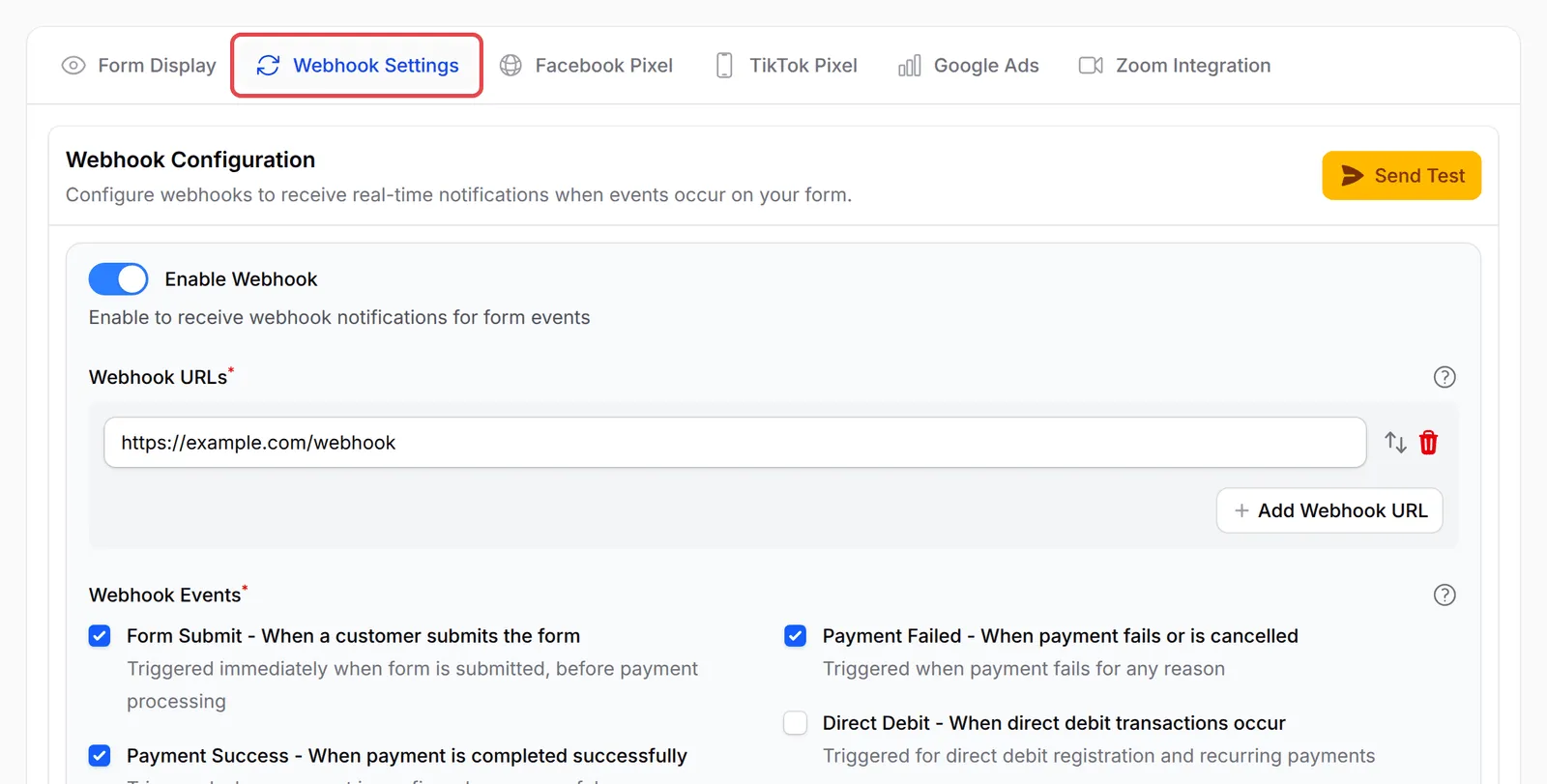
Go to Payments → Forms and open your form.
-
Click Advanced at the top.

-
Open the Webhook Settings tab and turn on Enable Webhook.
-
Under Webhook URLs, type your endpoint. If you see no box, click Add Webhook URL first. Click Add Webhook URL again to add more, up to 10. Every URL must start with
https://, and every URL receives the same events. -
Under Webhook Events, tick the events you want.
-
Click Save Advanced Settings.
To try your endpoint without a real sale, click Send Test in the Webhook Configuration section. The button shows once the webhook is on and has a URL. Choose an Event Type, check the Webhook URL and the Payload Preview, then click Send Test Webhook. Test payloads use random sample values.
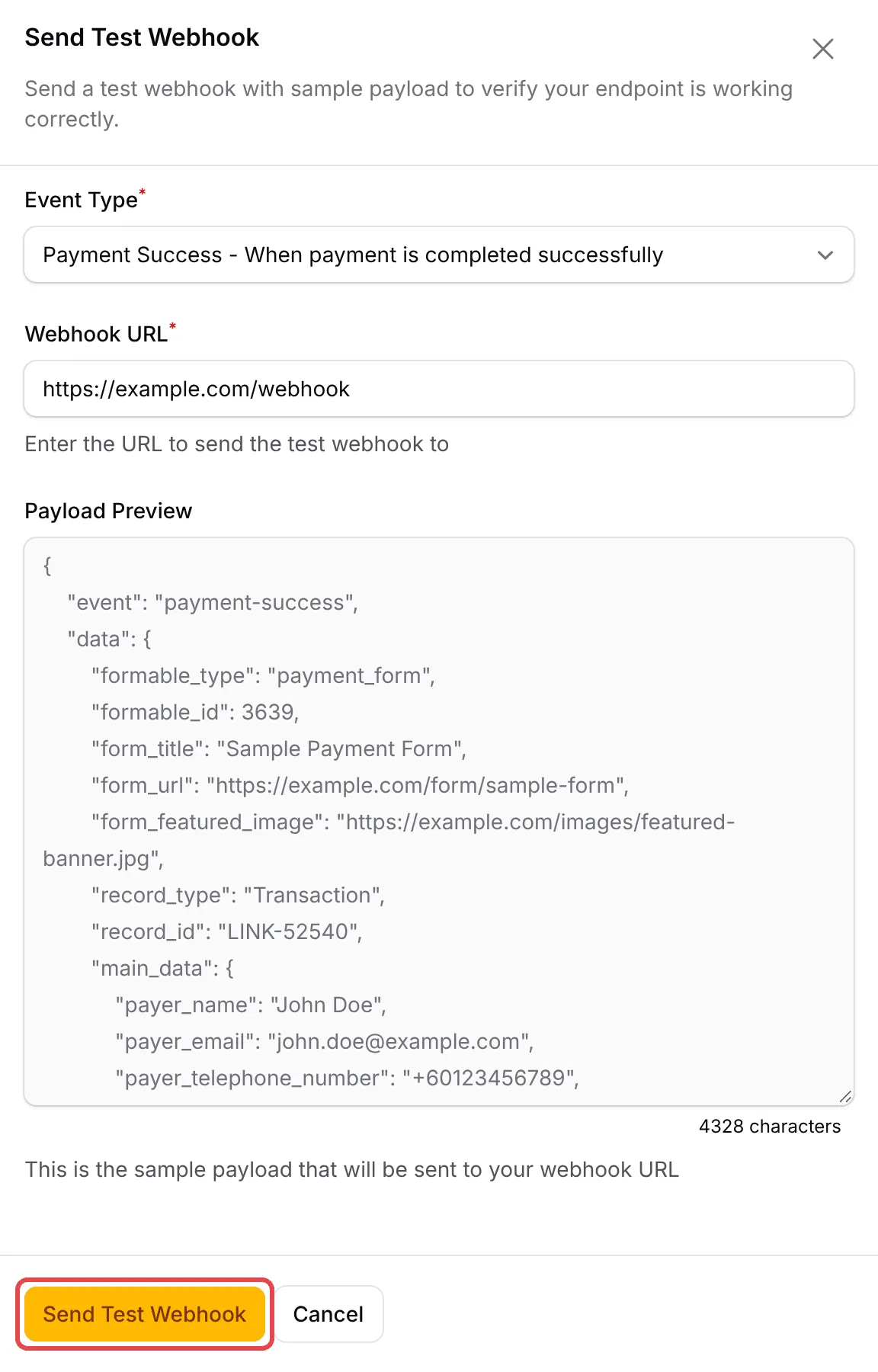
If the test works, BCL shows Test Webhook Sent and your endpoint’s status code. If not, it shows Webhook Failed, the status and the start of the reply. Webhook Logs does not list test webhooks.
Event and booking forms have the same Webhook Settings tab under Advanced, with the same payment payload described here.
Events
Section titled “Events”Each request body has two keys: event (the event name) and data (the payload). These events use the payload on this page:
| Event | When BCL sends it |
|---|---|
form-submit |
The customer submits the form, before payment. |
payment-success |
Bayarcash confirms the payment. |
payment-failed |
The payment fails or is cancelled. |
For Direct Debit forms, see Direct Debit webhook payload. Event forms can also send ticket-checked-in, and booking forms booking-confirmed and booking-cancelled. Those use a different payload.
Sample payload
Section titled “Sample payload”This is a payment-success request. The values are made up.
{ "event": "payment-success", "data": { "formable_type": "payment_form", "formable_id": 210, "form_title": "Online Cooking Class", "form_url": "https://shop.example.com/form/online-cooking-class", "form_featured_image": "https://cdn.example.com/banner.jpg", "record_type": "Transaction", "record_id": "LINK-02046", "main_data": { "id": "01jfps609t08vjb8d5exq27bz6", "payer_name": "Ali bin Abu", "payer_email": "ali@example.com", "payer_telephone_number": "+60123456789", "order_number": "LINK-02046", "transaction_type": "live", "currency": "MYR", "subtotal_amount": "100.00", "fee_amount": "1.00", "amount": "101.00", "payment_channel": "FPX", "status": 3, "status_description": "Approved", "created_at": "27/09/2026 14:05:09", "customer_id": "01jfps5zq1m2k8c4x7v9b3n6td", "is_paid": 1, "retry_count": 0, "source_type": "payment_form", "items": [ { "id": 5501, "index": 101, "productable_type": "product_item", "productable_id": 101, "item": "Cooking Class Recording", "sku": "CC-001", "option": "", "quantity": 1, "unit_amount": "100.00", "normal_price": "120.00", "sale_price": "100.00", "amount": "100.00", "access_url": null, "weight": "0.00", "total_weight": "0.00", "metadata": null, "product_image": "https://cdn.example.com/class.jpg", "protected_content": [ { "title": "Module 1", "url": "https://shop.example.com/content/abc123token", "access_finder_url": "https://shop.example.com/content/7/access" } ] } ] }, "tracking_params": { "utm_source": "facebook", "utm_campaign": "september-promo" }, "receipt_url": "https://bcl.my/storage/pdf/LINK-02046.pdf", "custom_fields_data": { "address_line1": "1 Jalan Contoh", "city": "Kajang", "state": "Selangor", "postal_code": "43000", "country": "MY" }, "affiliate_data": { "referral_id": 57, "affiliate_id": 12, "affiliate_username": "siti", "affiliate_name": "Siti binti Ahmad", "affiliate_email": "siti@example.com", "affiliate_phone": "+60198765432", "commission_type": "percentage", "commission_rate": "10.00", "commission_amount": "10.00", "commission_breakdown": null, "status": "approved", "referral_source": "direct" } }}Top-level fields
Section titled “Top-level fields”The data object contains these keys:
| Field | Type | Meaning |
|---|---|---|
formable_type |
string | Form type: payment_form, event_form or booking_form. |
formable_id |
number | The form’s ID. Replaces the old form_id. |
form_title |
string | Form title. For event forms, the event name. |
form_url |
string | Public link to the form. Empty if the form has no slug or domain. |
form_featured_image |
string | Featured image URL, or empty. |
record_type |
string | Always Transaction on this page. |
record_id |
string | The BCL order number, for example LINK-02046. Use it to match records. |
main_data |
object | The order. See the next section. |
tracking_params |
object or null | UTM and click IDs captured when the customer opened the form: utm_source, utm_medium, utm_campaign, utm_content, utm_term, utm_id, fbclid, ttclid, gclid. BCL sends only the ones that are present. |
receipt_url |
string | payment-success only. Link to the PDF receipt. Anyone who opens it must first verify with a one-time code. |
custom_fields_data |
object | The form’s custom fields and address fields, keyed by field name. Absent if there are none. |
affiliate_data |
object | Present only when an affiliate referred the sale. |
Order fields (main_data)
Section titled “Order fields (main_data)”BCL sends the order record and drops empty values. BCL leaves out a field with no value (null, empty, or 0.00 for most amounts). So do not expect every field in every request.
| Field | Type | Meaning |
|---|---|---|
id |
string | Internal transaction ID. |
payer_name, payer_email, payer_telephone_number |
string | The buyer’s details. |
order_number |
string | Same as record_id. |
transaction_type |
string | live or test. |
currency |
string | Usually MYR. |
subtotal_amount |
string | Item total before fees. Always sent. |
discount_amount |
string | Coupon discount. |
coupon_code, coupon_usage_id |
string, number | The coupon used. |
fee_amount |
string | Fee charged to the buyer. Always sent. |
additional_fee_amount |
string | Extra fee set on the form. |
rounding_adjustment |
string | Rounding applied to the total. |
tax_amount |
object | Tax details, such as the tax name, rate and amount. |
shipping |
object | Shipping method name, cost and total_weight. |
bank_transfer_details |
object | Bank details, for manual transfer orders. |
amount |
string | Total the buyer pays. |
payment_channel |
string | Channel name, for example FPX, DuitNow QR, Credit Card, Cash on Delivery (COD) or Manual Bank Transfer. |
status |
number | Payment status code. 3 means successful and 2 means failed. It is sometimes absent on form-submit. |
status_description |
string | Status text from Bayarcash. payment-success and payment-failed only. |
is_paid |
number | 1 once paid, otherwise 0. |
retry_count |
number | How many times the buyer retried payment. |
created_at |
string | Order time, DD/MM/YYYY HH:MM:SS, Malaysia time. |
customer_id |
string | BCL customer ID. |
classification_code |
string | e-invoice classification code. |
affiliate_id, cookie_id |
string | Affiliate attribution, when present. |
source_type |
string | Same as formable_type. |
items |
array | Items bought. See the next section. |
Item fields
Section titled “Item fields”Each entry in items has these keys:
| Field | Type | Meaning |
|---|---|---|
id |
number | Line item ID. |
index, productable_id |
number | Product ID. index is kept for older integrations. |
productable_type |
string | product_item, event_ticket or booking_service, for example. |
item, sku, option |
string | Product name, SKU and chosen variation. |
quantity |
number | Quantity. |
unit_amount, normal_price, sale_price |
string | Price paid per unit, normal price and sale price. |
amount |
string | Line total. |
access_url |
string or null | Download link for a digital product. |
weight, total_weight |
string | Weight per unit and for the line. |
metadata |
object or null | Extra item data. |
product_image |
string | Product image URL, or empty. |
protected_content |
array | payment-success only: each item has title, url (the buyer’s personal access link) and access_finder_url (the page where a buyer who lost the link can find it again). Empty on other events. |
Affiliate fields
Section titled “Affiliate fields”The affiliate_data object has referral_id, affiliate_id, affiliate_username, affiliate_name, affiliate_email and affiliate_phone. It also has commission_type (flat, percentage or per_item), commission_rate and commission_amount. For per-item commission, commission_rate is null and commission_breakdown lists each item. Last, it has status (for example pending or approved) and referral_source.
Changes from the old sample
Section titled “Changes from the old sample”If you built your integration from the old sample, check these changes:
form_idis gone. Useformable_id, andformable_typefor the form type.- New top-level fields:
formable_type,form_url,form_featured_imageandtracking_params. - New order fields:
subtotal_amount,created_at,customer_id,is_paid,retry_count,source_typeand the discount, coupon, tax and shipping fields. - New item fields:
id,productable_type,productable_id,sku,normal_price,sale_price,weight,total_weight,metadata,product_imageandprotected_content. - New affiliate field:
commission_breakdown. - New event:
payment-failed.
Check that a webhook is genuine
Section titled “Check that a webhook is genuine”BCL does not sign webhooks. There is no signature header or shared secret, so anyone who knows your URL can post to it. To stay safe:
- Before you ship an order or grant access, look up the order by
record_idthrough the BCL API. Confirm the status there. In Test Mode, useGET /transaction/{order_number}:GET /transactions/{order_number}only finds live payments. Send your ownUser-Agentheader, because BCL blocks the default ones from tools such as curl and python-requests. - Use a URL that is hard to guess, for example with a long random token in the path.
- Handle the same event more than once safely. Use
record_idandeventtogether to spot repeats.
Delivery and logs
Section titled “Delivery and logs”BCL sends each event once to each URL, one request per URL. Any 2xx response counts as delivered. Reply at once, and do the heavy work after you reply.
BCL records every attempt under Tools → Webhook Logs, with the payload, your response and any error. BCL does not retry a failed delivery on its own. To send one again:
-
Go to Tools → Webhook Logs.
-
Click the menu at the end of the row, then click Resend and confirm.
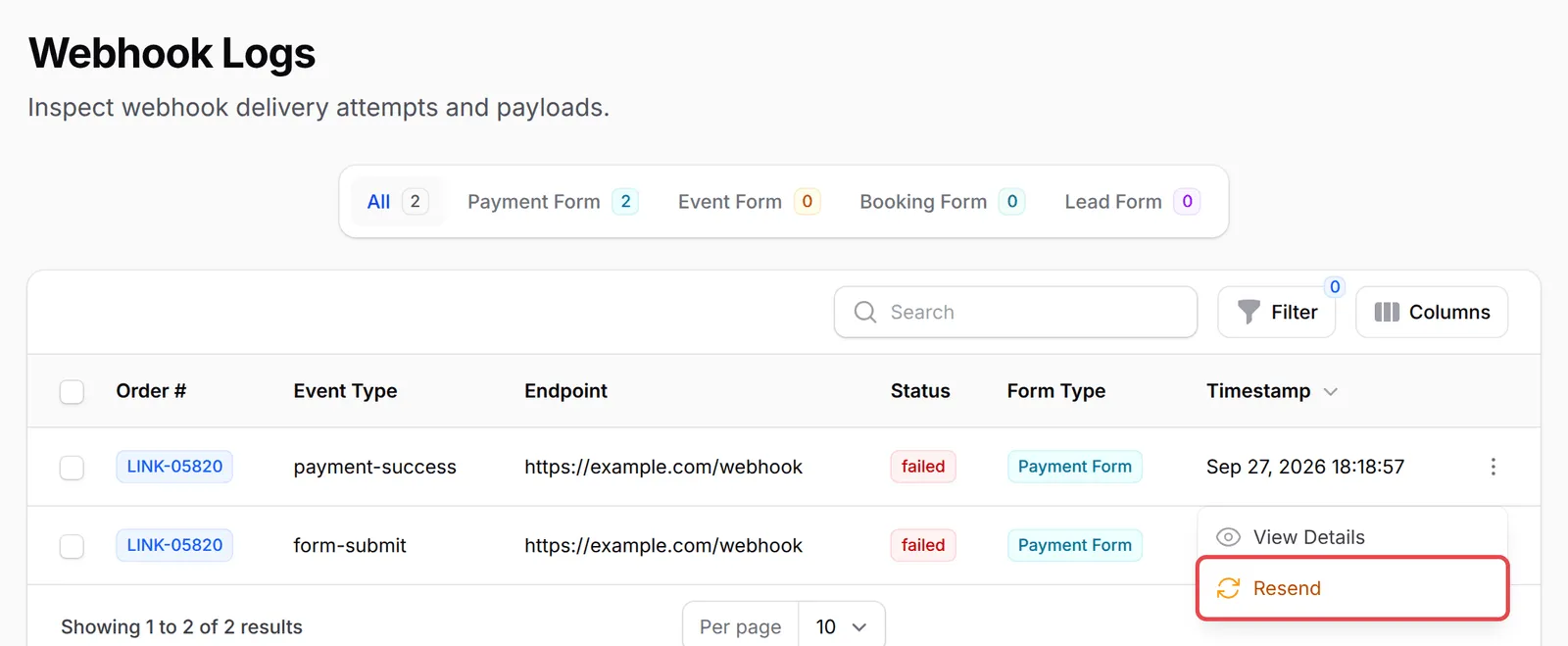
Click View Details in the same menu to see the payload BCL sent and your endpoint’s reply.
Common issues
I added my webhook URL but my system receives nothing. How do I test it?
Open the form's Webhook Settings tab and click Send Test. Choose an Event Type, check the Webhook URL and send. If the test arrives but real payments do not, check that you ticked Payment Success, and not Form Submit alone. If the test does not arrive, make sure your URL is public, starts with https://, accepts POST and replies with a 2xx status.
How can my own system know when a payment comes in?
Turn on the webhook for the form and tick Payment Success. BCL posts the order, buyer, items and custom fields to your URL as soon as the payment is confirmed. Match it to your records with record_id, which is the BCL order number.
Does my webhook fire when I import old records?
Only if you tick Run webhooks and automations on the import page. Each imported row then triggers your webhooks as if it were a real payment. So leave the box unticked if you only want the records in BCL.
Was this article helpful?
Thanks for your feedback.
Sorry this didn't help. WhatsApp us and we'll sort it out with you.