
 ChatGPT
 Claude
 Perplexity
 Google AI Mode
 Microsoft Copilot
 Grok
Grok Mistral Le Chat
付款表单webhook payload
Webhook让BCL在销售发生的那一刻通知你自己的系统。当顾客提交付款表单,或付款成功或失败时,BCL会向你设置的每个URL发送一个HTTP POST,body是JSON。本页列出这个body里的每个栏位。
完整的BCL API,请看API参考文档。
设置你的webhook URL
Section titled “设置你的webhook URL”Webhook是按表单设置的。开启方法:
-
前往Payments → Forms,打开你的表单。
-
点击顶部的Advanced。

-
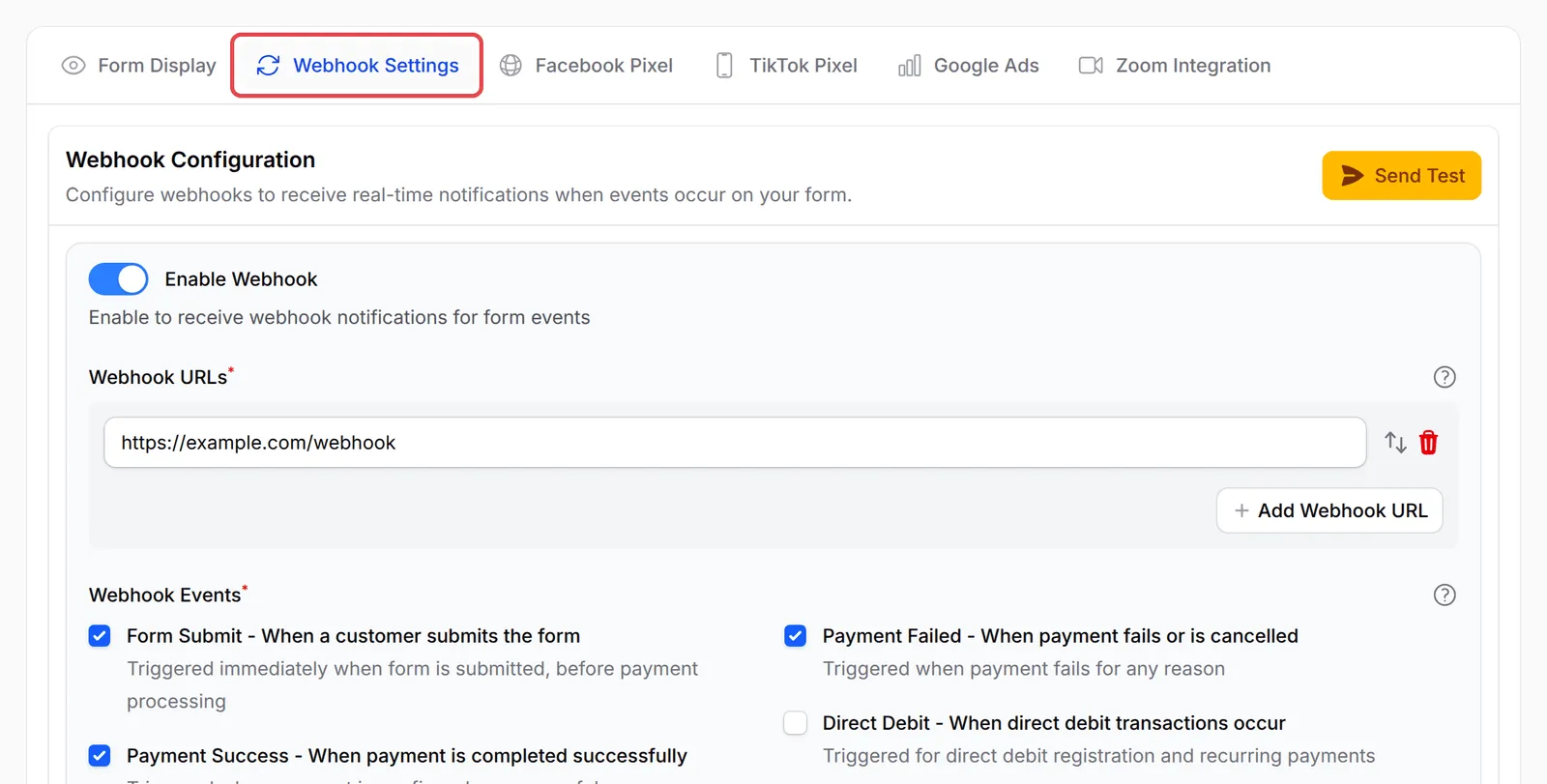
打开Webhook Settings标签页,开启Enable Webhook。
-
在Webhook URLs下输入你的endpoint。如果没有显示输入框,先点击Add Webhook URL。再点击Add Webhook URL可以添加更多,最多10个。每个URL都必须以
https://开头,而且每个URL都会收到相同的事件。 -
在Webhook Events下,勾选你要的事件。
-
点击Save Advanced Settings。
要在没有真实销售的情况下测试你的endpoint,就在Webhook Configuration部分点击Send Test。Webhook开启并有URL后,这个按钮才会出现。选择Event Type,检查Webhook URL和Payload Preview,然后点击Send Test Webhook。测试payload使用随机的范例值。
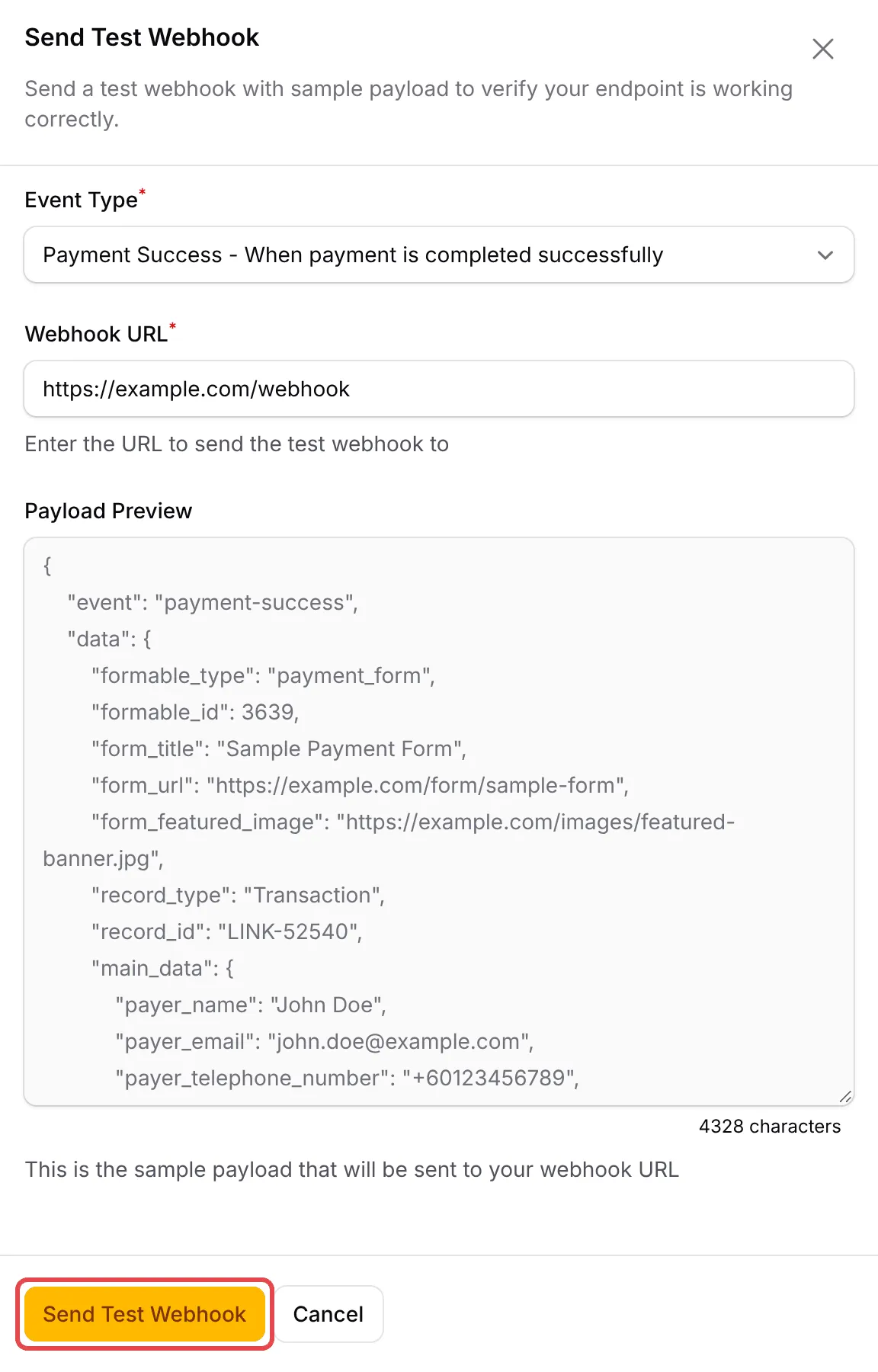
之后BCL会显示Test Webhook Sent和你endpoint的状态码,或显示Webhook Failed、状态码和回复的开头部分。测试webhook不会列在Webhook Logs里。
活动表单和预约表单的Advanced下也有同样的Webhook Settings标签页,使用本页说明的相同付款payload。
每个请求的body有两个键:event(事件名称)和data(payload)。以下事件使用本页的payload:
| 事件 | BCL什么时候发送 |
|---|---|
form-submit |
顾客在付款前提交表单。 |
payment-success |
Bayarcash确认付款。 |
payment-failed |
付款失败或被取消。 |
Direct Debit表单请看直接扣账(Direct Debit)webhook payload。活动表单也可以发送ticket-checked-in,预约表单可以发送booking-confirmed和booking-cancelled。这些事件使用不同的payload。
范例payload
Section titled “范例payload”这是一个payment-success请求。数值都是虚构的。
{ "event": "payment-success", "data": { "formable_type": "payment_form", "formable_id": 210, "form_title": "Online Cooking Class", "form_url": "https://shop.example.com/form/online-cooking-class", "form_featured_image": "https://cdn.example.com/banner.jpg", "record_type": "Transaction", "record_id": "LINK-02046", "main_data": { "id": "01jfps609t08vjb8d5exq27bz6", "payer_name": "Ali bin Abu", "payer_email": "ali@example.com", "payer_telephone_number": "+60123456789", "order_number": "LINK-02046", "transaction_type": "live", "currency": "MYR", "subtotal_amount": "100.00", "fee_amount": "1.00", "amount": "101.00", "payment_channel": "FPX", "status": 3, "status_description": "Approved", "created_at": "27/09/2026 14:05:09", "customer_id": "01jfps5zq1m2k8c4x7v9b3n6td", "is_paid": 1, "retry_count": 0, "source_type": "payment_form", "items": [ { "id": 5501, "index": 101, "productable_type": "product_item", "productable_id": 101, "item": "Cooking Class Recording", "sku": "CC-001", "option": "", "quantity": 1, "unit_amount": "100.00", "normal_price": "120.00", "sale_price": "100.00", "amount": "100.00", "access_url": null, "weight": "0.00", "total_weight": "0.00", "metadata": null, "product_image": "https://cdn.example.com/class.jpg", "protected_content": [ { "title": "Module 1", "url": "https://shop.example.com/content/abc123token", "access_finder_url": "https://shop.example.com/content/7/access" } ] } ] }, "tracking_params": { "utm_source": "facebook", "utm_campaign": "september-promo" }, "receipt_url": "https://bcl.my/storage/pdf/LINK-02046.pdf", "custom_fields_data": { "address_line1": "1 Jalan Contoh", "city": "Kajang", "state": "Selangor", "postal_code": "43000", "country": "MY" }, "affiliate_data": { "referral_id": 57, "affiliate_id": 12, "affiliate_username": "siti", "affiliate_name": "Siti binti Ahmad", "affiliate_email": "siti@example.com", "affiliate_phone": "+60198765432", "commission_type": "percentage", "commission_rate": "10.00", "commission_amount": "10.00", "commission_breakdown": null, "status": "approved", "referral_source": "direct" } }}data对象包含这些键:
| 栏位 | 类型 | 意思 |
|---|---|---|
formable_type |
string | 表单类型:payment_form、event_form或booking_form。 |
formable_id |
number | 表单ID。取代旧的form_id。 |
form_title |
string | 表单标题。活动表单则是活动名称。 |
form_url |
string | 表单的公开链接。如果表单没有slug或域名,就是空的。 |
form_featured_image |
string | 封面图片URL,或空值。 |
record_type |
string | 在本页永远是Transaction。 |
record_id |
string | BCL订单号码,例如LINK-02046。用它来对应记录。 |
main_data |
object | 订单。请看下一节。 |
tracking_params |
object或null | 顾客打开表单时记录的UTM和点击ID:utm_source、utm_medium、utm_campaign、utm_content、utm_term、utm_id、fbclid、ttclid、gclid。只发送有值的项目。 |
receipt_url |
string | 仅限payment-success。PDF收据的链接。任何人打开它,都要先用一次性验证码验证。 |
custom_fields_data |
object | 表单的自定义栏位和地址栏位,以栏位名称为键。如果没有,就不会出现。 |
affiliate_data |
object | 只有在affiliate推荐这笔销售时才会出现。 |
订单栏位(main_data)
Section titled “订单栏位(main_data)”BCL发送订单记录时会去掉空值。没有值的栏位(null、空的,或大部分金额为0.00)不会发送,所以不要以为每个栏位都一定存在。
| 栏位 | 类型 | 意思 |
|---|---|---|
id |
string | 内部交易ID。 |
payer_name, payer_email, payer_telephone_number |
string | 买家的资料。 |
order_number |
string | 与record_id相同。 |
transaction_type |
string | live或test。 |
currency |
string | 通常是MYR。 |
subtotal_amount |
string | 未加手续费的产品总额。一定会发送。 |
discount_amount |
string | 优惠券折扣。 |
coupon_code, coupon_usage_id |
string, number | 使用的优惠券。 |
fee_amount |
string | 向买家收取的手续费。一定会发送。 |
additional_fee_amount |
string | 表单上设置的额外费用。 |
rounding_adjustment |
string | 总额的四舍五入调整。 |
tax_amount |
object | 税务详情,例如税名、税率和金额。 |
shipping |
object | 运送方式的name、cost和total_weight。 |
bank_transfer_details |
object | 银行资料,用于手动转账的订单。 |
amount |
string | 买家支付的总额。 |
payment_channel |
string | 渠道名称,例如FPX、DuitNow QR、Credit Card、Cash on Delivery (COD)或Manual Bank Transfer。 |
status |
number | 付款状态码。3表示成功,2表示失败。在form-submit可能不会出现。 |
status_description |
string | 来自Bayarcash的状态文字。仅限payment-success和payment-failed。 |
is_paid |
number | 已付款为1,否则为0。 |
retry_count |
number | 买家重试付款的次数。 |
created_at |
string | 下单时间,DD/MM/YYYY HH:MM:SS,马来西亚时间。 |
customer_id |
string | BCL顾客ID。 |
classification_code |
string | 电子发票(e-Invoice)分类代码。 |
affiliate_id, cookie_id |
string | Affiliate归属,有的话才会出现。 |
source_type |
string | 与formable_type相同。 |
items |
array | 购买的产品。请看下一节。 |
items里的每一项都有这些键:
| 栏位 | 类型 | 意思 |
|---|---|---|
id |
number | 订单明细ID。 |
index, productable_id |
number | 产品ID。保留index是为了旧的整合。 |
productable_type |
string | 例如product_item、event_ticket或booking_service。 |
item, sku, option |
string | 产品名称、SKU和所选的规格。 |
quantity |
number | 数量。 |
unit_amount, normal_price, sale_price |
string | 每件实付价格、原价和特价。 |
amount |
string | 该行总额。 |
access_url |
string或null | 数码产品的下载链接。 |
weight, total_weight |
string | 每件重量和该行总重量。 |
metadata |
object或null | 额外的产品数据。 |
product_image |
string | 产品图片URL,或空值。 |
protected_content |
array | 仅限payment-success:每一项有title、url(买家的个人访问链接)和access_finder_url(弄丢链接的买家可以重新找回链接的页面)。其他事件则是空的。 |
Affiliate栏位
Section titled “Affiliate栏位”affiliate_data对象有referral_id、affiliate_id、affiliate_username、affiliate_name、affiliate_email和affiliate_phone。它也有commission_type(flat、percentage或per_item)、commission_rate和commission_amount。按产品佣金时,commission_rate是null,commission_breakdown会列出每个产品。最后是status(例如pending或approved)和referral_source。
与旧范例的不同
Section titled “与旧范例的不同”如果你是根据旧范例创建整合的,请检查这些变更:
form_id已取消。使用formable_id,表单类型则用formable_type。- 新的顶层栏位:
formable_type、form_url、form_featured_image和tracking_params。 - 新的订单栏位:
subtotal_amount、created_at、customer_id、is_paid、retry_count、source_type,以及折扣、优惠券、税和运送栏位。 - 新的产品栏位:
id、productable_type、productable_id、sku、normal_price、sale_price、weight、total_weight、metadata、product_image和protected_content。 - 新的affiliate栏位:
commission_breakdown。 - 新事件:
payment-failed。
确认webhook是真的
Section titled “确认webhook是真的”BCL不会为webhook签名。没有signature header,也没有共享的secret,所以任何知道你URL的人都可以向它发送请求。为了安全:
- 在你寄出订单或给予访问权限之前,先通过BCL API用
record_id查找订单,并在那里确认状态。在测试模式下,使用GET /transaction/{order_number}:GET /transactions/{order_number}只能找到真实付款。发送你自己的User-Agentheader,因为BCL会封锁curl和python-requests等工具的默认User-Agent。 - 使用难以猜到的URL,例如在路径里加入一段很长的随机token。
- 确保同一个事件处理多次也不会出问题。同时用
record_id和event找出重复的请求。
BCL会把每个事件向每个URL发送一次,每个URL一个请求。任何2xx回复都算发送成功。请尽快回复,繁重的工作之后再做。
每次尝试都记录在Tools → Webhook Logs,包括payload、你的回复和任何错误。BCL不会自动重试失败的发送。要重新发送:
-
前往Tools → Webhook Logs。
-
点击该行末端的菜单,然后点击Resend并确认。
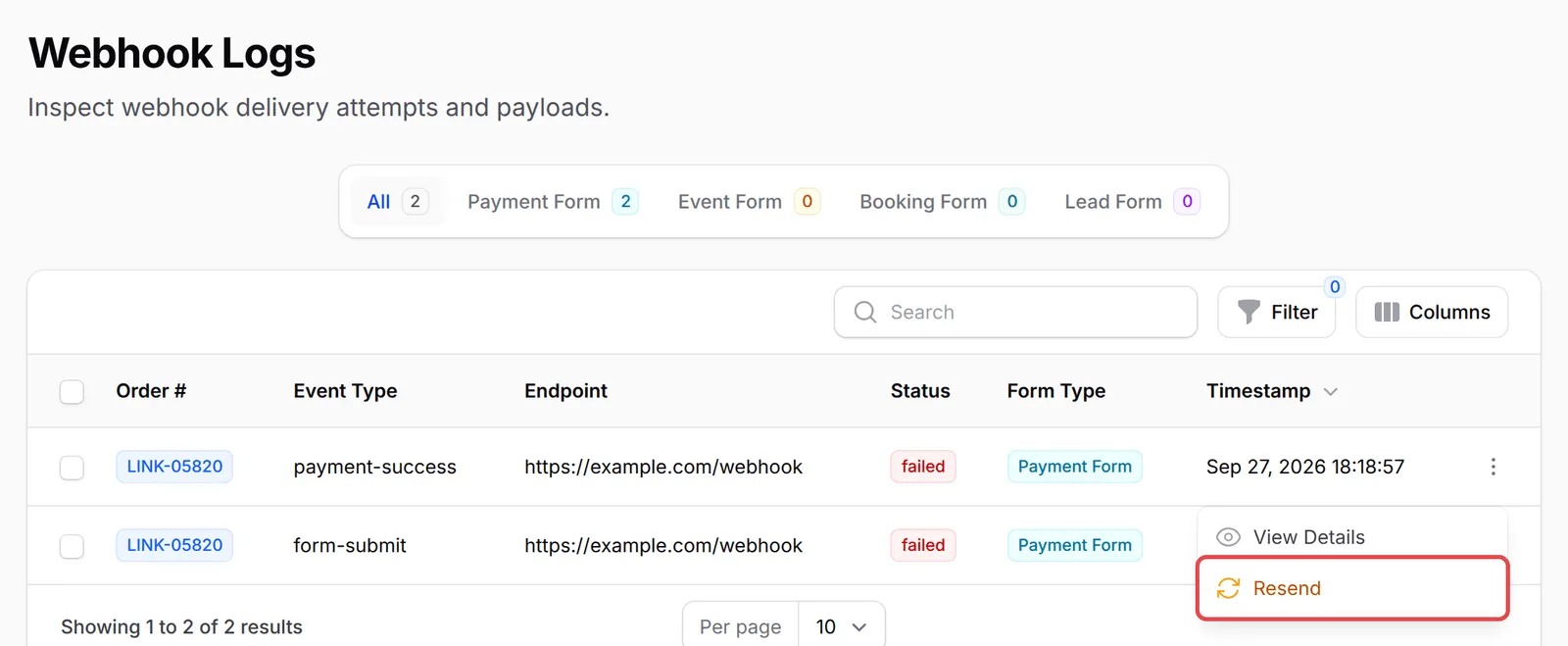
在同一个菜单点击View Details,查看BCL发送的payload和你endpoint的回复。
常见问题
我已添加webhook URL,但我的系统什么都没收到。怎样测试?
打开表单的Webhook Settings标签页,点击Send Test。选择Event Type,检查Webhook URL,然后发送。如果测试收到了,真实付款却没有,检查你是否勾选了Payment Success,而不是只勾选Form Submit。如果测试没有收到,确保你的URL是公开的、以https://开头、接受POST,并回复2xx状态。
我自己的系统怎样知道有付款进来?
为表单开启webhook,并勾选Payment Success。付款一确认,BCL就会把订单、买家、产品和自定义栏位发送到你的URL。用record_id(即BCL订单号码)对应你的记录。
导入旧记录会触发我的webhook吗?
只有在导入页面勾选Run webhooks and automations时才会。这样每一行导入的记录都会像真实付款一样触发你的webhook,所以如果你只想把记录放进BCL,就不要勾选。