
 ChatGPT
 Claude
 Perplexity
 Google AI Mode
 Microsoft Copilot
 Grok
Grok Mistral Le Chat
位于https://bcl.my/mcp的BCL MCP服务器给AI助手62个工具:30个读取,32个写入。每个工具做的事和一个BCL API endpoint相同,检查也一样。本页列出全部工具,以及每个工具需要的权限和速率限制。
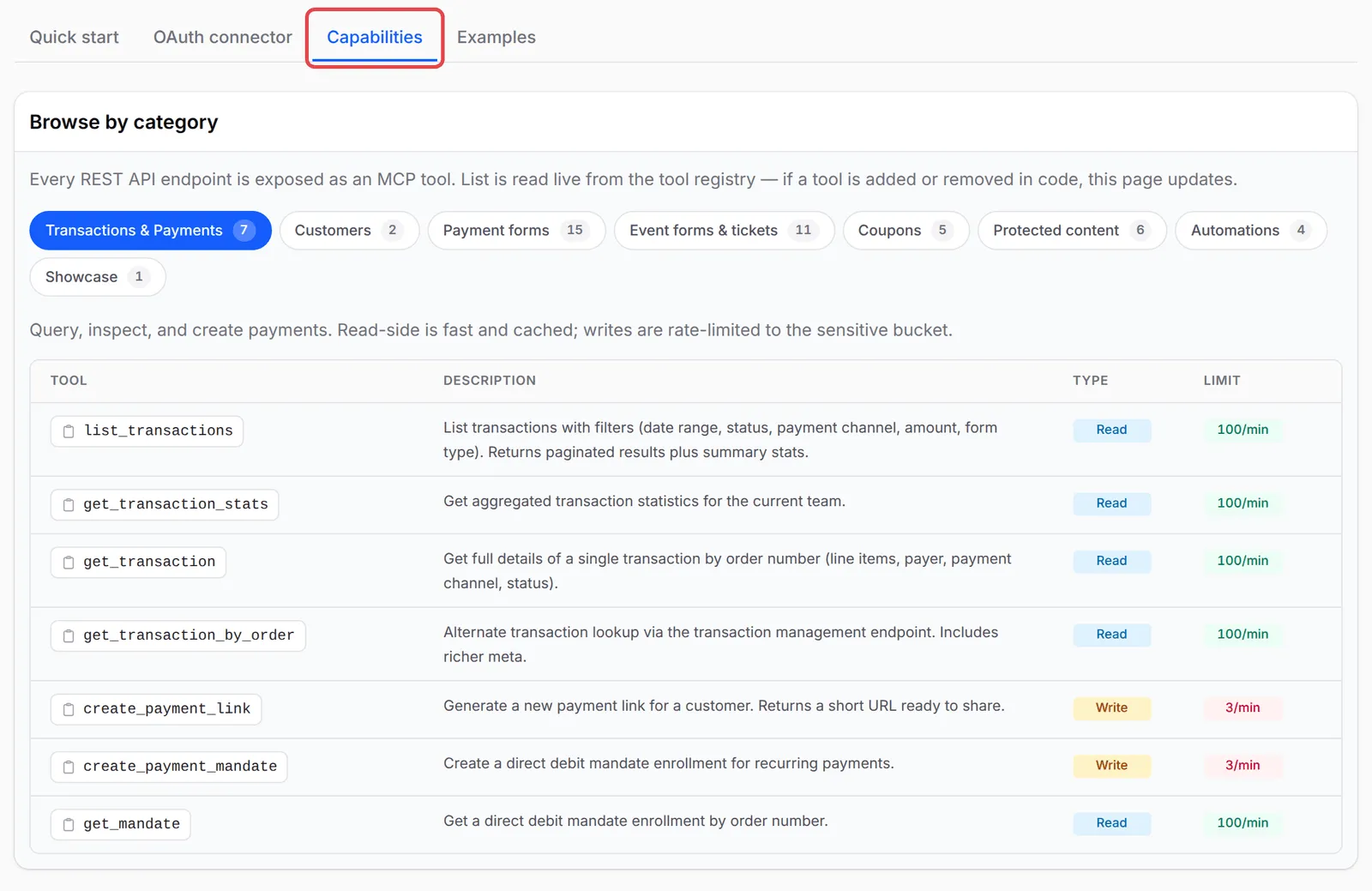
要连接AI助手,请看把Claude或ChatGPT连接到BCL或Set up other AI apps。BCL也在Platform Setup → Connect AI Agent的Capabilities标签页显示同一份列表。
Token或OAuth连接至少需要一个MCP权限。AI助手只会看到它的权限允许的工具:
| 权限 | Token复选框 | 可以使用 |
|---|---|---|
mcp:read |
MCP Read | 下面所有读取工具 |
mcp:write |
MCP Write | 下面所有写入工具。不包括读取工具。 |
完全访问(*) |
(仅限旧token) | 所有工具 |
只有API Read或API Write的token会被拒绝,并显示“Token needs at least one of: mcp:read, mcp:write”。没有mcp:write却调用写入工具,会返回“Tool ‘…’ requires the ‘mcp:write’ ability”。
AI助手看到的资料,和创建token或批准连接的BCL用户一样。管理员看到整个团队的资料。Team成员只看到自己的资料,除非开启了Show data for all team members。请看团队角色和权限。
这些工具涵盖付款和直接扣账(Direct Debit)。list_transactions、get_transaction_stats和顾客工具只计算真实付款;测试模式的付款不计算在内。
| 工具 | 作用 | 类型 | 限制 |
|---|---|---|---|
list_transactions |
列出交易。筛选条件:日期、状态、付款渠道、金额、表单类型,以及按订单号码、名字、电邮或电话搜索 | 读取 | read |
get_transaction_stats |
某个日期范围(默认最近30天):已付款的收入和笔数、按状态分的所有交易、按付款渠道和表单类型分的已付款交易 | 读取 | read |
get_transaction |
按订单号码(例如LINK-00123)查一笔交易:产品、付款人、渠道、状态 |
读取 | read |
get_transaction_by_order |
同样的查询,但更详细 | 读取 | read |
get_mandate |
按订单号码查一个直接扣账授权(mandate) | 读取 | read |
create_payment_link |
创建付款链接。需要金额、付款人名字、电邮、电话和portal key | 写入 | sensitive |
create_payment_mandate |
创建直接扣账授权登记 | 写入 | sensitive |
顾客工具查询付款给你的人:
| 工具 | 作用 | 类型 | 限制 |
|---|---|---|---|
list_customers |
列出顾客,按电邮或电话搜索,按付款金额或交易次数排序 | 读取 | read |
get_customer |
一位顾客和他最近的交易 | 读取 | read |
大部分表单工具一次只改一个设置,让AI助手可以小心地做一个更改:
| 工具 | 作用 | 类型 | 限制 |
|---|---|---|---|
list_forms |
列出付款表单 | 读取 | read |
get_form |
一个表单的完整内容:产品、规格、优惠券、webhook和affiliate设置 | 读取 | read |
list_showcase_forms |
显示在你主页上的表单 | 读取 | read |
duplicate_form |
用新的标题和slug复制表单。副本马上正式上线 | 写入 | write |
update_form_status |
开启或关闭表单 | 写入 | write |
update_form_title |
为表单改名 | 写入 | write |
update_form_slug |
更改表单的网址 | 写入 | write |
update_form_content |
更改表单的描述 | 写入 | write |
update_form_prices |
更改产品或规格价格,包括数量折扣层级 | 写入 | write |
update_form_stock |
更改产品库存 | 写入 | write |
update_form_coupon |
附加或移除优惠券 | 写入 | write |
update_form_affiliate |
为表单开启或关闭affiliate、显示affiliate资料、覆盖佣金 | 写入 | write |
update_form_redirect_urls |
设置付款成功或失败后打开的页面 | 写入 | write |
update_form_webhook |
设置表单的webhook URL | 写入 | write |
update_form_facebook_pixel |
设置Facebook Pixel ID | 写入 | write |
update_form_tiktok_pixel |
设置TikTok Pixel ID | 写入 | write |
update_form_homepage |
在你的主页显示或隐藏表单 | 写入 | write |
活动表单和门票
Section titled “活动表单和门票”活动工具用于你的活动和售票表单:
| 工具 | 作用 | 类型 | 限制 |
|---|---|---|---|
list_event_forms |
列出活动表单 | 读取 | read |
get_event_form |
一个活动和它的票种与设置 | 读取 | read |
update_event_form_status |
发布活动或设为草稿 | 写入 | write |
update_event_form_slug |
更改活动的网址 | 写入 | write |
update_event_form_venue_name |
更改场地名称 | 写入 | write |
update_event_form_content |
更改活动描述 | 写入 | write |
update_event_form_tickets |
更改票种和库存 | 写入 | write |
update_event_form_ticket_prices |
更改门票价格 | 写入 | write |
update_event_form_affiliate |
活动的affiliate设置 | 写入 | write |
update_event_form_facebook_pixel |
设置Facebook Pixel ID | 写入 | write |
update_event_form_tiktok_pixel |
设置TikTok Pixel ID | 写入 | write |
update_event_form_homepage |
在你的主页显示或隐藏活动 | 写入 | write |
优惠券工具读取和管理你的折扣码:
| 工具 | 作用 | 类型 | 限制 |
|---|---|---|---|
list_coupons |
列出优惠券 | 读取 | read |
get_coupon |
一张优惠券和它的设置与使用情况 | 读取 | read |
create_coupon |
创建百分比或固定金额的优惠券,可选择设置限制和日期 | 写入 | sensitive |
update_coupon |
更改优惠券的设置 | 写入 | write |
update_coupon_status |
开启或关闭优惠券 | 写入 | write |
受保护内容工具涵盖你设了访问限制的视频、文件、文字和链接:
| 工具 | 作用 | 类型 | 限制 |
|---|---|---|---|
list_protected_contents |
列出受保护内容和每项的顾客人数 | 读取 | read |
get_protected_content |
一项内容和它的访问设置、观看次数和下载次数 | 读取 | read |
get_protected_content_customers |
谁有访问权限,以及他们的使用情况 | 读取 | read |
update_protected_content_status |
开启或关闭内容 | 写入 | write |
update_protected_content_title |
更改页面标题和访问电邮的主题 | 写入 | write |
update_protected_content_access |
更改访问类型、日期、期限、设备和下载限制 | 写入 | write |
更多详情:用API和AI工具管理受保护内容。
自动化工具只能读取:
| 工具 | 作用 | 类型 | 限制 |
|---|---|---|---|
list_automations |
列出自动化和它们的触发器与运行次数 | 读取 | read |
get_automation |
一个自动化和它的条件与步骤 | 读取 | read |
get_automation_executions |
运行记录:哪些运行成功或失败 | 读取 | read |
get_automation_stats |
成功和失败的次数 | 读取 | read |
平台工具(仅限BCL员工)
Section titled “平台工具(仅限BCL员工)”有9个读取工具以platform_开头:platform_revenue_overview、platform_revenue_concentration、platform_merchant_performance、platform_growth_and_churn、platform_form_performance、platform_conversion_funnel、platform_traffic_overview、platform_affiliate_overview和platform_monthly_trend。它们报告的是整个BCL平台。你的AI助手会在工具列表里看到它们,但对商家账号来说,它们只会返回“Platform analytics are available to super admins only.”。
工具不能做的事
Section titled “工具不能做的事”有些工作只能在BCL仪表板完成。这些工具不能:
- 删除任何东西。
- 从零开始创建付款、活动、预约或lead表单,或上传文件。
- 读取预约表单、lead表单、参加者或affiliate。
- 更改付款设置、Bayarcash密钥、支付网关手续费、公司或团队设置,或API token。
- 发送电邮、SMS或WhatsApp信息。
每个token或OAuth连接都有自己的限制,按每分钟计算:
| 类别(bucket) | 限制 | 适用于 |
|---|---|---|
| read | 每分钟100次 | 所有读取工具 |
| write | 每分钟10次 | 除了下面三个以外的所有写入工具 |
| sensitive | 每分钟3次 | create_payment_link、create_payment_mandate、create_coupon |
| meta | 每分钟60次 | 连接、列出工具和ping(initialize、tools/list、ping) |
超过限制时,调用会失败,并显示“Rate limit exceeded for bucket ‘sensitive’. Retry in 42s.”(显示相关的类别和秒数),错误代码是-32003。响应数据会提供bucket、limit_per_minute和retry_after_seconds,让设计良好的AI助手等一等再重试。
服务器通过HTTP POST使用JSON-RPC 2.0。以下是AI助手可能遇到的错误:
| 代码 | 意思 |
|---|---|
-32001 |
没有token,或token无效或已过期(HTTP 401) |
-32002 |
Token没有这个工具的权限(完全没有MCP权限时是HTTP 403) |
-32003 |
达到速率限制 |
-32601 |
方法或工具名称不存在 |
-32602 |
tools/call没有工具名称 |
-32700 |
请求body不是JSON |
当工具的输入有错,例如缺少订单号码,工具本身会以isError: true和列出每个栏位的“Validation failed”信息回应。要知道每个工具的每个参数,可以问你的AI助手“Show me the inputs for <tool name>”,或查看BCL API参考文档。
每个使用有效token的请求,包括被拒绝和失败的调用,都会记录在Tools → MCP Audit Log。没有有效token的请求不会记录。请看查看你的AI助手做了什么。
常见问题
我的token有MCP Write,但AI助手什么都读不到。为什么?
MCP Write只包括写入工具。请同时勾选MCP Read,让AI助手可以在更改前先查询资料。
AI助手说“Rate limit exceeded”。怎么办?
每个token或连接的每类工具都有每分钟的限制。等信息里说的秒数过后再试,或叫AI助手一次少做一些更改。
为什么AI助手列出一些我不能用的platform_工具?
那9个platform_工具报告的是整个BCL平台,只有BCL员工可以使用。对商家来说,它们只会返回“Platform analytics are available to super admins only.”。不用理会它们。