
Ask an AI about this page
 ChatGPT
 Claude
 Perplexity
 Google AI Mode
 Microsoft Copilot
 Grok
Grok Mistral Le Chat
Server-side tracking (Conversions API) explained
Updated

Server-side tracking means BCL’s server tells Meta, TikTok or Google Analytics about a purchase directly, instead of relying only on the pixel in the customer’s browser. It still works when the customer uses an ad blocker, pays in an in-app browser or closes the page before the receipt loads.
What each platform supports
Section titled “What each platform supports”Server-side tracking is set up in a different place for each platform:
| Platform | Server-side feature | Where to turn it on |
|---|---|---|
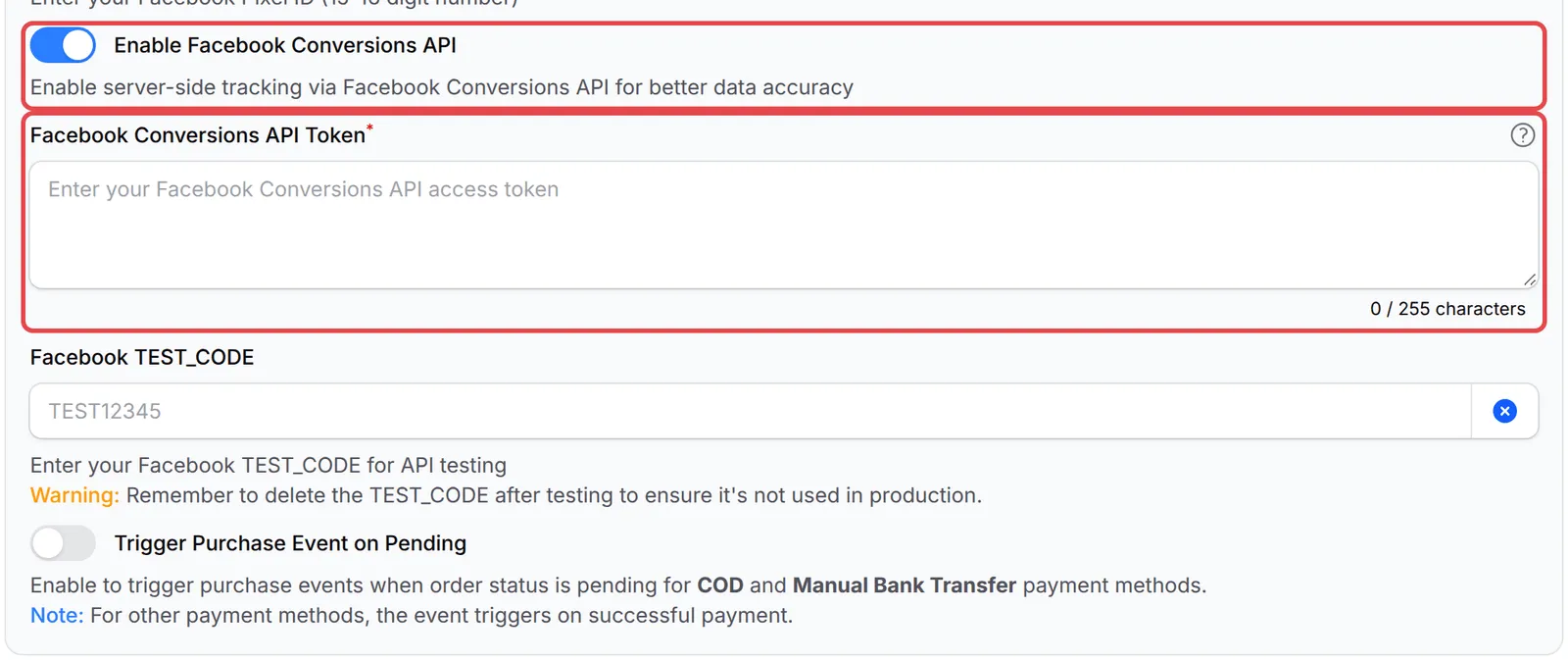
| Meta (Facebook) | Conversions API | Each form: Advanced → Facebook Pixel → Enable Facebook Conversions API |
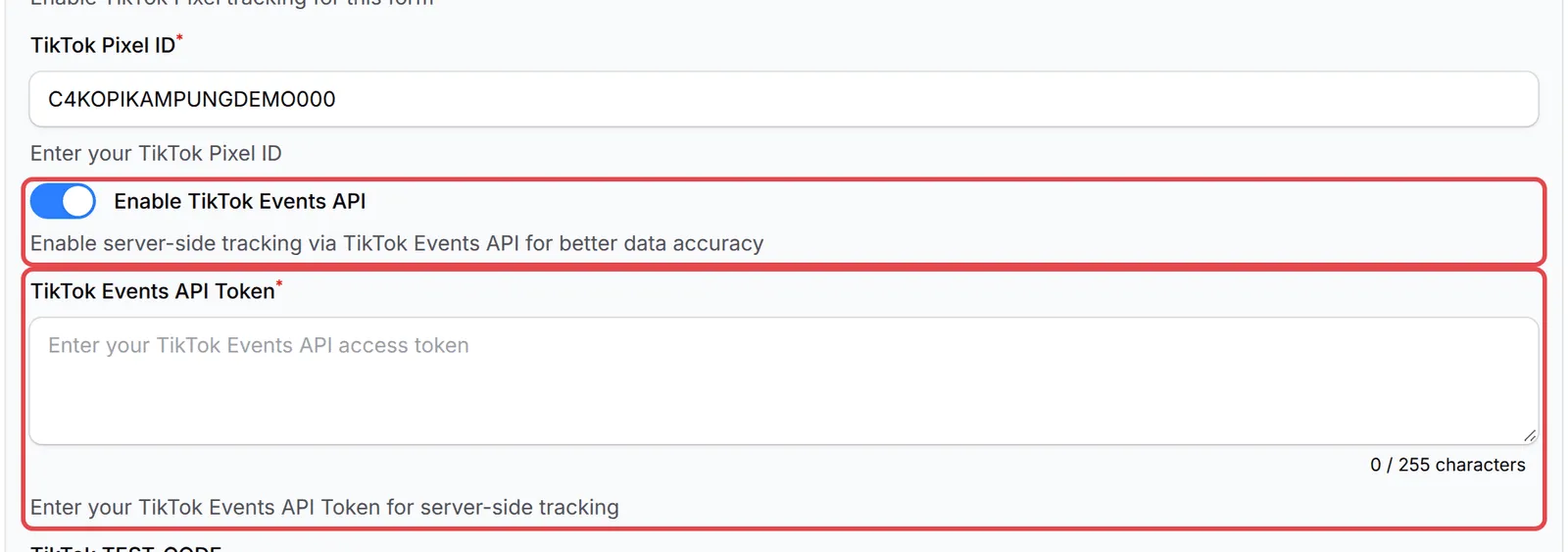
| TikTok | Events API | Each form: Advanced → TikTok Pixel → Enable TikTok Events API |
| Google Analytics 4 | Measurement Protocol | Once for the account: Platform Setup → Integrations → Google |
| Google Ads | None | Browser only, from the form’s Google Ads tab |
Payment links have their own Enable Facebook API and Enable TikTok API switches under Platform Setup → Link Configuration → Pixel Settings.
Which events BCL sends
Section titled “Which events BCL sends”The pixel in the browser sends the visit and checkout events. The purchase can come from the browser or from BCL’s server:
| Platform | When the form opens | When the customer clicks pay | When the order is paid |
|---|---|---|---|
| Meta | PageView, ViewContent | InitiateCheckout (Lead on a lead form) | Purchase |
| TikTok | Pageview, ViewContent | InitiateCheckout (SubmitForm on a lead form) | CompletePayment |
| Google Analytics 4 | page_view | begin_checkout (generate_lead on a lead form) | purchase (server only) |
| Google Ads | page_view, view_item | begin_checkout | conversion (browser only) |
With the server-side purchase, BCL sends the order number, amount, currency and form name. To help the platform match the sale to the ad click, it adds the customer’s email, phone number and name (hashed, so they cannot be read), their IP address and browser, and the tracking cookies from the form visit (such as Meta’s fbp and fbc, TikTok’s ttp and Google’s _ga).
When the purchase is sent
Section titled “When the purchase is sent”The purchase goes out once per order and platform:
- Successful online payment. As soon as Bayarcash confirms the payment, BCL’s server sends the purchase in the background (it tries up to 3 times if something goes wrong). If the receipt page opens first, the browser pixel sends it instead. Whichever is first is recorded; the other is skipped.
- COD and manual bank transfer. The order is pending until you confirm payment. Meta and TikTok get the purchase when the order is placed only if you turn on Trigger Purchase Event on Pending; otherwise they get it when you mark the order paid (server-side only, so the Conversions API or Events API must be on). Google Ads always counts it when the order is placed. Google Analytics 4 counts it only when the order is paid.
- Failed or cancelled payment. Nothing is sent.
How to turn it on
Section titled “How to turn it on”Set up the pixel first, then add the server-side token:
- For Meta, follow Add a Meta (Facebook) pixel to a form and add your Facebook Conversions API Token.
- For TikTok, follow Add a TikTok pixel to a form and add your TikTok Events API Token.
- For Google Analytics 4, follow Track purchases in Google Analytics 4 and add your Measurement Protocol API secrets value.
A few things help you get the most from server-side tracking:
- Check the Method column. In Tools → Marketing Logs, each purchase shows Browser or Server. A Server row also shows the platform’s reply under Response Payload, so you can see errors such as an expired token. See Marketing Pixel Logs.
- Test with a TEST_CODE, then clear it. Paste the test event code from Meta or TikTok into Facebook TEST_CODE or TikTok TEST_CODE to see server events in the platform’s test tool. Clear it afterwards, as the warning under the field says.
- Affiliates can use their own tokens. An affiliate can add their own Meta or TikTok pixel and token for your form in their affiliate dashboard (see Share your affiliate links). BCL sends them a separate purchase, only for successful sales they referred.
Common issues
Do I still need the pixel if I turn on the Conversions API?
Yes. The Conversions API is switched on inside the pixel settings, and the pixel still tracks visits and checkouts. The API only adds a server-side Purchase.
Will Meta count the purchase twice, once from the browser and once from the server?
No. BCL sends the Purchase once per order, from whichever side comes first, and uses the same event ID on both sides so Meta can match them.
Why are purchases missing in Meta or TikTok even with the pixel installed?
Ad blockers, in-app browsers and customers who close the page before the receipt loads stop the browser pixel. Server-side tracking sends the purchase from BCL even then.
Was this article helpful?
Thanks for your feedback.
Sorry this didn't help. WhatsApp us and we'll sort it out with you.