
Ask an AI about this page
 ChatGPT
 Claude
 Perplexity
 Google AI Mode
 Microsoft Copilot
 Grok
Grok Mistral Le Chat
Track affiliate referrals
Updated

A referral is the record of one sale that an affiliate brought in, with the commission it earns. BCL creates it by itself when a customer pays through an affiliate’s link. You find every referral under Affiliate → Referrals.
How a referral is created
Section titled “How a referral is created”When a customer opens an affiliate’s link, BCL remembers the affiliate for the number of days in Cookie Expiration Days. When that customer pays on a form with Enable Affiliates on, BCL creates a referral for the affiliate with the commission worked out from their rate.
With multi-tier commission on, the same sale also creates one referral for each upline who earns from it.
Referral statuses
Section titled “Referral statuses”A referral’s Status follows the customer’s payment:
| Status | When |
|---|---|
| Pending | The payment has not gone through yet. |
| Approved | The payment succeeded. The commission counts towards the affiliate’s earnings and can be paid out. |
| Rejected | The payment failed or was cancelled, or you rejected the referral. |
Payout Status shows where the commission is in the payout process: Unpaid, Requested, Processing or Paid. See Pay affiliate commission.
See your referrals
Section titled “See your referrals”All referrals are on one page:
-
In the sidebar, go to Affiliate → Referrals.
-
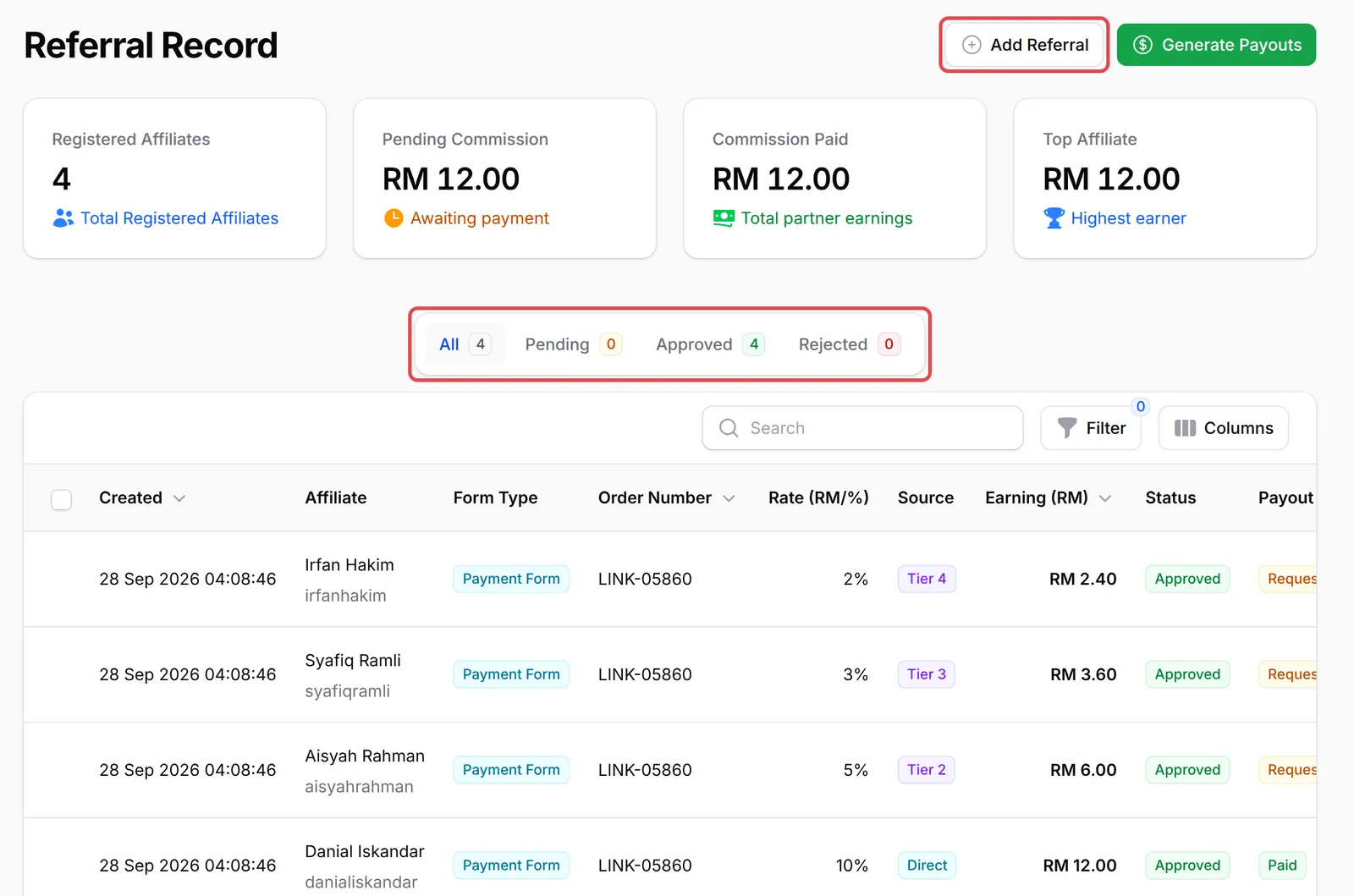
The Referral Record page shows your totals at the top, then tabs for All, Pending, Approved and Rejected.
-
Each row shows the affiliate, Form Type, Order Number, Rate (RM/%), Earning (RM), Status and Payout Status. With multi-tier on, the Source column shows Direct for the seller and Tier 2, Tier 3 and so on for their uplines.
-
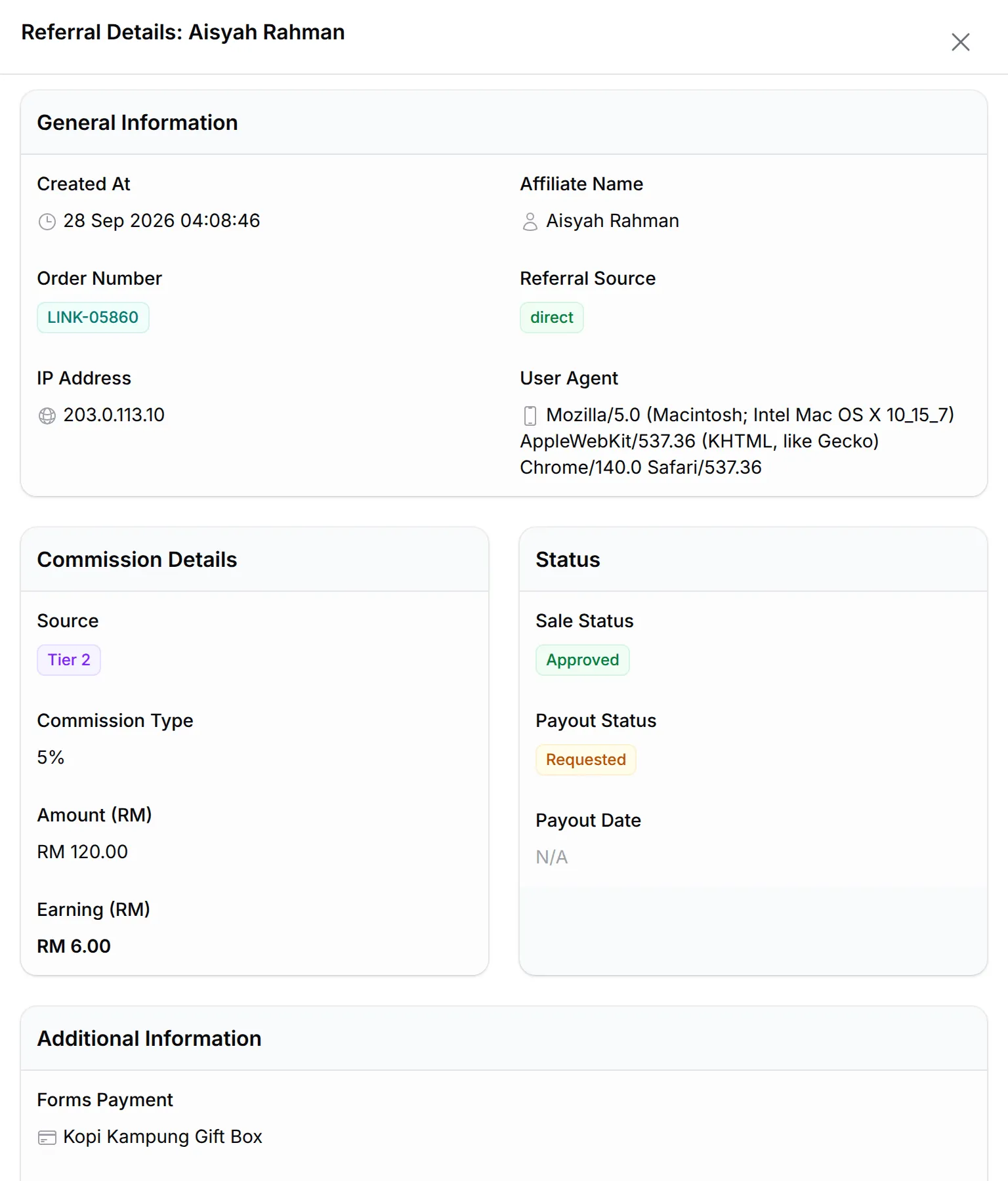
Click a row to see the referral’s details: the order, Source, Commission Type, the sale Amount (RM), the Earning (RM) and both statuses, including what each item earned when the form pays commission per item.
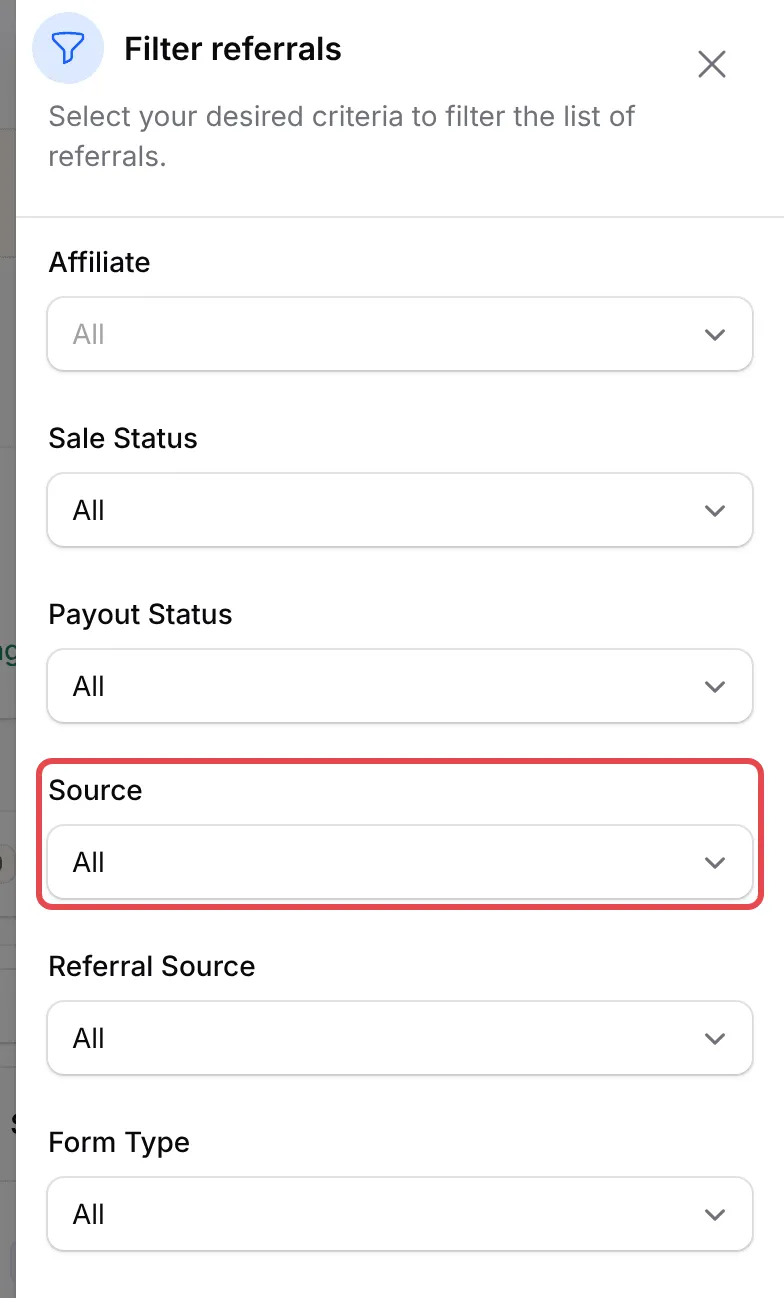
To narrow the list, click Filter. You can filter by Affiliate, Sale Status, Payout Status, Source (the tier level), Referral Source, Form Type and dates.
Reject a referral
Section titled “Reject a referral”Reject a sale that should not earn commission, for example when an affiliate bought through their own link:
-
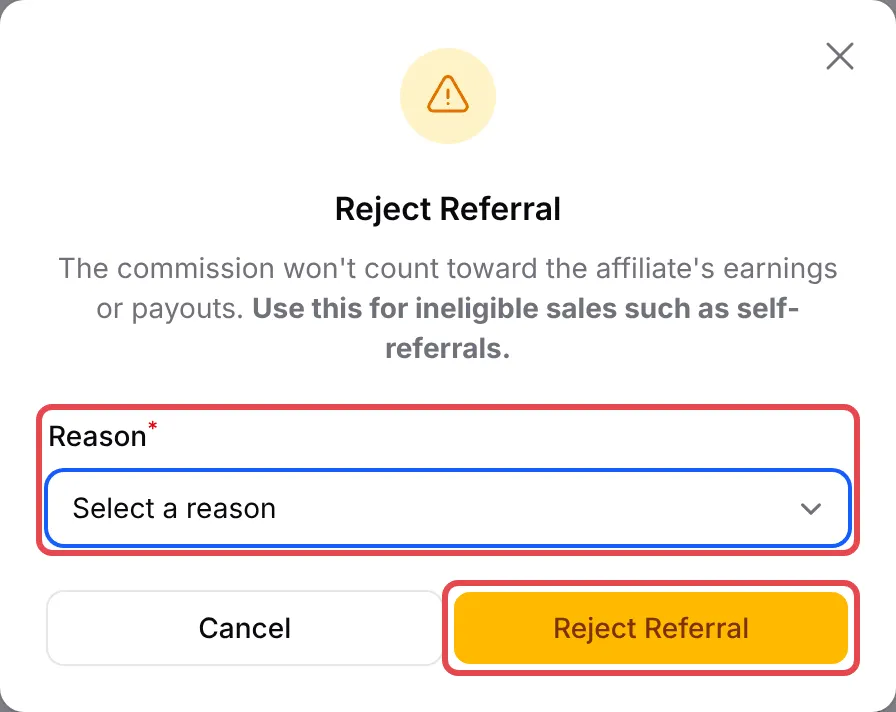
Click Reject on the referral.
-
Choose a Reason, such as Self-referral (own link purchase), Refunded / cancelled order or Duplicate referral. For Other, write the Details.
-
Click Reject Referral.
The commission no longer counts towards the affiliate’s earnings or payouts. A referral that has already been paid out cannot be rejected. If you rejected one by mistake, choose Approve Referral from its menu to restore it. Rejected referrals can also be deleted.
Add a referral by hand
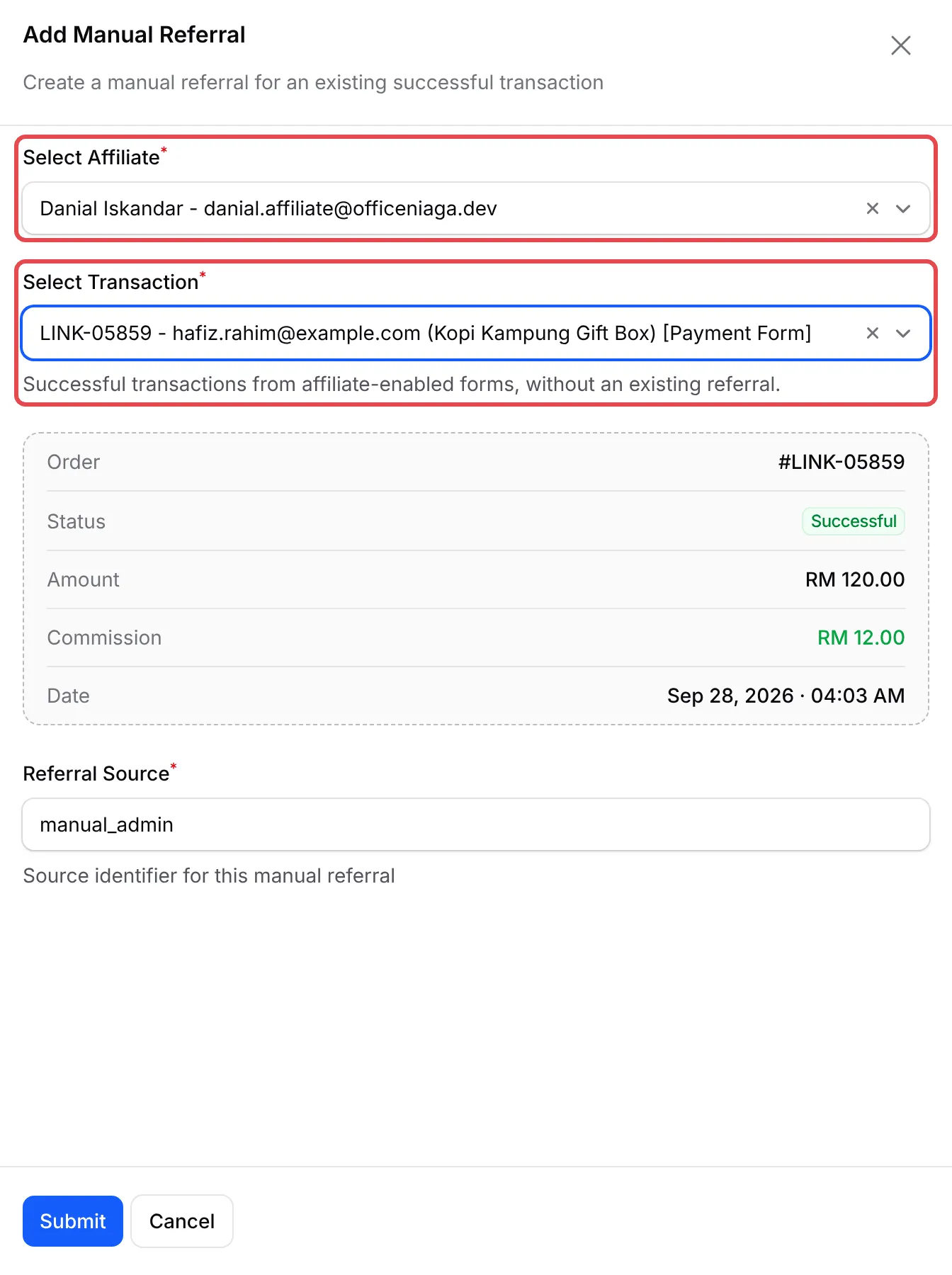
Section titled “Add a referral by hand”Use this when a customer bought without the affiliate’s link, for example after the affiliate sent them your normal form link:
-
On Affiliate → Referrals, click Add Referral.
-
In Select Affiliate, choose the affiliate. Only active affiliates are listed.
-
In Select Transaction, choose the sale. The list shows successful transactions from affiliate-enabled forms that the affiliate has no referral for yet. BCL shows the order, its amount and the commission it will pay.
-
Leave Referral Source as
manual_admin, or type your own label. -
Click Submit. BCL shows Manual Referral Added.
A manual referral is Approved straight away and pays the affiliate their normal rate. It does not pay any uplines.
Two habits keep your referrals tidy:
- Check the Pending tab now and then. A referral that stays pending usually means the customer left at the bank page.
- Reject with the right reason. The reason is saved on the referral, so you can explain the decision if the affiliate asks.
Common issues
A customer bought through an affiliate link but the affiliate got no commission. What should I check?
Check that the link ends with the affiliate's ID, the affiliate is Active and Enable Affiliates is on for that form. If the sale is valid, add it under Affiliate → Referrals with Add Referral.
An affiliate bought through their own link. Can I cancel the commission?
Yes. On Affiliate → Referrals, click Reject on the referral and choose Self-referral (own link purchase). It no longer counts towards their earnings or payouts.
Why does a referral still show as pending?
A referral stays Pending until the customer's payment succeeds. It turns Approved when the payment succeeds and Rejected if the payment fails or is cancelled.
Was this article helpful?
Thanks for your feedback.
Sorry this didn't help. WhatsApp us and we'll sort it out with you.