
Ask an AI about this page
 ChatGPT
 Claude
 Perplexity
 Google AI Mode
 Microsoft Copilot
 Grok
Grok Mistral Le Chat
Protected Content ideas and recipes
Updated

Protected Content fits any product that is watched, read, downloaded or joined online. Each idea below is a recipe: the Content Type to choose, the access settings, and what you sell to unlock it. Three of them are built on our sample shop, Kopi Kampung, so you can see the result.
Recipes
Section titled “Recipes”Pick the row closest to what you sell:
| Use case | Content Type | Access settings | Sold as | Sample |
|---|---|---|---|---|
| Online course or members-only videos | Video (YouTube, Vimeo or embed code) | Duration-based Access, e.g. 365 days; Maximum Devices 2 | A payment form item | Kopi Kampung Barista Masterclass |
| eBook or PDF download | File | Immediate Access; Maximum Downloads e.g. 5 | A payment form item | - |
| Event recording for ticket holders | Video | Duration-based Access, e.g. 30 days | Event tickets, plus Grant Buyer Access for people who already bought | Kopi Kampung Coffee Festival 2026 Recording |
| Pay-per-view football or live match | Video, YouTube (Stream Player), Football (Dark) theme | Scheduled Access around match day; Maximum Devices 1 | A payment form item or an event ticket | Kopi Kampung Live Cupping Session |
| Donor-only thank-you content | Text with {name} |
Immediate Access | A donation item with Enable Open Amount | - |
| Templates and design assets | File (ZIP, PDF or images, up to 10 files) | Immediate Access; Maximum Downloads | One item per pack | - |
| Private group invite (Telegram, WhatsApp) | Redirect URL | Immediate Access; Maximum Devices 1 | A membership item | Kopi Kampung Brew Club Telegram |
The step-by-step guides are Create protected content and Give buyers access.
Sample 1: a video course
Section titled “Sample 1: a video course”Kopi Kampung sells a barista video course as one item on a payment form:
-
Create protected content Kopi Kampung Barista Masterclass: Content Type Video, Video Type YouTube, and the lesson link in YouTube URL. See Protect a video.
-
Set Access Type to Duration-based Access, Access Duration (Days) to 365 and Maximum Devices to 2. Turn on Show on Receipt.
-
On the payment form Kopi Kampung Digital Shop, click More on the item Barista Masterclass (video course) and pick the content in Protected Content.
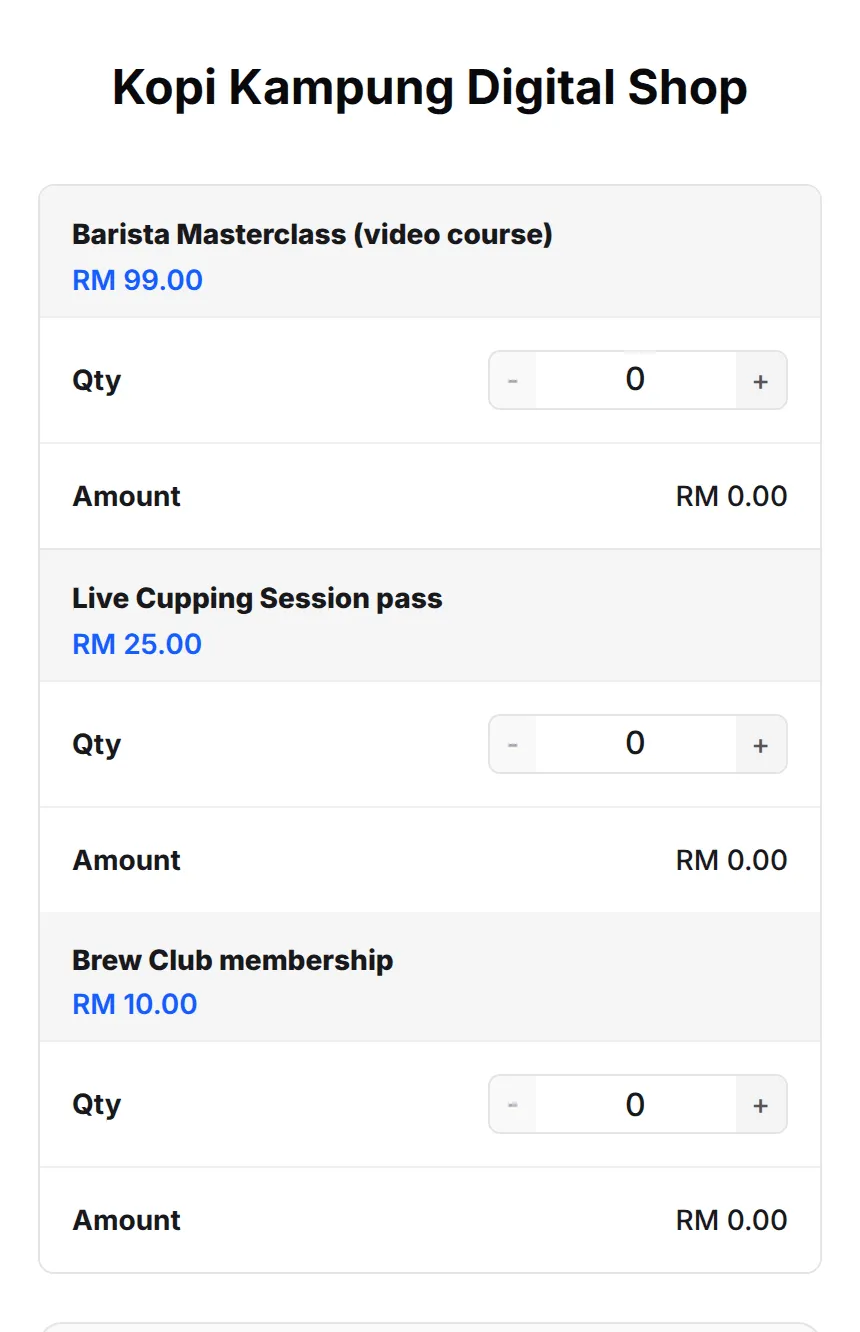
Each buyer gets a year of access on up to two devices at a time, counted from the day they pay.
Sample 2: a pay-per-view live session
Section titled “Sample 2: a pay-per-view live session”The live cupping session is sold as a pass and streamed from YouTube:
- Create Kopi Kampung Live Cupping Session with Video Type YouTube (Stream Player) and Stream Page Theme Broadcast (Dark). For a match, choose Football (Dark). See Stream page themes.
- Add an Ad/Break Video for half time or technical breaks. See Control a live stream.
- Set Access Type to Scheduled Access, from the day of the stream to the end of the replay window, and Maximum Devices to 1 so one pass is one screen.
- Link it to the item Live Cupping Session pass.
Sample 3: recordings for past ticket holders
Section titled “Sample 3: recordings for past ticket holders”After the Kopi Kampung Coffee Festival 2026, the organiser shares the main-stage recording with everyone who bought a ticket:
- Create Kopi Kampung Coffee Festival 2026 Recording as a Video with Duration-based Access of 30 days.
- In the event, click Edit on each ticket type (Early Bird, Normal, VIP) and pick the recording in Protected Content.
- On the content’s Customer Access page, click Actions → Grant Buyer Access. Everyone who already paid for a ticket gets access, and future buyers get it automatically.
The Kopi Kampung Brew Club membership works the same way, with two pieces of content on one item: a Text welcome note with a member code, and a Redirect URL to the private group.
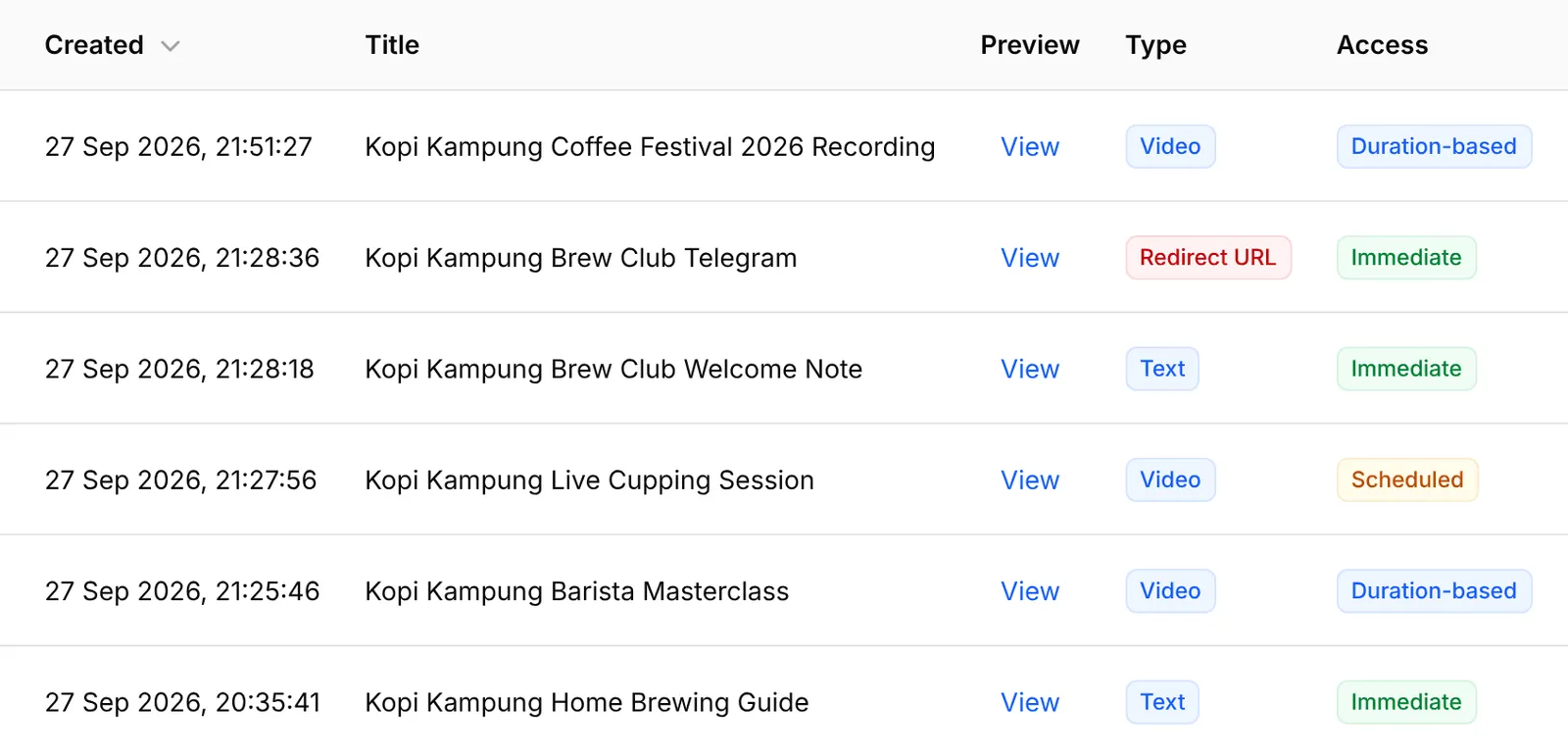
A few things make these recipes work better:
- Put the course and its worksheets on one item. An item can unlock several pieces of content, and the receipt lists each one as its own button.
- Use Duration-based Access for anything you update. Scheduled Access ends on the same date for everyone, while duration-based access gives each buyer the same number of days from their own purchase.
- Keep Maximum Devices low for live streams. One pass on one device stops a single ticket being watched on many screens at once.
- Delivering files by email is simpler but open. If sharing does not matter, a plain download link needs no add-on.
Common issues
I want to sell video classes and some PDF files, and I don't want people sharing the link. How?
Create one protected content for the videos and one for the files, then link both to the item you sell. Each buyer gets their own link that opens only with a one-time code sent to them.
I just set up protected content. How do people who bought earlier get access?
Open the content, go to Customer Access, click Actions and choose Grant Buyer Access. BCL gives access to every paid buyer of the linked items or tickets and skips anyone who already has it.
Can I give different content to different ticket types?
Yes. Protected content is linked per item and per ticket type, so a VIP ticket can unlock more than a Normal ticket.
Was this article helpful?
Thanks for your feedback.
Sorry this didn't help. WhatsApp us and we'll sort it out with you.