
Ask an AI about this page
 ChatGPT
 Claude
 Perplexity
 Google AI Mode
 Microsoft Copilot
 Grok
Grok Mistral Le Chat
Set up multi-tier commission
Updated

Multi-tier commission pays the affiliates above the seller as well as the seller. When an affiliate makes a sale, the person who recruited them earns a smaller share of the same sale, and so on up the chain, for up to 10 levels. Use it when you want affiliates to build their own team of affiliates.
Turn on your affiliate programme first: see Turn on your affiliate programme.
How levels work
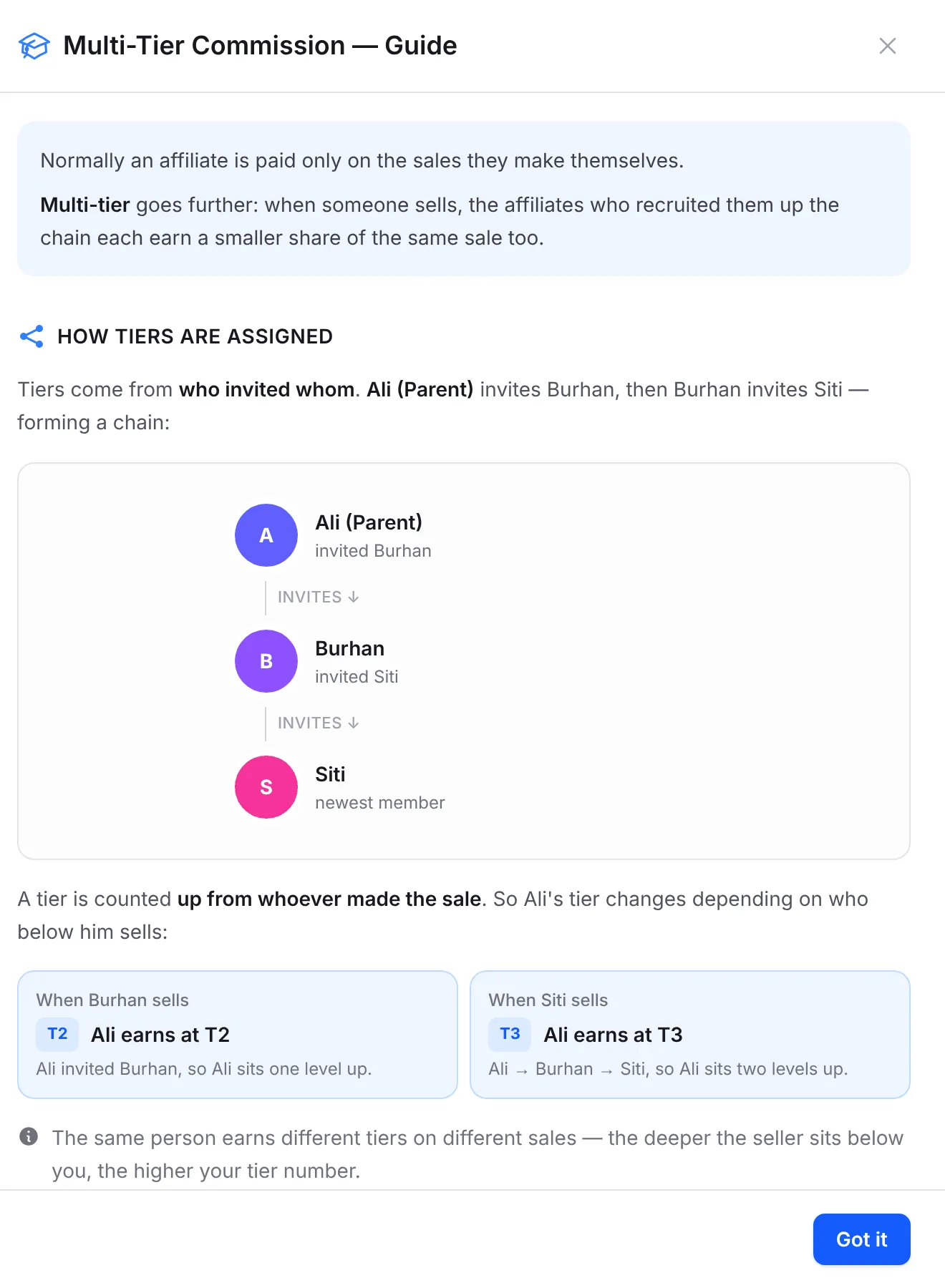
Section titled “How levels work”Each affiliate can have one parent (upline): the affiliate whose network link they joined through. A level is counted up from whoever made the sale:
| Level | Who earns | Rate comes from |
|---|---|---|
| Tier 1 (Direct) | The affiliate who made the sale | Your normal Commission Rate, or the form’s or the affiliate’s own rate |
| Tier 2 | The seller’s parent | The Tier 2 rate |
| Tier 3 | The parent’s parent | The Tier 3 rate |
| Tier 4 to 10 | The next affiliates up the chain | That tier’s rate |
The same person earns at a different tier on different sales. If Irfan recruited Syafiq, Irfan earns at Tier 2 on Syafiq’s sales and at Tier 3 on the sales of the people Syafiq recruits.
Turn on multi-tier commission
Section titled “Turn on multi-tier commission”You need the Admin or Super Admin role.
-
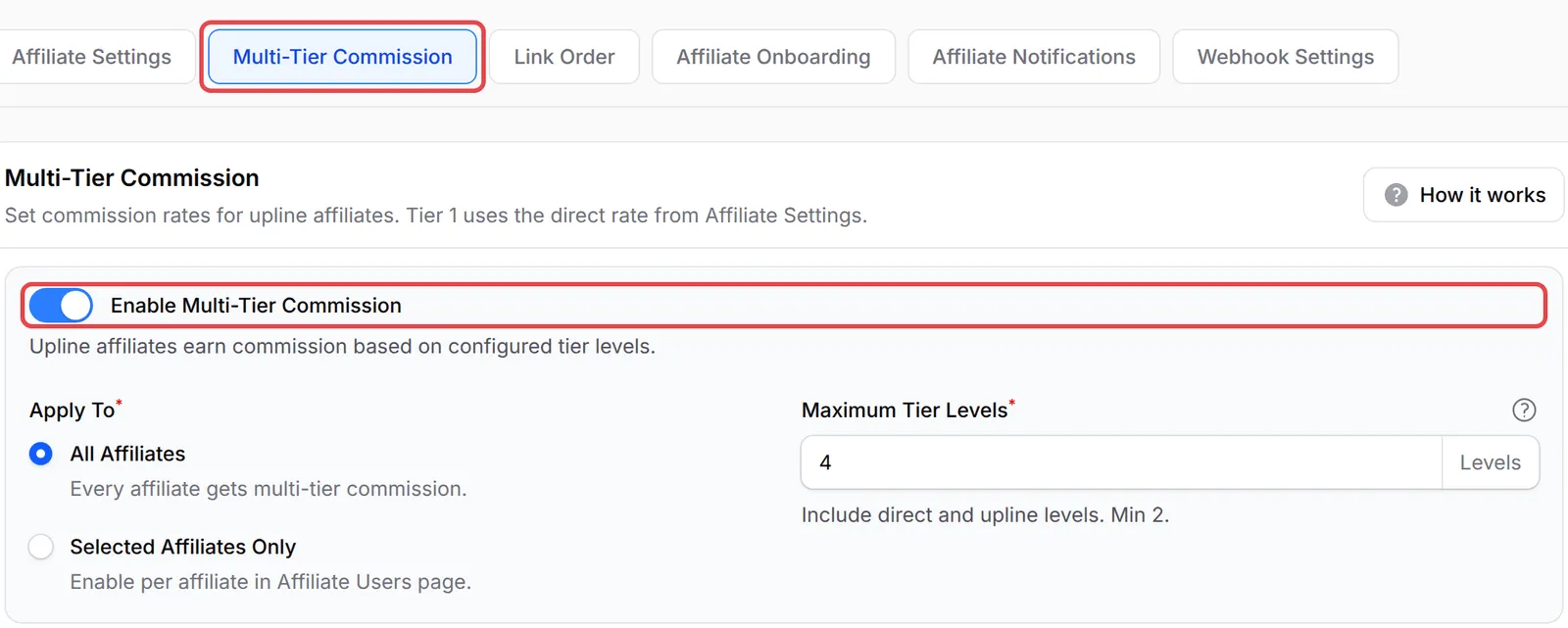
Go to Affiliate → Settings and open the Multi-Tier Commission tab.
-
Turn on Enable Multi-Tier Commission.
-
Under Apply To, choose All Affiliates, or Selected Affiliates Only to switch it on for chosen affiliates from the Affiliates list.
-
In Maximum Tier Levels, enter how many levels to pay, counting the seller as level 1. For example, 4 pays the seller and three uplines. You can set 2 to 10.
-
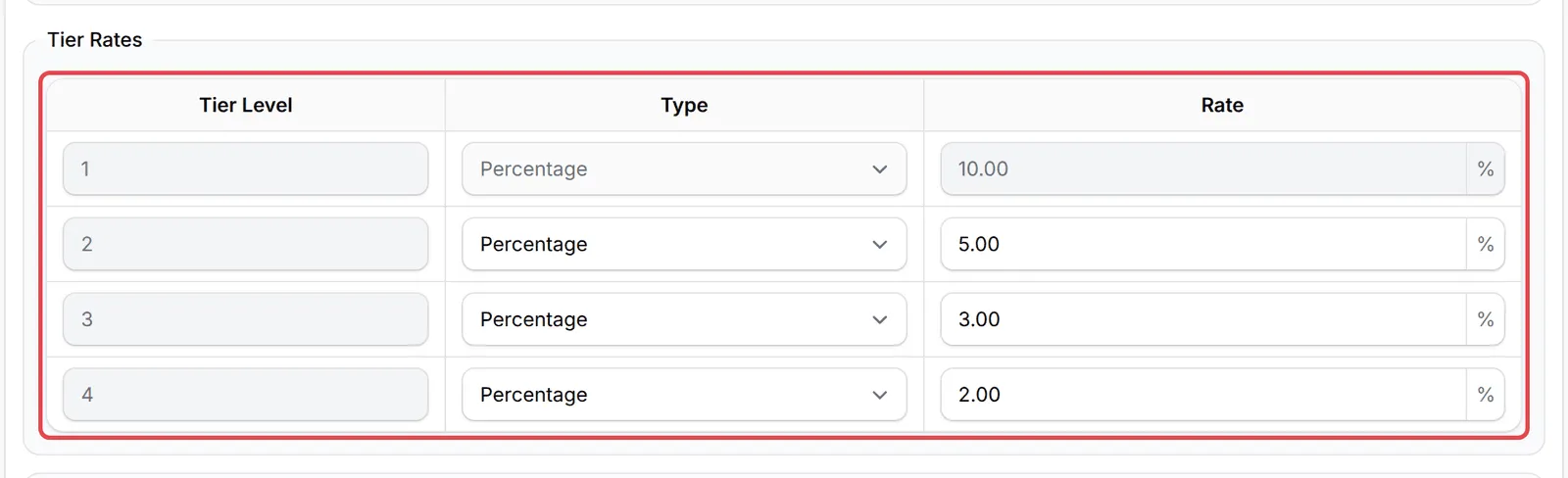
Under Tier Rates, choose Percentage or Flat Rate for each tier from 2 up and enter the Rate. Tier 1 is greyed out: it uses the Commission Rate on the Affiliate Settings tab.
-
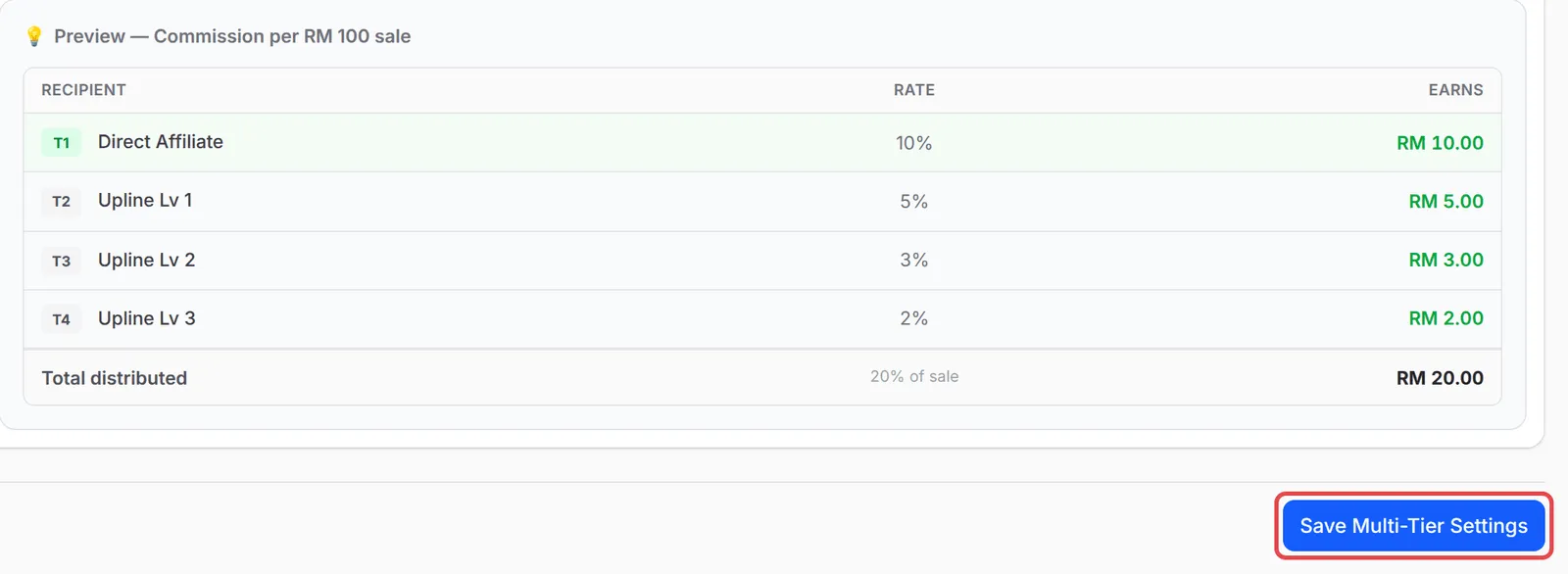
Check the preview, then click Save Multi-Tier Settings.
Worked example: a Kopi Kampung sale
Section titled “Worked example: a Kopi Kampung sale”Kopi Kampung pays 10% direct commission and uses 4 levels at 5%, 3% and 2%. The chain is Irfan Hakim → Syafiq Ramli → Aisyah Rahman → Danial Iskandar: Irfan recruited Syafiq, Syafiq recruited Aisyah, and Aisyah recruited Danial.
A customer buys the RM 120 Kopi Kampung Gift Box through Danial’s link:
| Level | Affiliate | Rate | Earns |
|---|---|---|---|
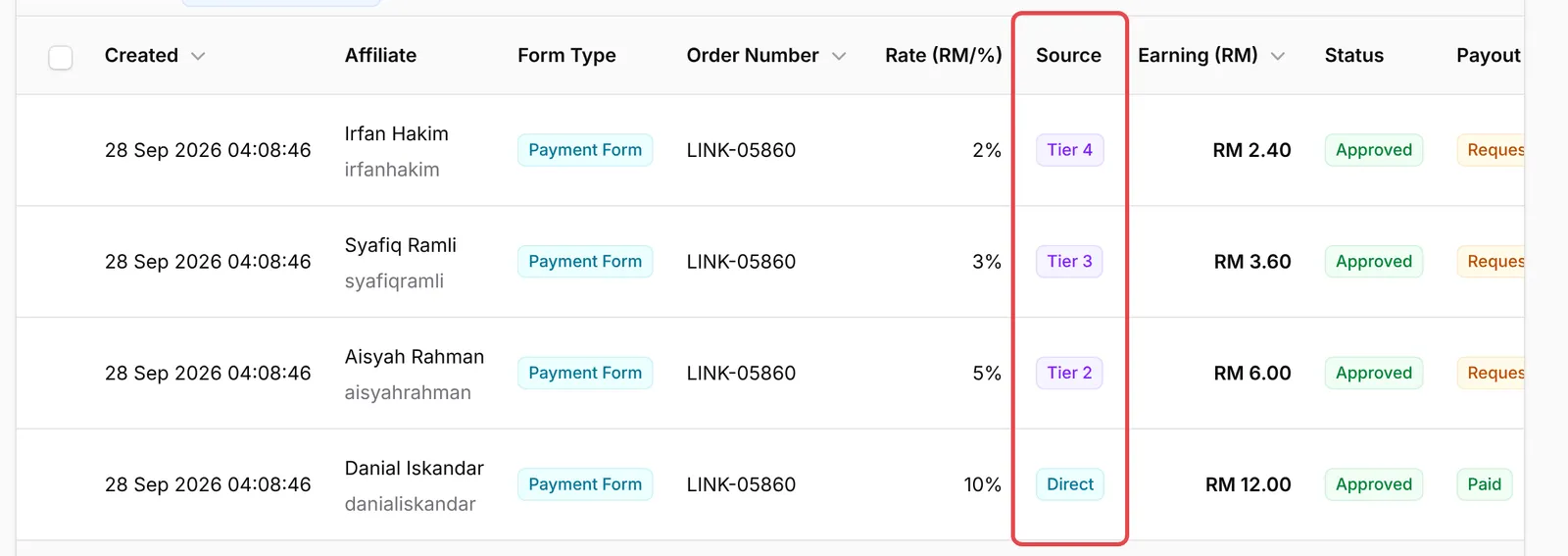
| Tier 1 (Direct) | Danial Iskandar | 10% | RM 12.00 |
| Tier 2 | Aisyah Rahman | 5% | RM 6.00 |
| Tier 3 | Syafiq Ramli | 3% | RM 3.60 |
| Tier 4 | Irfan Hakim | 2% | RM 2.40 |
| Total | 20% | RM 24.00 |
Every tier is worked out on the same RM 120, not on the commission of the person below. If Aisyah sells the same box herself, she earns RM 12.00 at Tier 1, Syafiq RM 6.00 at Tier 2 and Irfan RM 3.60 at Tier 3: nobody sits at Tier 4, so the total is RM 21.60.
Each tier becomes its own referral under Affiliate → Referrals, with Direct, Tier 2, Tier 3 or Tier 4 in the Source column. See Track affiliate referrals.
How affiliates build their network
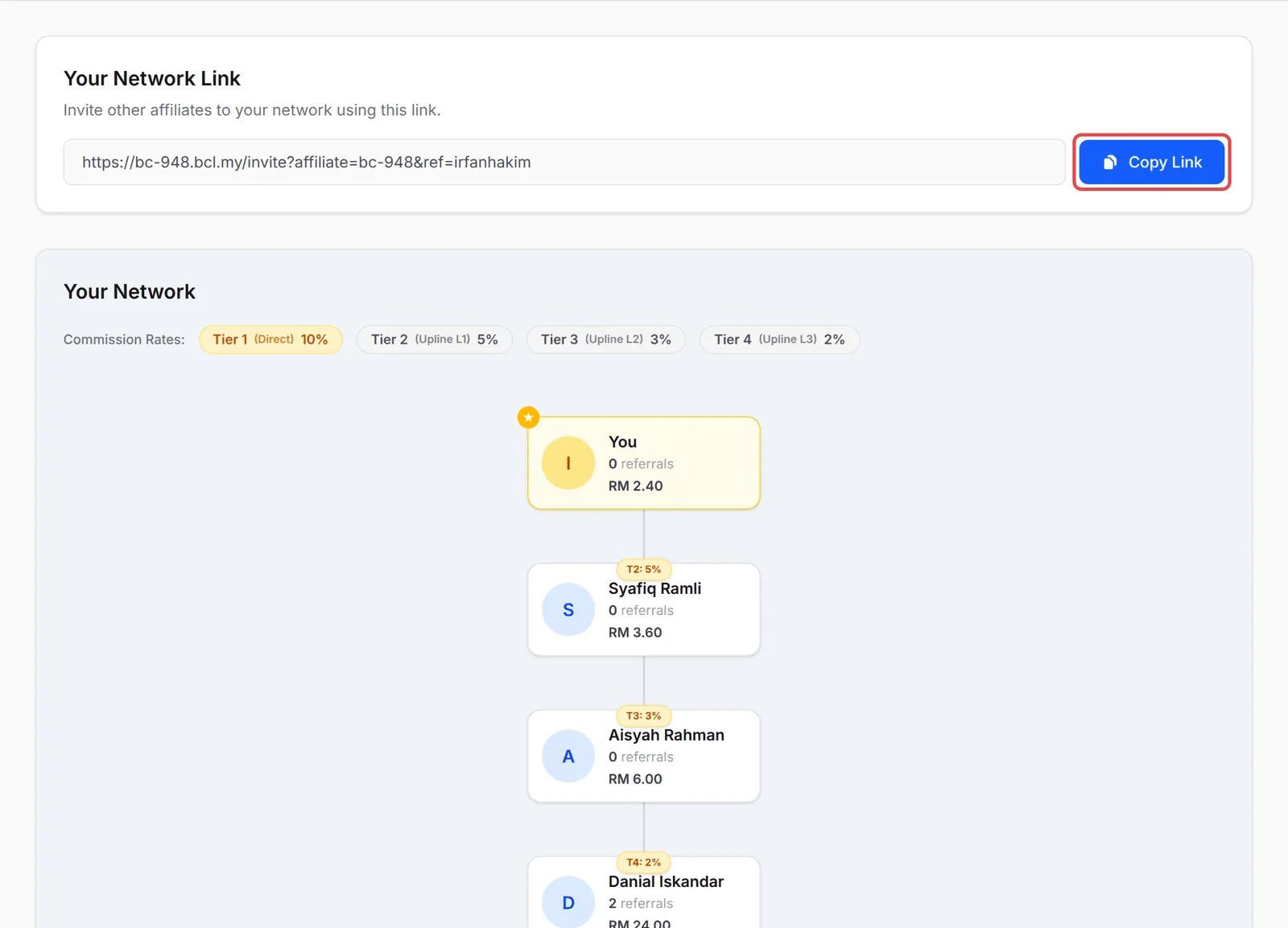
Section titled “How affiliates build their network”With multi-tier on, each affiliate has a Network page in their affiliate panel. They copy Your Network Link with Copy Link and share it. Anyone who joins through that link becomes their downline. Under Your Network, the page shows the Commission Rates for each tier and the affiliates below them, with what each has earned.
An affiliate who joined through your normal sign-up link has no parent. To set or change one, go to Affiliate → Affiliates, open the affiliate’s Actions menu and choose Assign Parent Affiliate. The Parent Affiliate column shows each affiliate’s upline. See Change an affiliate’s upline.
What stops a tier from paying
Section titled “What stops a tier from paying”An upline earns nothing on a sale when:
- They sit above Maximum Tier Levels for that sale.
- They are not active (pending or suspended). The chain stops there, so the affiliates above them earn nothing on that sale either.
- Selected Affiliates Only is on and they are not switched on. The chain skips them and carries on upwards.
- The referral was added by hand with Add Referral. Manual referrals pay the seller only.
A few habits keep a multi-tier programme healthy:
- Keep upline rates well below the direct rate. The seller did the work, and deep chains with high rates quickly eat into your margin.
- Check the total in the preview. The preview shows the whole share of a RM 100 sale you pay out across all levels before you save.
- Ask affiliates to recruit with their network link. It is the only way the chain is recorded automatically.
Common issues
Can my affiliates recruit other affiliates and earn a little from their sales?
Yes. Go to Affiliate → Settings → Multi-Tier Commission, turn on Enable Multi-Tier Commission, set Maximum Tier Levels and a rate for each tier, then click Save Multi-Tier Settings. Affiliates recruit through the Your Network Link on their Network page.
An affiliate joined through the normal sign-up link, not their upline's network link. Can I fix the chain?
Yes. On Affiliate → Affiliates, open the affiliate's Actions menu, choose Assign Parent Affiliate and pick their upline. BCL will not let you create a loop.
Is each upline's commission worked out from the seller's commission?
No. Every tier is a share of the same sale. On a RM 120 order at 10%, 5%, 3% and 2%, the four affiliates earn RM 12.00, RM 6.00, RM 3.60 and RM 2.40.
Was this article helpful?
Thanks for your feedback.
Sorry this didn't help. WhatsApp us and we'll sort it out with you.