
Ask an AI about this page
 ChatGPT
 Claude
 Perplexity
 Google AI Mode
 Microsoft Copilot
 Grok
Grok Mistral Le Chat
Refund a customer
BCL records your sales, but the money itself is collected and paid out by Bayarcash. BCL has no refund button and no Refunded status, so it cannot send money back to your customer. You return the money outside BCL, then cancel the order in BCL so your sales, stock and reports stay correct.
Return the money
Section titled “Return the money”Refund your customer the way you and they agree, for example with a bank transfer from your business account. Keep the order number from BCL (such as LINK-05870) in your transfer reference, so you can match the two later.
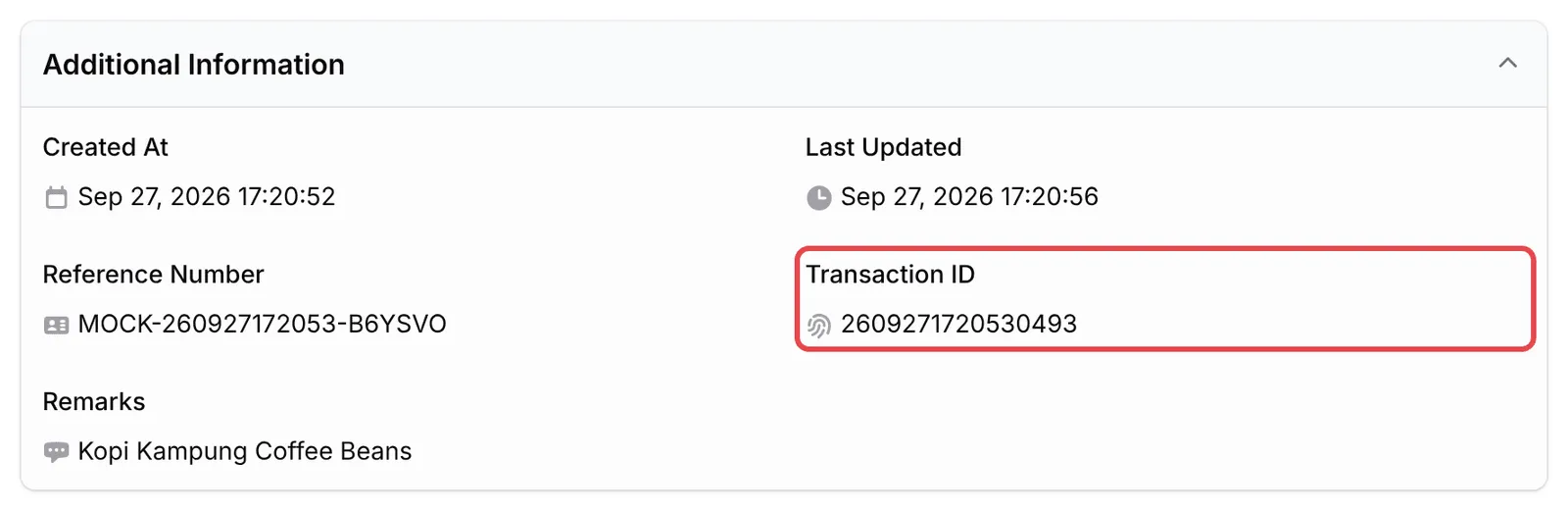
If you need Bayarcash’s help with the original payment, contact Bayarcash support and give them the payment’s Transaction ID. You find it under Additional Information in the transaction’s View Details. See Check a transaction’s details.
Cancel the order in BCL
Section titled “Cancel the order in BCL”Once the money is back with your customer, mark the order as cancelled:
-
In the sidebar, click Transactions and find the order. See Find a transaction.
-
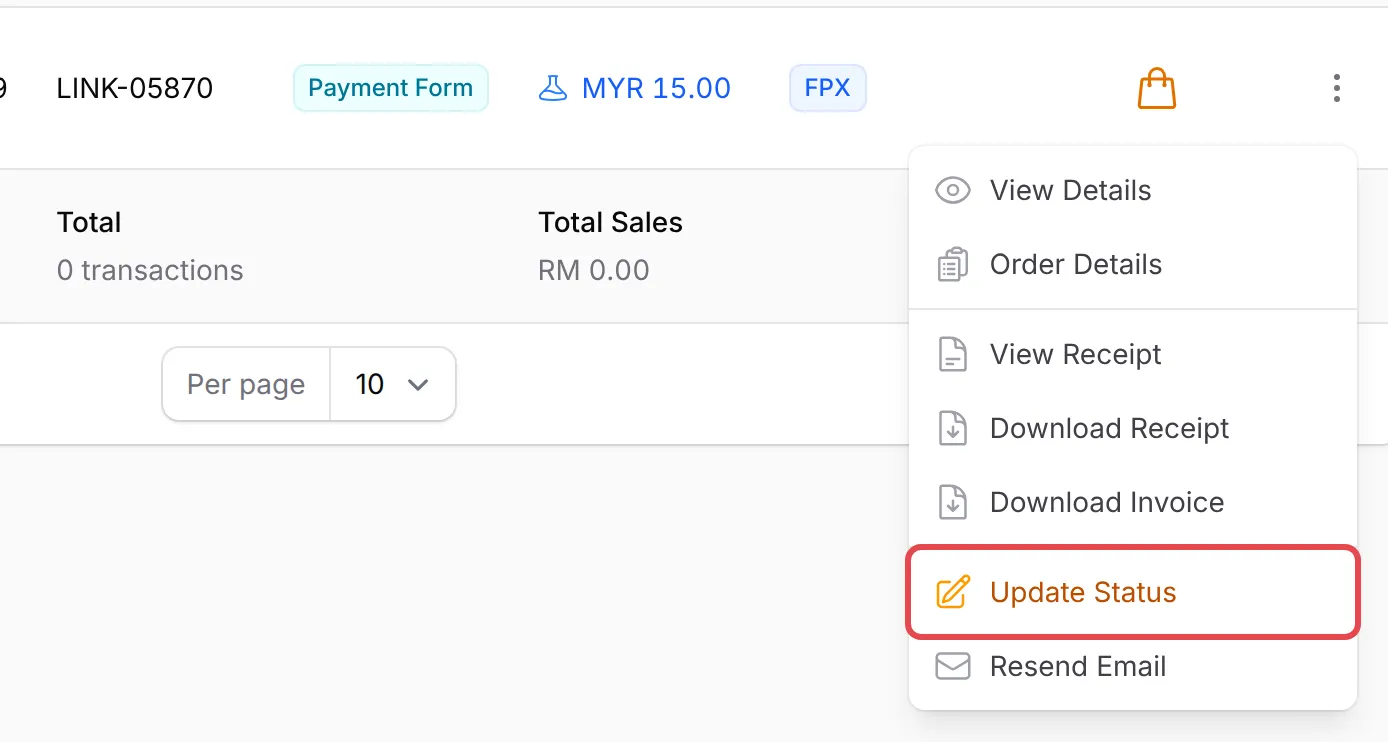
Open the actions menu at the end of its row and choose Update Status.
-
Under Other Actions, click Cancel. Your browser asks Mark as cancelled?: click OK.
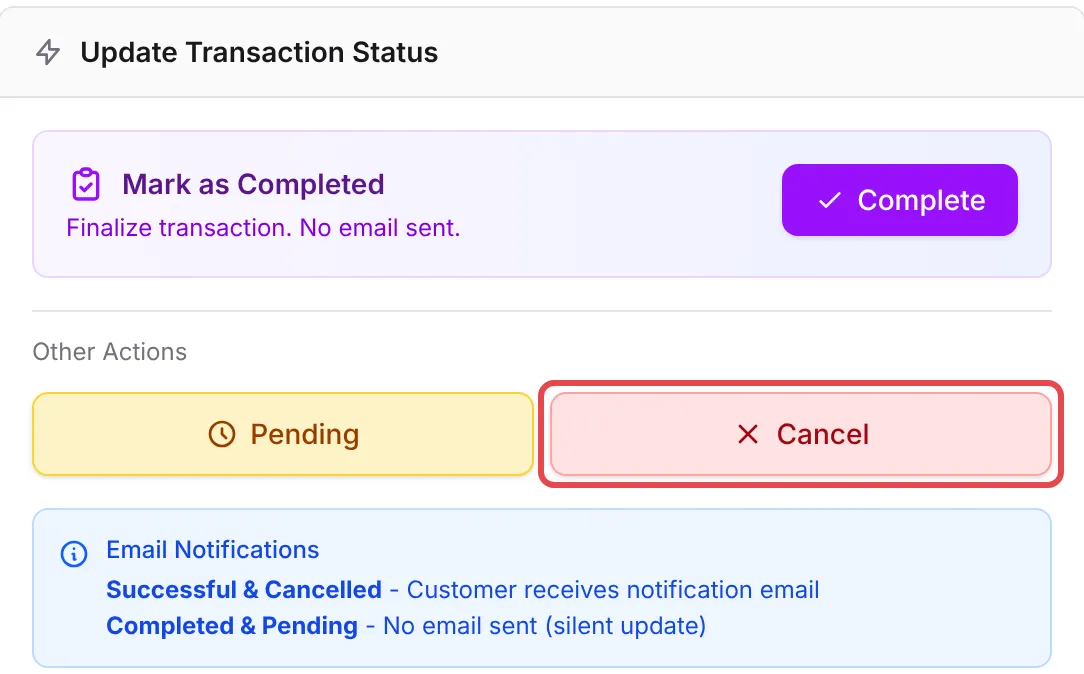
The order’s status changes to Cancelled, with the note Transaction was cancelled, and it no longer counts as a successful sale. As the Email Notifications note in the panel says, your customer receives an email. Its subject reads Order #(order number) - Payment Failed, so tell your customer about the refund yourself first. For a booking, they also get a Booking Cancelled email.
What cancelling changes
Section titled “What cancelling changes”BCL treats a cancelled order like any payment that did not go through:
| What | After you cancel |
|---|---|
| Stock | The items go back into stock. |
| Coupon | The coupon use is given back, so it no longer counts towards the coupon’s Maximum Usage Limit. |
| Affiliate commission | The referral is rejected, unless you have already paid that commission. |
| Event tickets and bookings | The tickets stop working and their seats are released. A booking is cancelled. |
| Protected content | Access already given stays. See Manage who has access. |
A few habits keep refunds tidy:
- Cancel only after the money is back. Your records then always match your bank account.
- Write down why. Keep a short note of the refund date and reason in your own records, since BCL has no refund field.
- Put your refund rules on the form. Customers who know the rules before they pay ask for fewer refunds. Turn on Enable Terms & Conditions on the form’s Miscellaneous Settings tab and write them there.
Common issues
How do I refund a customer in BCL?
BCL cannot send money back, and it has no refund button or Refunded status. Return the money yourself outside BCL, for example by bank transfer. Then open the order in Transactions, choose Update Status in its actions menu and click Cancel, so the sale no longer counts as paid.
Can Bayarcash take the money back from my payout and return it to the buyer?
BCL cannot do this for you. Ask Bayarcash support whether they can help with that payment, and give them the payment's Transaction ID from View Details.
I cancelled a paid order. Will the customer be told?
Yes. When you mark an order as Cancelled, your customer receives an email whose subject reads Order #(order number) - Payment Failed. For a booking they also get a Booking Cancelled email. Marking it Completed or Pending sends nothing.
Was this article helpful?
Thanks for your feedback.
Sorry this didn't help. WhatsApp us and we'll sort it out with you.