
Ask an AI about this page
 ChatGPT
 Claude
 Perplexity
 Google AI Mode
 Microsoft Copilot
 Grok
Grok Mistral Le Chat
How the affiliate programme works
An affiliate programme lets other people promote your forms with their own link and earn a commission on each sale they bring in. BCL tracks who sold what and how much each affiliate has earned. You pay the commission yourself.
How it works, step by step
Section titled “How it works, step by step”Every sale through an affiliate goes through the same five stages:
| Stage | What happens | Guide |
|---|---|---|
| 1. You turn it on | You switch on the programme once, set the default commission and payout rules, and turn on Enable Affiliates on each form affiliates may promote. | Turn on your affiliate programme |
| 2. Affiliates join | You share your Sign-up link. Each affiliate creates a free affiliate account and joins your programme. With Require Manual Approval on, they wait for your approval. | Invite affiliates to join |
| 3. They share their link | Each affiliate copies their own link for each form on Promotion Links. The link ends with their affiliate ID. | Share your affiliate links |
| 4. A customer pays | BCL creates a referral with the commission. It is Pending until the payment succeeds, then Approved. A failed or cancelled payment makes it Rejected. | Track affiliate referrals |
| 5. You pay out | You group approved commission into payouts (or affiliates click Request Payout), pay each affiliate by bank transfer or DuitNow, and click Mark as Paid. | Pay affiliate commission |
A sale only counts when the customer came through the affiliate’s link within your Cookie Expiration Days, and the form has Enable Affiliates on. Forms that use Direct Debit cannot have affiliates.
Where to find it in BCL
Section titled “Where to find it in BCL”All the merchant pages are under Affiliate in the sidebar. The group appears once the Affiliate Program add-on is active.
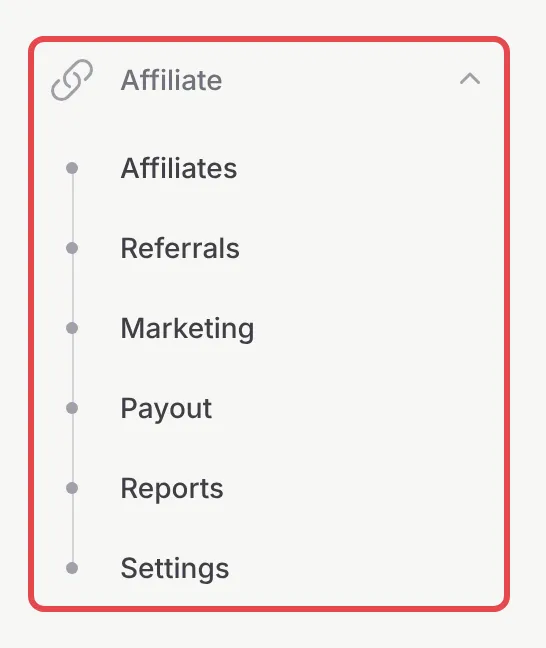
The Referrals and Payout pages only appear once the programme is switched on in Settings. Each page has its own guide:
| Menu | What you do there | Guide |
|---|---|---|
| Affiliates | See who joined, approve new affiliates, give one affiliate a custom rate, suspend or remove them | Manage your affiliates |
| Referrals | See every sale an affiliate brought in, reject ineligible ones, add a referral by hand, generate payouts | Track affiliate referrals |
| Marketing | Give affiliates banners and links, and email them announcements | Share marketing media with affiliates |
| Payout | Pay affiliates and mark payouts as paid | Pay affiliate commission |
| Settings | Turn the programme on, set the commission, tracking, payout rules and the join page | Turn on your affiliate programme |
Ways to pay commission
Section titled “Ways to pay commission”The default is one rate on the whole order, set in Settings. You can also:
- Pay a different rate on one form with Override Commission Settings on the form: see Turn on your affiliate programme.
- Pay a rate for each product, variation or ticket: see Set commission per product.
- Reward the affiliates who recruited the seller, up to 10 levels: see Set up multi-tier commission.
What your affiliates see
Section titled “What your affiliates see”Affiliates sign in to their own affiliate account, not your BCL dashboard. There they copy their links, see their referrals and commission, download your marketing media and request payouts. Send new affiliates Your affiliate dashboard as a starting point.
Common issues
How does the BCL affiliate programme work?
You turn on the programme and choose which forms affiliates can promote. Affiliates join with your sign-up link and share their own link for each form. When a customer pays through that link, BCL records a referral with the commission. Once the payment succeeds the referral is approved, and you pay the affiliate yourself and mark the payout as paid.
Does BCL pay my affiliates automatically?
No. BCL works out and tracks the commission, but you transfer the money yourself and then click Mark as Paid under Affiliate → Payout.
Do affiliates need their own BCL account?
They need a free affiliate account, which they create from your Sign-up link. It is separate from your BCL dashboard: they only see their links, referrals, marketing media and payouts.
Was this article helpful?
Thanks for your feedback.
Sorry this didn't help. WhatsApp us and we'll sort it out with you.