
Ask an AI about this page
 ChatGPT
 Claude
 Perplexity
 Google AI Mode
 Microsoft Copilot
 Grok
Grok Mistral Le Chat
Limit stock on a payment form
Stock is how many of an item you can sell on a payment form. It is Unlimited by default. Set it to Limited for anything you have a fixed number of: when it reaches 0, buyers see the item as out of stock and cannot order it.
Limit the stock of an item
Section titled “Limit the stock of an item”On a form with Multiple Items, each item in List of Items has its own stock:
-
Go to Payments → Forms, click Edit on the form and open the Payment Details tab.
-
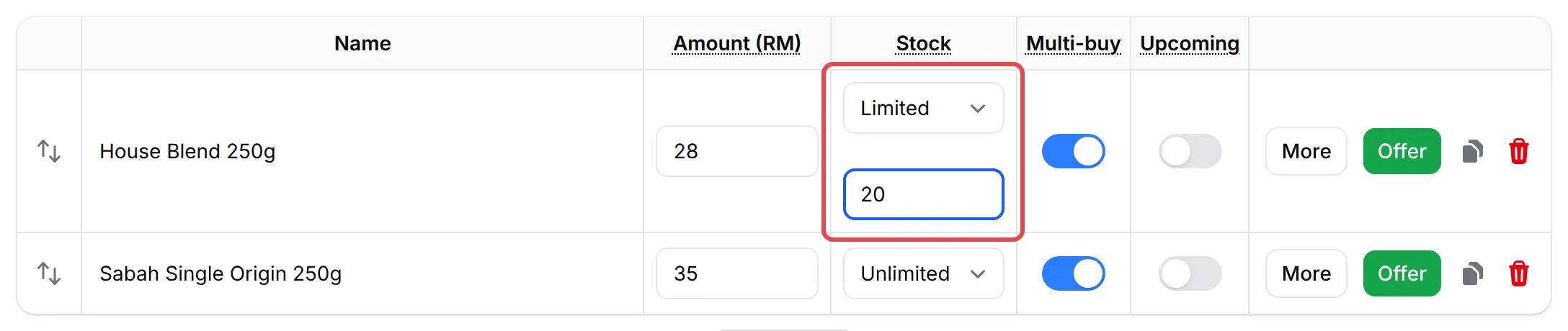
In List of Items, set the item’s Stock to Limited.
-
Enter the quantity in the box that appears below it, up to 9,999.
-
Click Update Form.
BCL counts the stock down with every order. To add stock later, edit the form and change the number.
Limit the stock of an option
Section titled “Limit the stock of an option”On a form with Items with Variations, each option, such as size M, has its own stock:
-
On the Payment Details tab, open the variation in Variation Items.
-
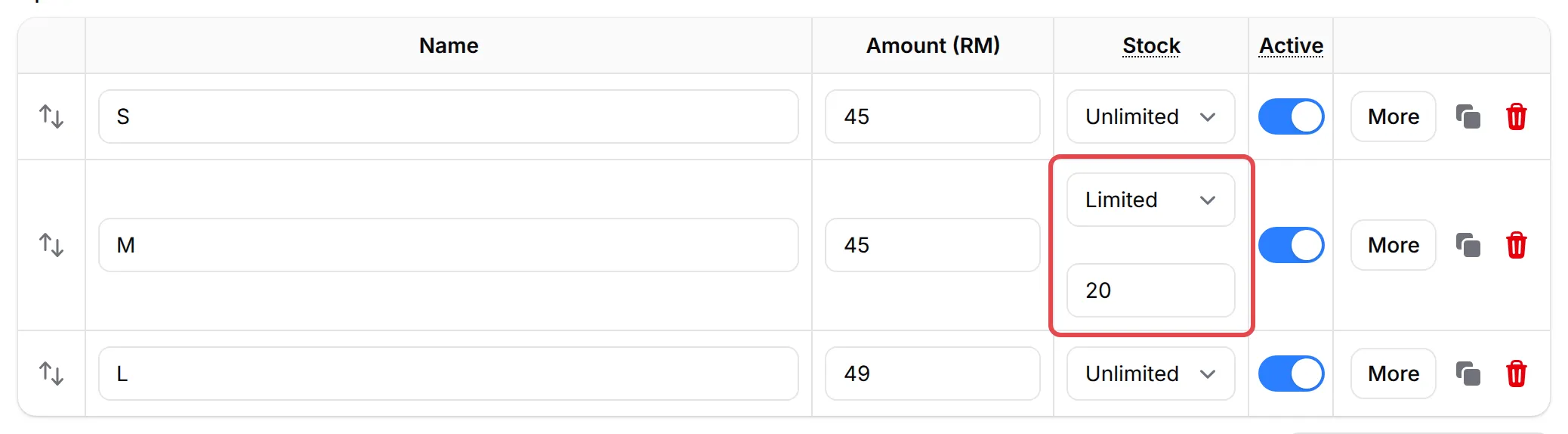
In the option’s Stock column, choose Limited and enter the quantity.
-
Click Update Form.
To stop selling one option for now without changing its stock, turn off its Active switch.
Warn buyers when stock is low
Section titled “Warn buyers when stock is low”The Stock notice shows a label next to an item that is running low. It works on Multiple Items:
-
In List of Items, open the Item Settings tab.
-
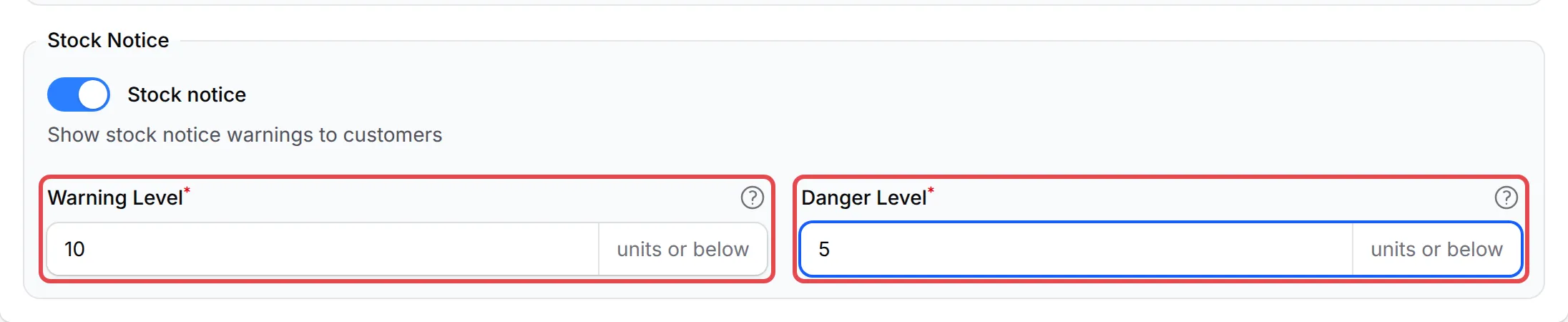
Under Stock Notice, turn on Stock notice.
-
Set the Warning Level and Danger Level in units, for example 10 and 5.
-
Click Update Form.
What buyers see
Section titled “What buyers see”Buyers see the stock on the form and cannot order more than is left:
| Situation | Multiple Items | Items with Variations |
|---|---|---|
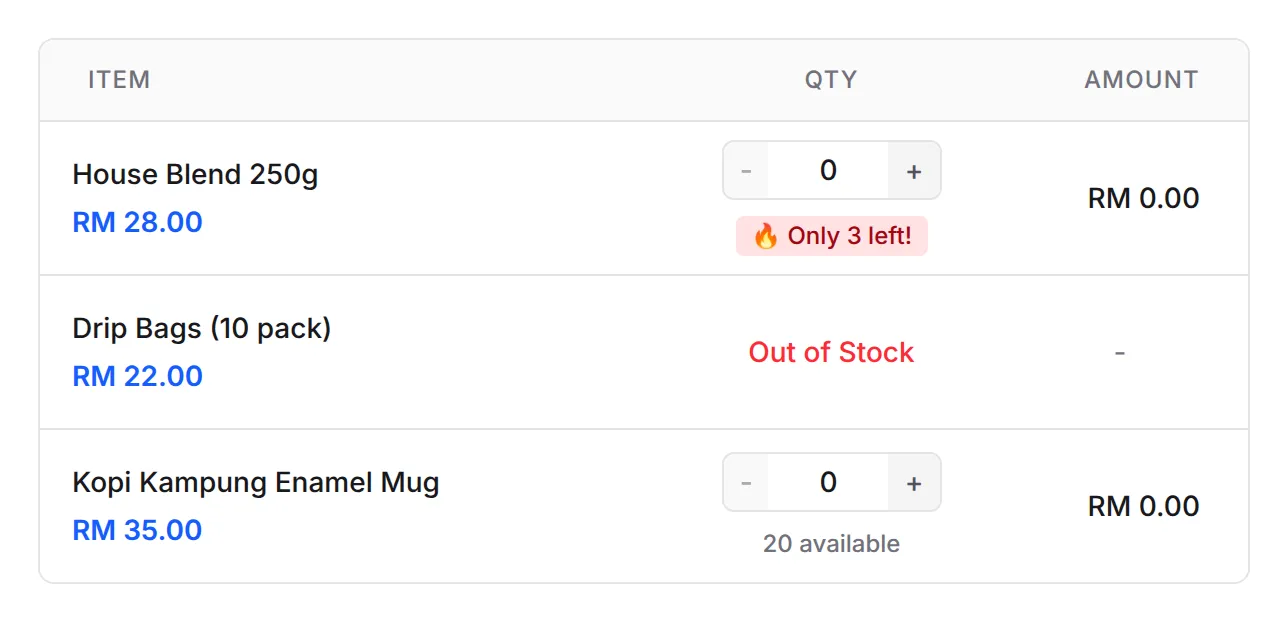
| Stock is Limited | How many are available, such as 20 available | Nothing extra |
| Stock at or below the Warning Level | Limited: 8 remaining | Not used |
| Stock at or below the Danger Level, or 10 or fewer for an option | Only 4 left! | 4 left next to the option |
| Stock is 0 | Out of Stock, and the item cannot be picked | Sold out on the option; All options are sold out when none is left |
On a Multiple Items form with the Stock notice on, it looks like this: the first item is at or below the Danger Level, the second is sold out and the third is above the Warning Level. The + button stops at the number left.
If a required variation has nothing left, the buyer is told the order can’t be completed right now. If the last unit sells while a buyer is still on the form, they get an out-of-stock message when they try to pay, and their quantity is cleared.
When stock goes down and comes back
Section titled “When stock goes down and comes back”BCL takes the stock as soon as the buyer clicks to pay, before they reach the bank. This stops two buyers paying for the last unit. The stock stays taken while the payment is pending. It comes back when the payment fails or is cancelled, including when you cancel the order yourself. See Refund a customer.
- Check the stock after cancelling orders. A cancelled or failed payment puts its units back, so the number on the form can go up as well as down.
- Use Purchase Limit to share stock fairly. Under More on an item, Purchase Limit sets how many one buyer can order in a single transaction.
- Close the form when everything is sold. A form with every item out of stock still opens; see Close or unpublish a form.
Common issues
How do I limit the stock of a product?
Edit the form and, on the Payment Details tab, set the item's Stock to Limited in List of Items (or on the option in Variation Items). Enter how many you can sell, up to 9,999, then click Update Form.
Does stock go down before the customer has paid?
Yes. BCL takes the stock when the buyer clicks to pay, so two buyers cannot pay for the last unit. If the payment then fails or is cancelled, the stock goes back.
Can I show buyers that only a few are left?
Yes, for Multiple Items. In List of Items, open Item Settings, turn on Stock notice and set the Warning Level and Danger Level. Variation options show how many are left by themselves when 10 or fewer remain.
Was this article helpful?
Thanks for your feedback.
Sorry this didn't help. WhatsApp us and we'll sort it out with you.