
Ask an AI about this page
 ChatGPT
 Claude
 Perplexity
 Google AI Mode
 Microsoft Copilot
 Grok
Grok Mistral Le Chat
Start from a booking template
A booking template creates a complete booking form in one click: the form, its services with sample prices and add-ons, sample staff and opening hours. BCL has 20 templates, from a hair salon to a badminton court. You then change the names, prices and staff to your own before you share the form.
Use a template
Section titled “Use a template”Pick the template closest to your business:
-
Go to Bookings → Forms and click Templates.

-
In Booking Form Templates, click a tab (All, Accommodation, Appointment, Class, Restaurant, Sport or Ticket) to narrow the list. Each card shows how many Services, Staff and Options the template creates, and the first three services with their sample prices.
-
Click Use Template on the card you want.
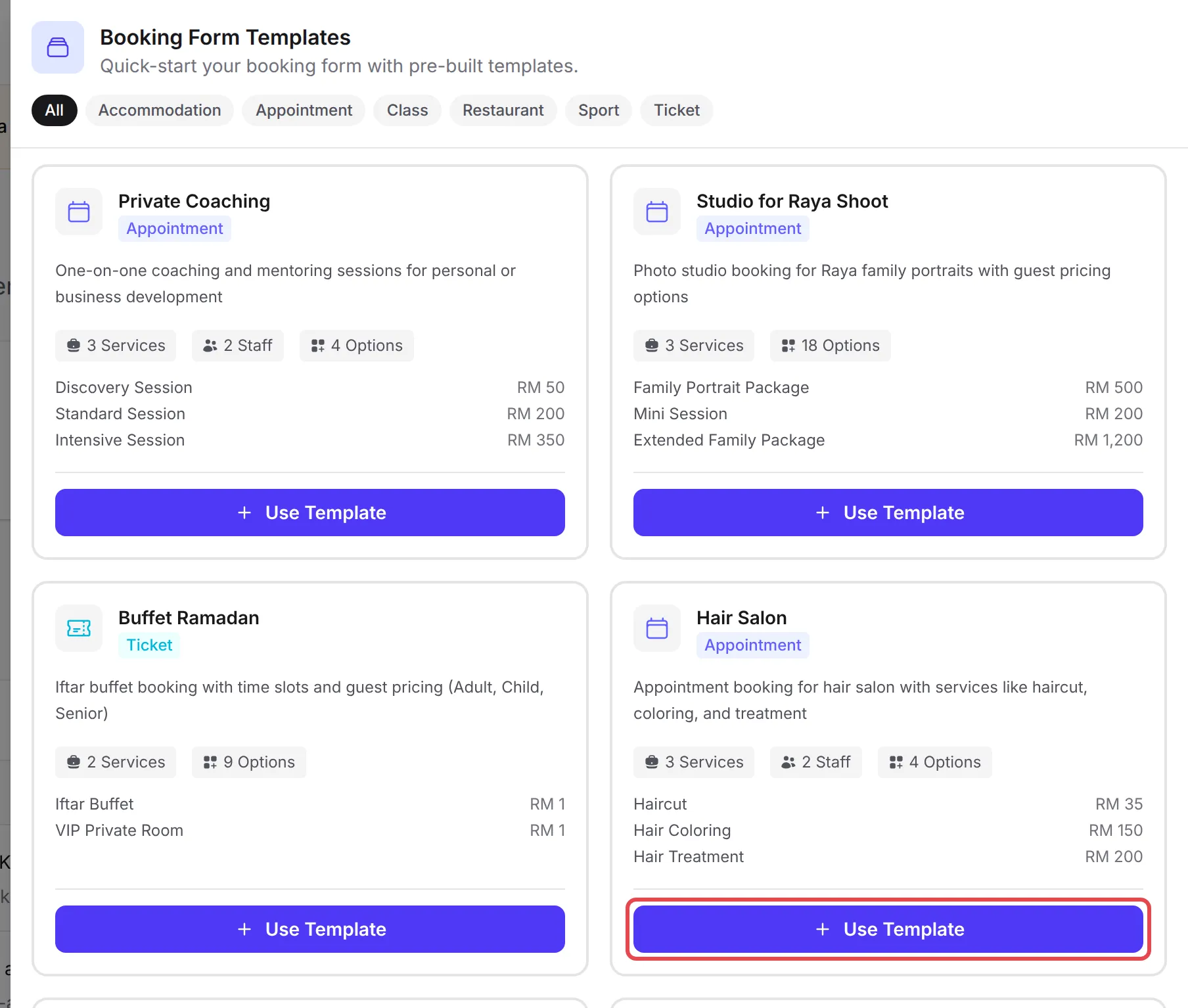
There is no confirmation step. BCL creates everything straight away, shows Template applied, for example “Booking form ‘Hair Salon’ created with 3 services and 2 staff”, and opens the new form for editing.
What a template creates
Section titled “What a template creates”A template fills in the same things you would set up by hand:
| What | What BCL creates |
|---|---|
| The form | Titled with the template name, for example Hair Salon, with the URL Slug hair-salon. The Booking Type, Staff Selection Mode, Operating Hours and Classification Code are set. The form is switched off, so nobody can book yet. |
| Services | Listed on Bookings → Services, each with a sample price, duration, capacity and category, and already added to the form’s Available Services. |
| Add-ons | Extras on the services, such as Hair Wash for a haircut. Ticket templates also add ticket types, such as Adult and Child, each with its own price. |
| Staff | Sample employees on Bookings → Employees, assigned to every service in the template. Their working hours are copied from the form’s opening hours. |
The template does not choose a Payment Option. Portal Key is set to Use account default.
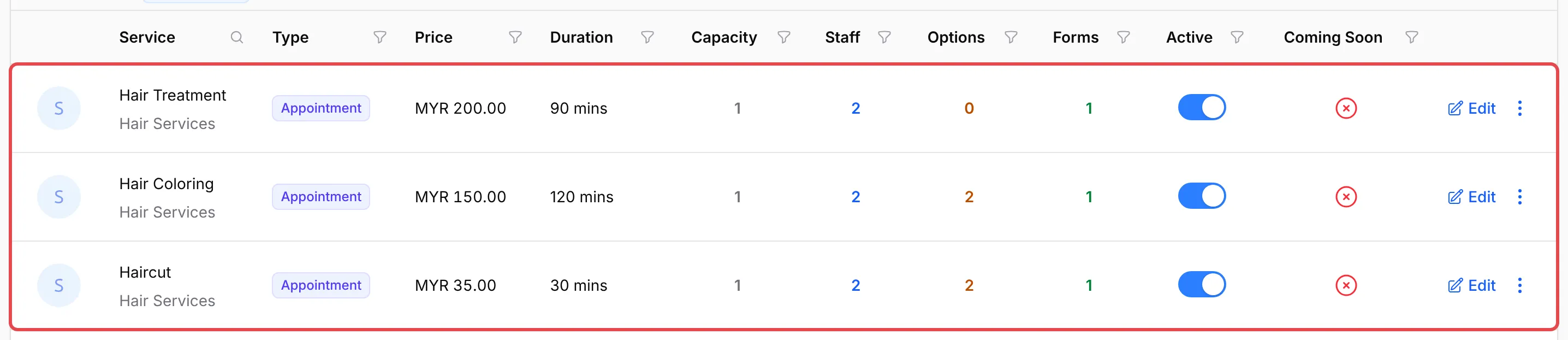
The 20 templates
Section titled “The 20 templates”The tabs in the panel group the templates by kind of business. Class templates create Appointment forms, the Restaurant template creates a Reservation form and Sport templates create Court forms. All prices below are sample prices from the template, for you to change.
Appointment
Section titled “Appointment”These eight templates book a service with a staff member at a time slot:
| Template | Services (sample price) | Some add-ons | Sample staff |
|---|---|---|---|
| Private Coaching | Discovery Session (RM 50), Standard Session (RM 200), Intensive Session (RM 350) | Session Recording, Action Plan Document | 2 |
| Studio for Raya Shoot | Family Portrait Package (RM 500), Mini Session (RM 200), Extended Family Package (RM 1,200) | Guest types (Adult, Child, Additional Adult), Makeup Service, Printed Album | 0 |
| Hair Salon | Haircut (RM 35), Hair Coloring (RM 150), Hair Treatment (RM 200) | Hair Wash, Scalp Massage, Highlights | 2 |
| Medical Clinic | General Consultation (RM 50), Health Screening (RM 250) | Blood Test, Medical Certificate, X-Ray | 2 |
| Dental Clinic | Dental Checkup (RM 80), Teeth Cleaning (RM 150), Teeth Whitening (RM 500), Tooth Extraction (RM 200) | X-Ray, Fluoride Treatment, Take-Home Kit | 2 |
| Spa & Wellness | Full Body Massage (RM 120), Facial Treatment (RM 150), Couple Package (RM 350) | Aromatherapy Oil, Hot Stone, Face Mask | 2 |
| Photography Studio | Portrait Session (RM 200), Family Session (RM 400), Product Photography (RM 300) | Makeup Service, Photo Album, White Background Edit | 1 |
| Car Service Center | Basic Service (RM 150), Full Service (RM 350), Car Wash & Detail (RM 80) | Premium Oil, Wheel Alignment, Wax Polish | 2 |
These three templates book group classes and one-to-one sessions with a teacher or coach:
| Template | Services (sample price) | Some add-ons | Sample staff |
|---|---|---|---|
| Fitness Class | Yoga Class (RM 30), HIIT Training (RM 40), Personal Training (RM 150) | Yoga Mat Rental, Nutrition Plan, Body Assessment | 2 |
| Tuition Center | Mathematics Class (RM 50), Science Class (RM 60), Private Tutoring (RM 100) | Workbook, Lab Materials | 2 |
| Workshop & Seminar | Half-Day Workshop (RM 150), Full-Day Workshop (RM 280), Online Webinar (RM 80) | Materials Kit, Certificate, Lunch, Recording Access | 2 |
Restaurant
Section titled “Restaurant”This template books tables for a party size, with no staff:
| Template | Services (sample price) | Some add-ons | Sample staff |
|---|---|---|---|
| Restaurant Reservation | Regular Table for 2 to 4 (RM 20), VIP Room for 6 to 12 (RM 200) | Window Seat, High Chair, Birthday Setup, Projector | 0 |
Ticket
Section titled “Ticket”These four templates sell tickets for a date and time. Customers pick how many of each ticket type they want, and each type has its own price, so the cards show RM 1 for most of these services:
| Template | Services and ticket types (sample price) | Some add-ons | Sample staff |
|---|---|---|---|
| Buffet Ramadan | Iftar Buffet (Adult RM 89, Child RM 49, Senior RM 69), VIP Private Room (Adult RM 129, Child RM 69) | Window Seat, Birthday Cake, Live Cooking Station | 0 |
| Tour & Attraction | General Admission (Adult RM 50, Child RM 30, Senior RM 35, Infant free), VIP Experience (VIP Adult RM 120, VIP Child RM 80) | Guided Tour, Souvenir Package, Private Guide | 0 |
| Boat Tour & Island Trip | Half Day Island Trip (Adult RM 150, Child RM 100), Full Day Island Trip (Adult RM 280, Child RM 180), Sunset Cruise (Adult RM 200, Child RM 120) | Snorkeling Gear, Lunch Box, GoPro Rental | 0 |
| Escape Room | Mystery Mansion (Player RM 60), Prison Break (Player RM 70), Private Room Booking (RM 350) | Extra Hint Card, Photo Package, Pizza & Drinks | 0 |
Accommodation
Section titled “Accommodation”These two templates book rooms by check-in and check-out date, with no staff:
| Template | Services (sample price) | Some add-ons | Sample staff |
|---|---|---|---|
| Simple Room Booking | Standard Room (RM 100), Deluxe Room (RM 150), Family Room (RM 200) | None | 0 |
| Resort & Chalet | Pondok Sungai (RM 300), Pondok Rimba (RM 250), Pondok Keluarga (RM 450) | Breakfast (per person), BBQ Set, Extra Mattress | 0 |
These two templates book courts by the hour, with no staff:
| Template | Services (sample price) | Some add-ons | Sample staff |
|---|---|---|---|
| Badminton Court | Court A and Court B (RM 15), Court C and Court D (RM 20) | None | 0 |
| Futsal Court | Court 1 (Indoor) and Court 2 (Indoor) (RM 80), Court 3 (Outdoor) (RM 60) | Jersey Set (10 pcs), Futsal Ball, Drinking Water (box) | 0 |
What to change before you share it
Section titled “What to change before you share it”Everything a template creates is sample data. Work through this list on the new form:
- Prices. Go to Bookings → Services, click Edit on each service and set your own price on the Pricing tab. Change or remove the extras on the Add-ons tab. See Create booking services.
- Service names. On the same service, change the Service Name on the Details tab to what you sell, and delete the services you do not need.
- Sample staff. Go to Bookings → Employees and click Edit on each sample employee. Enter the real Name and Email: the sample
@example.comaddresses receive nobody’s booking notifications. Delete the samples you do not need. See Add booking staff. - Opening hours. On the form’s Availability tab, set your Operating Hours. The sample staff got their working hours from the template’s hours, so when you change the form’s hours, change each employee’s Working Hours too.
- The portal. On the form’s Payment tab, choose at least one Payment Option, which the template leaves empty. Portal Key uses your account default; pick another Bayarcash portal if this form’s payments should go there. See Bayarcash portal key.
- The form title and slug. On the General tab, change the Title, URL Slug and Description. The slug is the end of your form’s link, such as
https://<your-subdomain>.bcl.my/booking/hair-salon. - Switch it on. On the Form Settings tab, turn on Form Active, then click Update Booking.
For an Accommodation template, also replace the sample address in Location / Address on the Booking Setup tab.
A few things save time with templates:
- Pick by how customers book, not by the name. The template’s booking type decides the booking flow. A yoga studio can start from Fitness Class, and a meeting room from Restaurant Reservation.
- Click Use Template once. Every click creates another form with its own services and staff. If you clicked twice, delete the extra form with its services, then the extra staff.
- Make a test booking. In Test Mode, book one slot yourself before you switch to Live Mode, to check the prices and times customers see.
Common issues
Can I use a template for a different business?
Yes. Pick the template that books the way your customers do, then rename everything. A barber can start from Hair Salon, a tennis club from Badminton Court and a homestay from Simple Room Booking. The names, prices and staff are only samples.
Does using a template twice create duplicates?
Yes. Each click on Use Template creates a new form (the second Hair Salon gets the slug hair-salon-1), a new set of services and new sample staff with the same names. To remove the extra form and its services, open the Actions menu on the form's row on Bookings → Forms, click Delete and switch on Also delete linked services and their options. Delete the extra staff on Bookings → Employees.
Where did the sample staff come from?
From the template. Hair Salon, for example, adds Sarah and Ahmad with @example.com email addresses, assigned to every service in the template. Rename them to your real staff with their own email, or delete them on Bookings → Employees.

Was this article helpful?
Thanks for your feedback.
Sorry this didn't help. WhatsApp us and we'll sort it out with you.