
Ask an AI about this page
 ChatGPT
 Claude
 Perplexity
 Google AI Mode
 Microsoft Copilot
 Grok
Grok Mistral Le Chat
Subscribe to or cancel an add-on
Add-ons unlock extra BCL features, one feature each. Payment forms, payment links, coupons and your transactions work without any add-on. The price of each add-on is shown on its card in BCL, with a monthly or yearly plan and sometimes a free trial.
What each add-on unlocks
Section titled “What each add-on unlocks”Each add-on belongs to one BCL account. If you run several accounts, subscribe in each one that needs it.
| Add-on | What it unlocks | Guide |
|---|---|---|
| COD & Manual Transfer | Cash on delivery and manual bank transfer on your forms, and shipping rules by state | Accept COD and manual bank transfer |
| LHDN E-Invoice | E-invoices submitted to MyInvois | Add Bayarcash as your MyInvois intermediary |
| Courier Integration | Waybills from Pos Malaysia, Ninja Van, EasyParcel, MyParcel Asia and Parcel Daily | Ship orders with EasyParcel |
| Event Management | Event forms, tickets, check-in and certificates | Create an event form |
| Lead Forms | Lead forms without payment | Create a lead form |
| OTP-Protected Content | Videos, files and pages that open only after a one-time code | What is Protected Content? |
Start a trial or subscribe
Section titled “Start a trial or subscribe”Only the account owner and admins see the Add-ons menu. To add one:
-
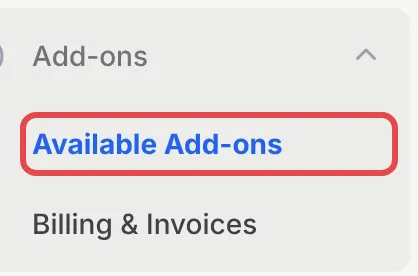
In the sidebar, go to Add-ons → Available Add-ons.
-
Find the add-on’s card. It lists what the add-on includes and its price.
-
If the card offers a trial, leave the switch on Try Free and click the Start button to begin the free trial. No payment is needed.
-
To pay instead, switch to Subscribe and click the monthly or yearly button.
-
Check the total, choose Online Banking or DuitNow QR and click Confirm & Pay. You pay on the next page.
Once active, the card shows Active Subscription with the next billing date, or Free Trial Active with the date the trial ends.
Pay a renewal invoice
Section titled “Pay a renewal invoice”BCL does not charge you automatically. On the renewal date, it creates a renewal invoice and emails it to the account owner. To pay it:
-
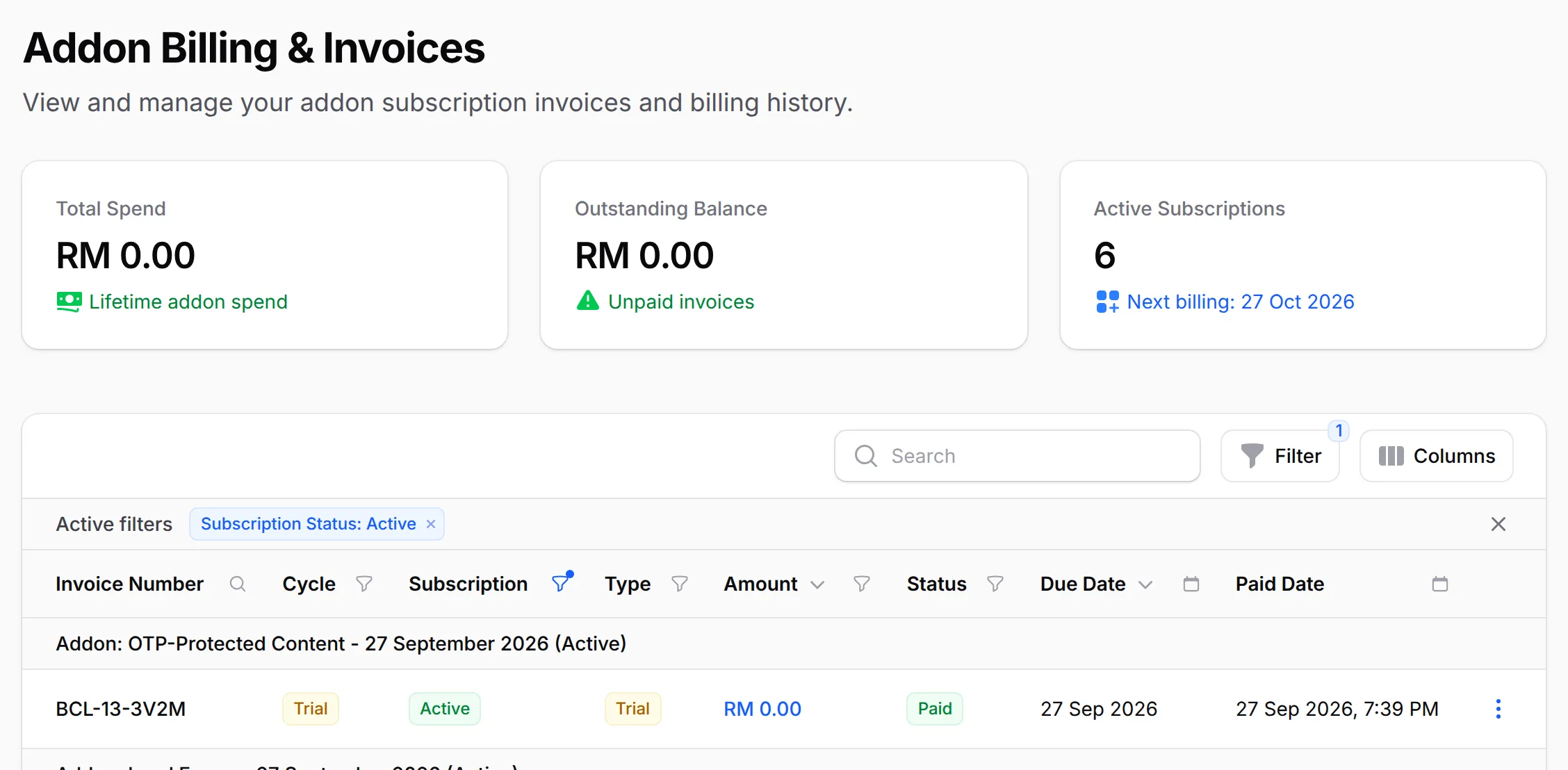
Go to Add-ons → Billing & Invoices.
-
On the unpaid invoice, click Pay.
-
Choose a payment method under Select Payment Method and click Proceed to Payment.
Pay before the invoice’s Due Date. When it stays unpaid after that date, the add-on expires and its feature locks. A free trial also ends on its end date unless you subscribe. View and PDF on each invoice show it for your records.
Cancel an add-on
Section titled “Cancel an add-on”To stop an add-on from renewing:
- Go to Add-ons → Available Add-ons.
- On the add-on’s card, click Cancel subscription (or Cancel, next to Renew Early).
- Click Yes, cancel.
The card then shows Cancellation scheduled. You keep the add-on until the end of the period you paid for, and BCL does not bill you again. Changed your mind? Click Keep my subscription before that date.
A few habits save money and surprises:
- Use the trial to test the whole flow. Try the feature end to end, for example one COD order, before the trial ends.
- Cancel before the renewal date. Cancelling stops the next renewal invoice, so there is nothing left unpaid on your account.
- Check Billing & Invoices each month. Outstanding Balance tells you at a glance if an invoice is waiting.
Common issues
Which add-on do I need?
It depends on the feature. COD and manual transfer need COD & Manual Transfer, e-invoices need LHDN E-Invoice, courier waybills need Courier Integration, event forms need Event Management, lead forms need Lead Forms, and protected videos and files need OTP-Protected Content. Payment forms, payment links and coupons need no add-on.
How do I cancel an add-on subscription?
Go to Add-ons → Available Add-ons, click Cancel subscription on the add-on's card and confirm with Yes, cancel. You keep the add-on until the end of the period you paid for, and it does not renew after that.
Where do I see my add-on invoices and what I still owe?
Go to Add-ons → Billing & Invoices. Outstanding Balance shows unpaid invoices, and each invoice has Pay while it is unpaid.
Was this article helpful?
Thanks for your feedback.
Sorry this didn't help. WhatsApp us and we'll sort it out with you.